Sponsored
In Stock
At a glance
Sponsored
About this item
Highlights
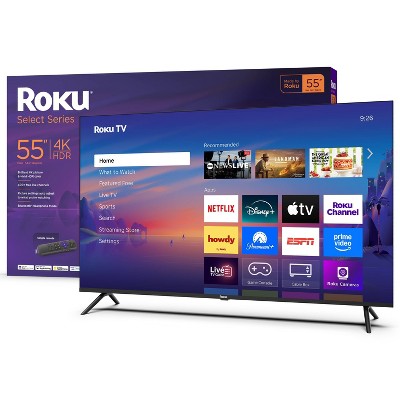
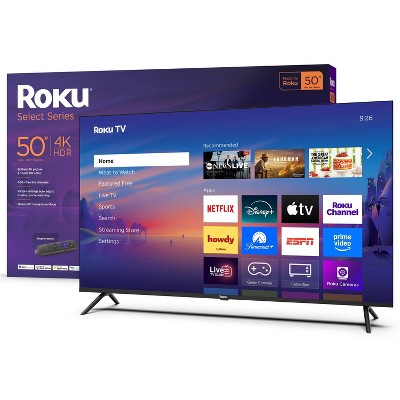
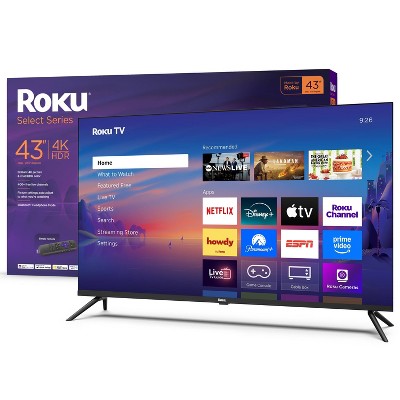
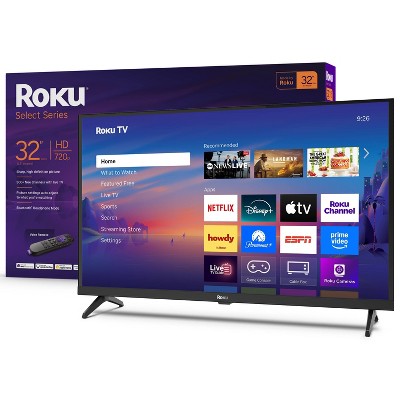
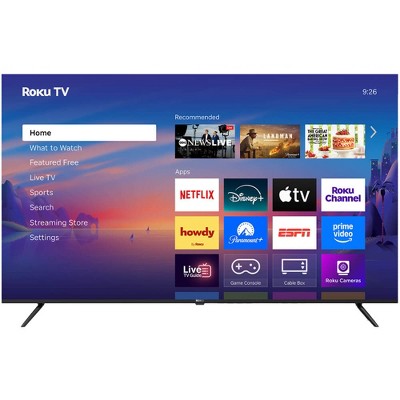
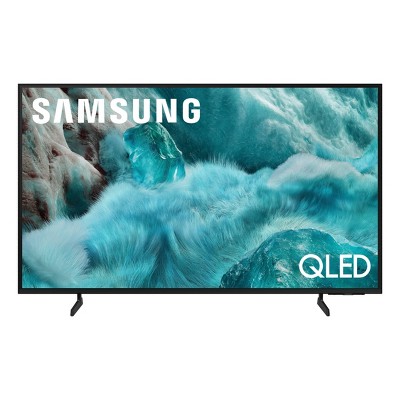
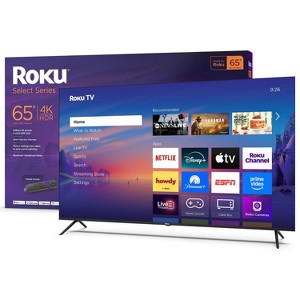
- A treat for the eyes: Sharp 4K brings out rich detail on our 65" flat screen TV, while colors pop off in lifelike clarity with HDR10. Roku Smart Picture cleans up incoming TV signals, optimizes them, and chooses the right picture mode..
- Explore a world's worth of TV: Dive into all kinds of entertainment and easily find your favorites or soon-to-be favorites.
- A ton of entertainment at the best price—free: Your go-to streaming destination for free entertainment, Roku has 500+ TV channels, with live in-season shows, hit movies, weather, local news, and award-winning Roku Originals.
- Home sweet home screen: Move apps around and make the Roku experience your own with a home screen that easily gets you to what you want to watch fast.
- Just keeps getting better: Get the newest apps, features, and more with automatic software updates.
- A perfect fit for any smart home: njoy easy voice control with Roku Voice, Siri, Alexa, or Google Assistant. Effortlessly share videos, photos, music, and more from your Apple devices to your smart TV with Apple AirPlay.
- Seamless streaming: With fast Wi-Fi® and apps that launch in a snap, Roku Select Series TVs get you to your entertainment quickly. Our intuitive interface makes exploring popular apps—plus free movies, shows, and live TV—as easy as it is fun.
- Stream easy: Power up your TV, adjust the volume, and control your streaming with one remote that does it all.
Description
A smart TV that makes sense. Roku Select Series 4K TVs are designed to upgrade your entertainment. Enjoy your streaming favorites on this flat screen TV. Catch every word with auto speech clarity or hook up headphones so you don’t wake the house. Switch to your inputs and watch free live television right from the home screen or use the remote’s pre-set shortcut buttons to quickly launch popular apps. Smart TV doesn’t have to be complicated. That’s why we’ve designed a line of flat screen smart TVs powered by the delightfully simple Roku experience.
Shipping details
Return details
Q: Does the remote have a port for earbuds to plug into to be able to listen to the tv?
A: Hello Mikeb, Mark again I have to add I did not buy it at target...
submitted byMark - 1 year agoA: Hello Mikeb, I just got my better half the 50" roku tv this week, base model, retail 300 bucks on sale 200 bucks. THE remote has a port for earbuds or headphones !!! -Mark-
submitted byMark - 1 year agoA: Does remote have backlit buttons to see in the dark?
submitted by1981 - 1 month agoA: Hi Mikeb, thanks for reaching out about Roku 65" Select Series 4K HDR Smart Roku TV with Roku TV Remote - 65R4A4 This TV does not have the headphone jack on the remote, however you can still use the headphone feature through mobile app listening. If you have any additional questions, we welcome you to contact MyTGTtech at 833-848-8324 every day, between 7am-11pm CST.
submitted byMike - 1 year agoTarget expert supportA: Hello Mikeb, No this model does not come with a remote with a headphone jack on it. Here's an article on how to use your phone and the Roku App to use any headphones connected to your phone on the TV. https://support.roku.com/article/217478308
submitted byRoku Support - 1 year agoBrand expert
Q: Does this TV have bluetooth?
A: No. There are no Bluetooth options in the menus.
submitted byDcm20000 - 1 year agoA: Hi Chorra, thanks for reaching out about the Roku 65" Select Series 4K HDR Smart Roku TV with Roku TV Remote - 65R4A4. The Roku 65" Select Series 4K HDR Smart Roku TV with Roku TV Remote - 65R4A4 is not Bluetooth compatible. If you have any additional questions, we welcome you to contact MyTGTtech at 833-848-8324 every day, between 7 am-11 pm CST.
submitted byRena - 2 years agoTarget expert supportA: Hello Chorra, No unfortunately this model does not have bluetooth built in but our plus and pro models do.
submitted byRoku Support - 2 years agoBrand expert
Q: DO I NEED TO BUY ANOTHER ROKU RECEIVER TO USE THIS TV?
A: The Roku software is built in to the Tv
submitted byDcm20000 - 1 year agoA: Hi OLD DAWG, thanks for reaching out about Roku 65" Select Series 4K HDR Smart Roku TV with Roku TV Remote - 65R4A4 This TV has all of the same features built into it as a Roku you would plug in to the TV, so nothing extra is needed to use this TV other than a Wi-Fi connection to stream your content. If you have any additional questions, we welcome you to contact MyTGTtech at 833-848-8324 every day, between 7am-11pm CST.
submitted byMike - 1 year agoTarget expert supportA: Hello OLD DAWG! This is a Roku TV. It has Roku built in so you will not need another Roku device for this TV.
submitted byRoku Support - 1 year agoBrand expert
Q: Can I purchase a voice-activated remote for this TV?
A: Hello FRED, Yes, you can absolutely purchase a voice-activated remote for your Roku 65" Select Series TV. While this specific TV often comes with the "Roku TV Remote" (which is a standard infrared remote without a microphone), the TV itself is fully compatible with all of Roku's voice-enabled remotes.
submitted byRoku Support - 12 days agoBrand expertA: Hi, thanks for reaching out about Roku 65" Select Series 4K HDR Smart Roku TV with Roku TV Remote: LED, Wi-Fi, HDMI. Yes, you can absolutely purchase a voice-activated remote for your Roku 65" Select Series TV. While this specific TV often comes with the "Roku TV Remote" (which is a standard infrared remote without a microphone), the TV itself is fully compatible with all of Roku's voice-enabled remotes. If you have any additional questions, we welcome you to contact MyTGTtech at 833-848-8324 every day, between 7am-11pm CST.
submitted byJoe - 18 days agoTarget staff support
Q: Does this have an optical port?
A: Hello Jbald, Yes, the Roku 65" Select Series 4K HDR Smart Roku TV does include a digital optical audio output port (also often labeled as S/PDIF or Digital Audio Out). This is a key feature for connecting older or higher-end soundbars and audio/video receivers (AVRs) that do not support the modern HDMI ARC/eARC connection. 🔌 Where to Find It: The optical port is usually located on the back panel of the TV, often alongside the other ports like HDMI and USB. 💡 Connection Options for Audio: For this Roku Select Series TV, you have three main ways to get audio out to an external system: HDMI eARC/ARC: The most recommended connection for modern soundbars, as it supports the newest audio formats and allows the TV remote to control the soundbar volume. (The Select Series includes one HDMI port that supports eARC). Optical (Digital Audio Out): Ideal for connecting to soundbars or receivers that predate HDMI ARC or eARC. Roku Wireless Audio: You can wirelessly connect the TV to Roku's own soundbars and subwoofers for a hassle-free setup.
submitted byRoku Support - 22 days agoBrand expertA: Hi, thanks for reaching out about Roku 65" Select Series 4K HDR Smart Roku TV with Roku TV Remote: LED, Wi-Fi, HDMI. Yes, the Roku 65" Select Series 4K HDR Smart Roku TV does include a digital optical audio output port (also often labeled as S/PDIF or Digital Audio Out). This is a key feature for connecting older or higher-end soundbars and audio/video receivers (AVRs) that do not support the modern HDMI ARC/eARC connection. 🔌 Where to Find It: The optical port is usually located on the back panel of the TV, often alongside the other ports like HDMI and USB. 💡 Connection Options for Audio: For this Roku Select Series TV, you have three main ways to get audio out to an external system: HDMI eARC/ARC: The most recommended connection for modern soundbars, as it supports the newest audio formats and allows the TV remote to control the soundbar volume. (The Select Series includes one HDMI port that supports eARC). Optical (Digital Audio Out): Ideal for connecting to soundbars or receivers that predate HDMI ARC or eARC. Roku Wireless Audio: You can wirelessly connect the TV to Roku's own soundbars and subwoofers for a hassle-free setup. If you have any additional questions, we welcome you to contact MyTGTtech at 833-848-8324 every day, between 7am-11pm CST.
submitted byJoe - 1 month agoTarget staff support
Q: Whats the best wall mount to use for this TV?
A: Hello Crs, The best wall mounts for your Roku 65R4C4 TV will support a VESA pattern of 400x300mm and a weight of at least 31.9 pounds (the TV's weight without the stand). You can choose from a variety of mount types, including fixed, tilting, and full-motion.
submitted byRoku Support - 1 month agoBrand expertA: Hi, thank you for reaching out about Roku 65" Select Series 4K HDR Smart Roku TV with Roku TV Remote: LED, Wi-Fi, HDMI. The best wall mounts for your Roku 65R4C4 TV will support a VESA pattern of 400x300mm and a weight of at least 31.9 pounds (the TV's weight without the stand). You can choose from a variety of mount types, including fixed, tilting, and full-motion. If you have any additional questions, we welcome you to contact MyTGTtech at 833-848-8324 every day, between 7am-11pm CST.
submitted byMatt - 1 month agoTarget expert support
Q: Does this have Ethernet
A: Hello Apachee55, Yes, the Roku 65-Inch Select Series 4K HDR Smart TV does have an Ethernet port, allowing for a wired internet connection in addition to its built-in Wi-Fi, which is great for stable streaming and connecting other devices like game consoles.
submitted byRoku Support - 1 month agoBrand expertA: Hi, thanks for reaching out about Roku 65" Select Series 4K HDR Smart Roku TV with Roku TV Remote: LED, Wi-Fi, HDMI Yes, the Roku 65-Inch Select Series 4K HDR Smart TV does have an Ethernet port, allowing for a wired internet connection in addition to its built-in Wi-Fi, which is great for stable streaming and connecting other devices like game consoles. If you have any additional questions, we welcome you to contact MyTGTtech at 833-848-8324 every day, between 7am-11pm CST.
submitted byJustin - 1 month agoTarget expert support
Q: What Inputs are on this tv?
A: Hello Mary, The Roku 65R4C4 TV includes several inputs for connecting various devices. The inputs available are: -HDMI ports: It has a total of three HDMI ports, including one port with eARC (Enhanced Audio Return Channel) support, which is ideal for connecting soundbars or home theater systems. -USB-C port: The TV is equipped with one USB-C input. -Cable/Antenna input: A coaxial port is available for connecting an over-the-air antenna or a basic cable TV connection. -Ethernet port: An Ethernet port is available for a wired internet connection, though Wi-Fi is also an option. Additionally, the TV has a composite input (AV input) for older devices that use red, white, and yellow RCA connectors. An adapter may be required for this connection, as on some models it uses a single 1/8" jack with an included breakout cable.
submitted byRoku Support - 1 month agoBrand expertA: Hi, thank you for reaching out about Roku 65" Select Series 4K HDR Smart Roku TV with Roku TV Remote: LED, Wi-Fi, HDMI. The Roku 65R4C4 TV includes several inputs for connecting various devices. The inputs available are: -HDMI ports: It has a total of three HDMI ports, including one port with eARC (Enhanced Audio Return Channel) support, which is ideal for connecting soundbars or home theater systems. -USB-C port: The TV is equipped with one USB-C input. -Cable/Antenna input: A coaxial port is available for connecting an over-the-air antenna or a basic cable TV connection. -Ethernet port: An Ethernet port is available for a wired internet connection, though Wi-Fi is also an option. Additionally, the TV has a composite input (AV input) for older devices that use red, white, and yellow RCA connectors. An adapter may be required for this connection, as on some models it uses a single 1/8" jack with an included breakout cable. If you have any additional questions, we welcome you to contact MyTGTtech at 833-848-8324 every day, between 7am-11pm CST.
submitted byMatt - 1 month agoTarget expert support
Q: How many watts does this use
A: Hello Ermeg, The power consumption (wattage) of the Roku 65" Select Series 4K HDR Smart Roku TV varies significantly depending on the brightness setting and the content being displayed. The max is about 150 Watts. Brightness is Key: Your power usage is directly tied to the TV's backlight.2 Watching a bright sports game will use more power (closer to 150W) than watching a dark movie at night (closer to 70W). Standby Consumption: If you use the "Fast TV Start" feature (which lets the TV turn on instantly), the TV typically uses around 15 to 20 watts even when "off." If you disable this feature, the TV will go into a deep sleep, consuming less than 1 watt. Maximum Rating: The official maximum rated wattage for the product is often listed higher, sometimes around $\mathbf{245 \text{ Watts}}$ or $\mathbf{248 \text{ Watts}}$, which serves as the safety maximum for the power supply, not the actual typical usage.
submitted byRoku Support - 1 month agoBrand expertA: Hi, thanks for reaching out about Roku 65" Select Series 4K HDR Smart Roku TV with Roku TV Remote: LED, Wi-Fi, HDMI. The power consumption (wattage) of the Roku 65" Select Series 4K HDR Smart Roku TV varies significantly depending on the brightness setting and the content being displayed. The max is about 150 Watts. Brightness is Key: Your power usage is directly tied to the TV's backlight.2 Watching a bright sports game will use more power (closer to 150W) than watching a dark movie at night (closer to 70W). Standby Consumption: If you use the "Fast TV Start" feature (which lets the TV turn on instantly), the TV typically uses around 15 to 20 watts even when "off." If you disable this feature, the TV will go into a deep sleep, consuming less than 1 watt. Maximum Rating: The official maximum rated wattage for the product is often listed higher, sometimes around $\mathbf{245 \text{ Watts}}$ or $\mathbf{248 \text{ Watts}}$, which serves as the safety maximum for the power supply, not the actual typical usage. If you have any additional questions, we welcome you to contact MyTGTtech at 833-848-8324 every day, between 7am-11pm CST.
submitted byJoe - 2 months agoTarget staff support
Q: Does this TV have closed captioning?
A: Hello MJDC, Yes, this TV does have Closed Captioning (CC) support. You have two main ways to control closed captions: System-Wide Settings: You can set the TV to have captions On Always, Off, On Replay, or On Mute. To access this, press the Home button on your remote, go to Settings, and select Accessibility (or Captions). During Playback: For many streaming services and apps (like Netflix or The Roku Channel), you can toggle captions on and off quickly while content is playing: Start playing your movie or show. Press the Star (*) button on your Roku remote (this opens the Options menu). Select Closed captioning and choose your setting. You can also typically customize the look of the captions (font, size, color, and background) within the TV's settings.
submitted byRoku Support - 1 month agoBrand expertA: Hi, thanks for reaching out about Roku 65" Select Series 4K HDR Smart Roku TV with Roku TV Remote: LED, Wi-Fi, HDMI Yes, this TV does have Closed Captioning (CC) support. You have two main ways to control closed captions: System-Wide Settings: You can set the TV to have captions On Always, Off, On Replay, or On Mute. To access this, press the Home button on your remote, go to Settings, and select Accessibility (or Captions). During Playback: For many streaming services and apps (like Netflix or The Roku Channel), you can toggle captions on and off quickly while content is playing: Start playing your movie or show. Press the Star (*) button on your Roku remote (this opens the Options menu). Select Closed captioning and choose your setting. You can also typically customize the look of the captions (font, size, color, and background) within the TV's settings. If you have any additional questions, we welcome you to contact MyTGTtech at 833-848-8324 every day, between 7am-11pm CST.
submitted byMike - 2 months agoTarget expert support
Frequently Also Added
Guests also viewed
Related Categories
Guests are saying
TDUB
(no review title)

Easy

Roku TV

Great TV - great quality picture

No boohoo with Roku!!!

Love Roku

Love my Roku!

ruku tubi war movies sereis comedy etc

(no review title)

Plug And Go

(no review title)
1 reply from Roku Customer Advocate team - 3 days ago

Roku

Love the easy set up

Technophobes Dream

Value

Everything Wi-Fi, great!

2nd Roku tv

Fabulous