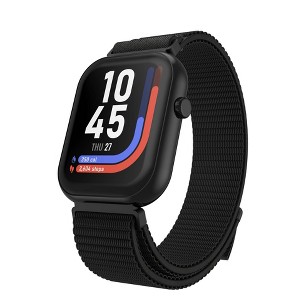
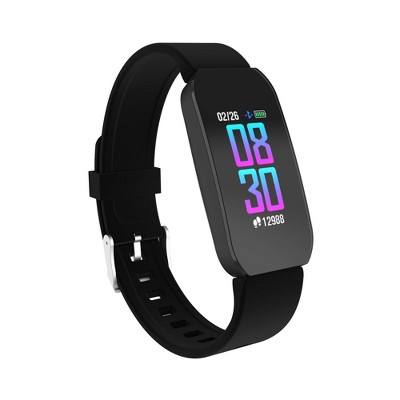
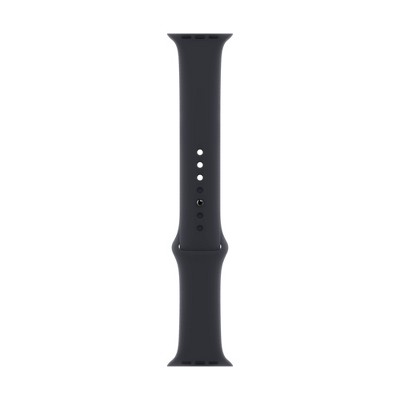
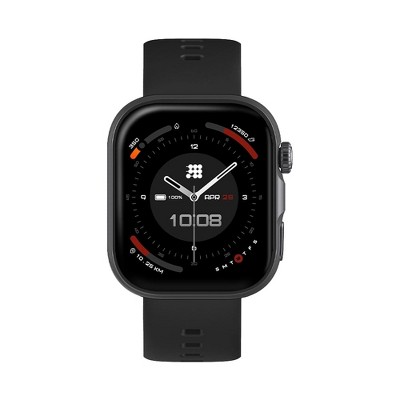
iTouch Air 5 Smartwatch Nylon Sport Strap - Black
$59.99
ColorBlack
MaterialNylon
Out of Stock

Free & easy returns
Return this item in store within 30 days for a full refund.
Eligible for registries and wish lists
At a glance
About this item
Additional product information and recommendations
Related Categories
Discover more options
- $499.99 - $549.99reg $549.99 - $599.99 Sale4.5 out of 5 stars with 160 ratings
Frequently bought together
- Bestseller$59.98reg $74.99 Sale
Guests also viewed
- $249.99 - $329.99Get the Apple Watch SE 3 starting at $24/mo. on select items4.2 out of 5 stars with 478 ratings
- Highly rated$399.99 - $529.99Get the Apple Watch Series 11 starting at $38/mo. on select items4.3 out of 5 stars with 901 ratings
- $66.99 - $69.99
4.6 out of 5 stars with 73 reviews
90% would recommend
21 recommendations
5 out of 5 stars
Thumbs up graphic, would recommend
10 May, 2026
originally posted on Sozie

Comfortable and Stylish for Everyday Use
[This review was collected as part of a promotion.] I’ve been really enjoying this smartwatch so far. The black nylon sport strap feels very lightweight and breathable, especially for all-day wear and workouts. The watch looks sleek and modern without being too bulky. The display is clear, notifications come through nicely, and the battery life has been pretty good for my daily use. I also like that it tracks steps, sleep, and workouts in a simple way without being complicated.
4 out of 5 stars
Thumbs up graphic, would recommend
10 May, 2026
originally posted on Sozie
Excellent value, easy to use
[This review was collected as part of a promotion.] I really like this watch but wish the battery life was longer. It was very simple to pair and connect to my phone. The magnetic strap is a great feature. Feels great on the wrist. The watch face is a great size, it does not feel bulky like other brands. The flashlight mode has been really helpful. It has a ton of features.
1 reply from iTouch Team team - 3 days ago
Hi there! Thank you so much for your kind feedback! We’re really happy to hear you’re enjoying the watch—especially the comfortable fit, magnetic strap, and features like the flashlight. It means a lot to us that you find it easy to use and not bulky. Regarding the battery life, kindly disable some default features that you feel you don't need for now to conserve battery. Settings such as brightness or vibration and feature use such as notifications or sports mode will impact battery life. We strongly recommend connecting your charger to an indirect source of power, like the USB port of an active (not idle or in sleep mode) laptop or computer. If you charge using a wall outlet, please make sure it is UL-certified and the adapter is not a fast charger (it may negatively impact battery life and performance). The output voltage should not exceed 5V/1A. Email us at reviews@itouchwearables.com if you need further assistance.
5 out of 5 stars
Thumbs up graphic, would recommend
7 May, 2026
originally posted on Sozie
This is a very comfortable strap.
[This review was collected as part of a promotion.] I picked up this wristwatch recently, and I must say it's a great budget-friendly option. If you want a stylish watch with useful everyday features without spending a lot of money. It has so many features, which is what I really love about it. It connected to my phone very easily, the straps are very comfortable, it does not irritate my skin. The battery life lasts very long. Overall, it's a great everyday smartwatch and I love the functionality.
4 out of 5 stars
Thumbs up graphic, would recommend
7 May, 2026
originally posted on Sozie
Love the magnetic band and has so many features
[This review was collected as part of a promotion.] I’m really impressed by this smart watch! I love the magnetic band, it’s super fun and cool to attach to your wrist and definitely feels secure. It has so many awesome features like the weather, flashlight, phone calls, calculator but my only disappointment is figuring out how to set up text messaging which has been difficult
1 reply from iTouch Team team - 3 days ago
Hi there! Thank you so much for your feedback—we’re really glad to hear you’re enjoying the watch and its features, especially the magnetic band! We understand your concern about the quick messaging feature. We’d like to let you know that this feature isn’t supported on any devices at the moment, and we currently don’t have a confirmed timeline for when it will become available. We truly apologize for the inconvenience. If you have any other questions or need assistance, feel free to contact us anytime at reviews@itouchwearables.com.
5 out of 5 stars
Thumbs up graphic, would recommend
6 May, 2026
originally posted on Sozie
Very convenient smartwatch
[This review was collected as part of a promotion.] This itouch wearable smartwatch is so amazing! It is the Air5 and has so many features for an incredible price! The sleek black watch is magnetic making it super fast and easy to put on and adjust the sizing! I like easy adjustable sizing so that it fits both myself and my six year old daughter. This watch can Bluetooth call, track calories, track sleep, track heart rate and guide workouts. It can recieve texts but not respond to texts. I love it!
5 out of 5 stars
Thumbs up graphic, would recommend
5 May, 2026
originally posted on Sozie
The best watch I’ve owned
[This review was collected as part of a promotion.] Came for the style, stayed for the functionality of this watch! I love how fashionable it is, with plenty of watch faces and bands to choose from to make it personalized. I really like this silver with the cream as silver is in right now so it feels on trend. The navigation on the watch is super easy, and I love that it tracks my vitals like HR, steps, etc. well worth it!
5 out of 5 stars
Thumbs up graphic, would recommend
4 May, 2026
originally posted on Sozie
Love this iTouch Air 5 Smartwatch
[This review was collected as part of a promotion.] This iTouch Air 5 Smartwatch is best fitness watch and must have for those who want to stay healthy and track their fitness goals and sports activities.I got this for my son for his birthday present.He absolutely love it.It comes with magnetic silicone strap in black color.This smartwatch have 100 plus sports modes covering all fitness activities with 24 hours health monitoring like heart rate,sleep,stress and spO2.It have Bluetooth and notifications for calls,messages etc.Its best for teens to keep them up to date on their health and fitness goals.This smartwatch is water resistant too.
5 out of 5 stars
Thumbs up graphic, would recommend
4 May, 2026
originally posted on Sozie
Easy to use for older guy
[This review was collected as part of a promotion.] My brother wanted nothing to do with a smartwatch until he saw this one. He is older and not much into messaging. But when he saw it could show the weather or help him hydrate he really started to enjoy this. It is really easy for him to use and charge it. He is still learning some of the features but he enjoys that part as well. Really happy with all of this.
2 out of 5 stars
Thumbs down graphic, would not recommend
4 May, 2026
originally posted on Sozie
Highly inaccurate readings on this watch
[This review was collected as part of a promotion.] This smartwatch was meant to just be used for some basic features given the price point so my husband wasn’t expecting much. Unfortunately it still underperformed for his basic needs. He really just needed a means to track sleep and steps along with the obvious of telling time. It was really off on a golf day noting only 1000 steps and on the other hand, sleep was overstated by 1 to 2 hrs. This inaccuracy seemed to be the pattern after multiple days of use. He did have one positive note that he at least was able to read texts received so added a star for that, though he couldn’t reply back to the text from the watch. He also complained of short battery life. The band seems to be a secure fit.
1 reply from iTouch Team team - 7 days ago
Hi there! Thank you for sharing your feedback—we’re really sorry to hear that the watch did not meet your husband’s expectations. We understand how important accurate step and sleep tracking can be, especially for daily use. Since you’ve experienced multiple issues, we recommend performing a full reset of the watch to help refresh the system: Go to Settings > System > Reset. Please note that this will erase all data on the watch. After resetting, reconnect it to the app and observe if the issues (step count, sleep tracking, and overall performance) improve. Regarding messaging, the watch is designed for notifications only—you can receive and read texts, but replying directly from the watch is not supported. For the battery life concerns, you may try conserving power by adjusting settings such as lowering screen brightness, reducing vibration intensity, and limiting notifications and features like sports modes. These can significantly impact battery performance. We also recommend charging the device properly: Use a USB port from an active computer or laptop whenever possible. If using a wall adapter, ensure it is UL-certified and not a fast charger. The output should not exceed 5V/1A, as higher output can affect battery health and performance. Email us at reviews@itouchwearables.com if you need further assistance.
5 out of 5 stars
Thumbs up graphic, would recommend
3 May, 2026
originally posted on Sozie
Great watch for my purpose
[This review was collected as part of a promotion.] I am using this watch for basic items such as steps and notifications from my phone. One week in and I am having no issues as it serves my purpose and for a good price point. The band is super soft. The clasp seems a little cheaply made yet I am having no issues with it. The watch was easy to set up. It comes with a charging cord and you just need the cube as most do anymore. I would recommend this watch.
5 out of 5 stars
Thumbs up graphic, would recommend
3 May, 2026
originally posted on Sozie
Comfortable for everyday wear
[This review was collected as part of a promotion.] This is a very beautiful and comfortable wrist watch, it feels lightweight and flexible on the wrist. It has a range of features, which is very impressive for the price. It was very easy to connect it to my iPhone 12 via Bluetooth. The battery life lasts for a very long time and that’s very impressive.
5 out of 5 stars
Thumbs up graphic, would recommend
2 May, 2026
originally posted on Sozie
Great quality with a lot of info
[This review was collected as part of a promotion.] I wanted this to keep track of my steps. I’m really impressed with this smartwatch. The app it uses is solid. I like that I now don’t have to check my phone all the time. Super easy. The battery life seems long, I charge it once in a weeks time. The band is comfortable to wear all day. All features seem to function the way it should.
5 out of 5 stars
Thumbs up graphic, would recommend
2 May, 2026
originally posted on Sozie
Looks and works like more expensive ones
[This review was collected as part of a promotion.] I got this for my niece, as I didn't want to invest a ton but wanted her to have a good looking watch that offered all the functionalities of other smart watches. What I love about this is how easy it was to set up, it connected really quickly with her iphone through the itouch app. It is a great solution for those who are looking for a smart watch but not a steep price.
5 out of 5 stars
Thumbs up graphic, would recommend
2 May, 2026
originally posted on Sozie
Does the job for fraction of the price
[This review was collected as part of a promotion.] The iTouch Air 5 smart watch is a great alternative to some of the mainstream devices that cost an arm and a leg. This easily connects to your phone for phone calls, messages and “Find My” features. There are many different material and color options for the watch band which I loved. Overall this is a good product.
4 out of 5 stars
Thumbs up graphic, would recommend
1 May, 2026
originally posted on Sozie
Incredible value for smart watch
[This review was collected as part of a promotion.] I was hesitant to try this watch based on the price and boy was I wrong. The quality and look are identical to the high end popular watches. It is very easy to use. The app downloaded to my phone worked flawlessly. I am about to receive notifications via this watch. It also has a great health tracker. The look is sleek and I love that the face comes with color options. I chose the rose gold with black band. The band is also removable. Very happy with my purchase.
5 out of 5 stars
Thumbs up graphic, would recommend
1 May, 2026
originally posted on Sozie
I especially like the rose gold color
[This review was collected as part of a promotion.] I think it’s important to mention that you need to read about the watch before you get it. This is not another well known brand and it does not work the same, but after using it, it does work as advertised. The first piece of advise would be that in order to connect, you need to download the app and pair to the watch within the app rather than through your traditional Bluetooth settings (it will make the watch work more seamlessly, trust me). You can get text messages sent to the watch, but they are notifications - you do not reply with in the watch. It’s nice that it has this as an extra feature, but it is a fitness watch. Other reviews have mentioned about the continuous HR not working, but you have to make sure you turn it on, it is a setting within the watch App. I was concerned about getting alerts all night while it was monitoring my sleep, but the watch automatically turned on sleep mode which is great! I love not having to do that manually.
5 out of 5 stars
Thumbs up graphic, would recommend
29 April, 2026
originally posted on Sozie
A great affordable option
[This review was collected as part of a promotion.] I saw this in store and was really impressed by the quality, and for the price point I though I would give it a go. It connected to my phone super easily through the iTOUCH app and set up was a breeze. The fact that it performs all the functions of much more expensive watches is mind blowing to me! It looks great and so far has been working great. Band is a little large for smaller wrists so I am going to have to get a different one but all in all I am happy.
5 out of 5 stars
Thumbs up graphic, would recommend
28 April, 2026
originally posted on Sozie
So many features to really love
[This review was collected as part of a promotion.] I love everything about this smartwatch! It is packed with so many fun things. I like to check the weather and my messages. I really like that it is not too bulky on my small wrist. The closure is magnetic and it feels really safe and secure on me. The overall look of the watch is great too. It was easy to set up.
5 out of 5 stars
Thumbs up graphic, would recommend
26 April, 2026
originally posted on Sozie
Easy to use smart watch for fitness
[This review was collected as part of a promotion.] Love being able to track my steps with this smart watch. It’s actually great for kids especially if you don’t want them to have the texting functionality, but still be able to track their steps and fitness goals. The screen is high quality and high definition. It’s great for fitness and health lovers.
5 out of 5 stars
Thumbs up graphic, would recommend
23 April, 2026
originally posted on Sozie
Love love love this watch
[This review was collected as part of a promotion.] I’ve had my new iTouch wearables smartwatch for a few days now and I can say it’s very comfortable and has all of the features that all other smart watches have at a fraction of the cost. The color I chose is a soft pink that goes with all of my clothing. It charges very fast. The 24 hour sleep monitor was one of the biggest selling points for me, along with the heart rate monitor. The display is big enough for me to see it, and also offers bigger fonts.