Sponsored
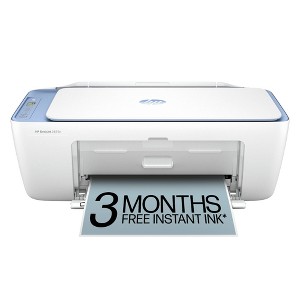
HP DeskJet 2825e Wireless All-in-One Color Printer, Scanner, Copier with 3 Months Free Instant Ink 6W7F4A
In Stock
Sponsored
About this item
Highlights
- Best for home printing
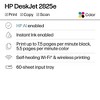
- Print, scan, copy and fax on the go with HP Smart app
- 3 months of free Instant Ink included + 1 bonus month for a limited time, with code: HOLIDAY25
- Built-in wireless
- Easy mobile setup
- Print up to 7.5 pages per minute (black), 5.5 pages per minute (color)
- USB 2.0
Description
FROM AMERICA'S MOST TRUSTED PRINTER BRAND: The Deskjet 2825e is perfect for homes printing to-do lists, letters, financial documents and recipes. Print speeds up to 5.5 ppm color, 7.5 ppm black.
Bonus 1 month of Instant Ink
Enter code "HOLIDAY25" to get 1 bonus month in addition to the 3 months of free Instant Ink service already included with this printer.
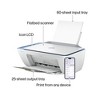
KEY FEATURES: Color printing, copy, scan, and a 60-sheet input tray.
WIRELESS PRINTING: Stay connected with our most reliable Wi-Fi®, which automatically detects and resolves connection issues.
HP APP: Print, scan, copy, or fax right from your smartphone with the easiest-to-use print app.
3 MONTHS OF FREE INK when you activate HP+: Subscribe to Instant Ink delivery service to get ink delivered directly to your door before you run out. After 3 months, monthly fee applies unless cancelled, and you save up to 50%.
COMPACT DESIGN: Made to fit any home.
ICON LCD: Print your basic documents with ease from the intuitive control panel.
SUSTAINABLE DESIGN: Made with at least 60% recycled plastic. Meets industry efficiency standards and is Energy Star® and EPEAT® certified.
DYNAMIC SECURITY: This printer is intended to work only with cartridges with original HP chips or circuitry and will block cartridges using non-HP chips or circuitry. Periodic firmware updates will maintain the effectiveness of these measures. More at www.hp.com/learn/ds.
Shipping details
Return details
Q: I am getting an E0 Code - unusable cartridge. I just set this up with the cartridges that were provided in the box. I do not understand how they can be "unusable". Please help. Thank You.
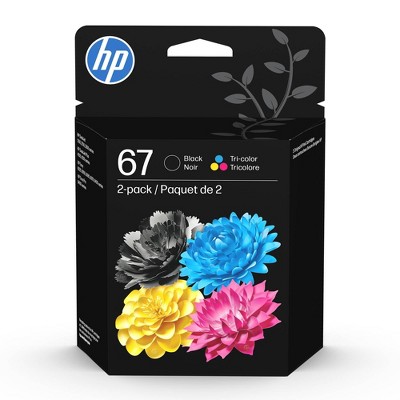
A: Same happened to me. Call HP (very hard to get a person but don’t give up) and they will analyze it and send you a free hp67 cartridge. Mine came in less than a week and it works. The inks provided with printer are just set up size and don’t last for nothing!
submitted bySD - 1 month agoA: Can I use hp 65 for this printer ?
submitted byPijama - 7 days agoA: Hi, thanks for reaching out about the HP DeskJet 2825e Wireless All-in-One Color Printer, Scanner, Copier with 3 Months Free Instant Ink (6W7F4A) E0 Cartridge Troubleshooting Steps 1. Reseat the Cartridges (Check Installation) 2. Perform a Power Reset (Clear the Glitch) 3. Clean the Contacts (Communication Issue) If the E0 error continues after trying all three steps above, it is very likely that one or both of the original SETUP cartridges are defective. Since the cartridges came directly from HP in the box, they are covered under your printer's warranty. You should contact HP Support directly to request a free replacement for the faulty cartridge(s). If you have any additional questions, we welcome you to contact MyTGTtech at 833-848-8324 every day between 7 am and 11 pm CST.
submitted byRena - 1 month agoTarget expert support
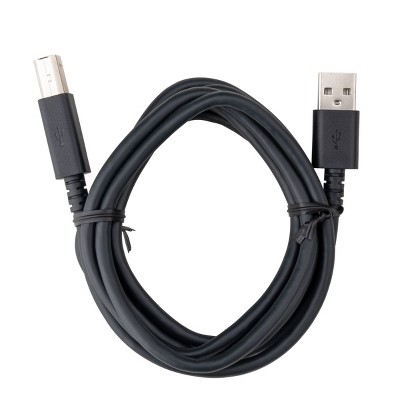
Q: Is there a way to connect the printer to a computer without using wireless? Like is there a cord or something I can buy to connected to my computer?
A: Yes, you can connect using a Printer USB Cable
submitted byDLou - 2 months agoA: Hi, thanks for reaching out about HP DeskJet 2825e Wireless All-in-One Color Printer Scanner Copier with 3 Months Free Instant Ink (6W7F4A) Yes, the HP DeskJet 2825e supports a USB connection, which can be used to connect it to a computer for printing, scanning, and copying. While the printer is designed for wireless use, it also has a USB 2.0 port and can be used with a USB cable for a wired connection to a PC or Mac. If you have any additional questions, we welcome you to contact MyTGTtech at 833-848-8324 every day, between 7am-11pm CST.
submitted byJustin - 2 months agoTarget expert support
Q: Does this printer come with ink in the box?
A: The cartridges that come with printer are SetUp size, not much in them
submitted bySD - 1 month agoA: Hi, thanks for reaching out about HP DeskJet 2825e Wireless All-in-One Color Printer, Scanner, Copier with 3 Months Free Instant Ink (6W7F4A) Yes, the HP DeskJet 2825e comes with starter ink tanks so you can begin printing immediately after setup. Additionally, the purchase includes a 3-month free trial of HP Instant Ink, which requires HP+ activation at setup. If you have any additional questions, we welcome you to contact MyTGTtech at 833-848-8324 every day, between 7am-11pm CST.
submitted byJustin - 1 month agoTarget expert support
Q: Can it do back to back printing
A: Hi, thanks for reaching out about HP DeskJet 2825e Wireless All-in-One Color Printer, Scanner, Copier with 3 Months Free Instant Ink (6W7F4A) The HP DeskJet 2825e (6W7F4A) supports back-to-back printing, but it must be done manually, as it does not feature automatic two-sided printing (duplexing). You must print one side, reload the paper into the input tray, and then print the second side. If you have any additional questions, we welcome you to contact MyTGTtech at 833-848-8324 every day, between 7am-11pm CST.
submitted byJustin - 4 days agoTarget expert support
Q: How do I enroll in HP + ?
A: Hi, thank you for reaching out about HP DeskJet 2825e Wireless All-in-One Color Printer, Scanner, Copier with 3 Months Free Instant Ink (6W7F4A). To enroll your HP DeskJet 2825e in HP+, you must activate the service during the initial printer setup through the HP Smart app. If you have any additional questions, we welcome you to contact MyTGTtech at 833-848-8324 every day, between 7am-11pm CST.
submitted byMatt - 4 days agoTarget expert support
Q: Does this come with paper
A: Hi, thanks for reaching out about the HP DeskJet 2825e Wireless All-in-One Color Printer, Scanner, Copier with 3 Months Free Instant Ink (6W7F4A) No, the HP DeskJet 2825e does not come with a pack of standard printing paper in the box. If you have any additional questions, we welcome you to contact MyTGTtech at 833-848-8324 every day between 7 am and 11 pm CST.
submitted byRena - 6 days agoTarget expert support
Q: What in What are the ink cartridge numbers for this printer? HP DeskJet 2825e.
A: Hi, thanks for reaching out about the HP DeskJet 2825e Wireless All-in-One Color Printer, Scanner, Copier with 3 Months Free Instant Ink (6W7F4A) The HP DeskJet 2825e uses the HP 67 ink cartridge series. If you have any additional questions, we welcome you to contact MyTGTtech at 833-848-8324 every day between 7 am and 11 pm CST.
submitted byRena - 6 days agoTarget expert support
Q: What ink does this printer take
A: Hi, thank you for reaching out about The HP DeskJet 2825e Wireless All-in-One Color Printer, Scanner, Copier with 3 Months Free Instant Ink (6W7F4A). Your HP DeskJet 2825e printer uses HP 67 series ink cartridges, which come in standard (67) or high-yield (67XL) versions for both black and tri-color, with compatible part numbers like 3YM56AN (Black), 3YM55AN (Tri-color), and their XL counterparts. If you have any additional questions, we welcome you to contact MyTGTtech at 833-848-8324 every day, between 7am-11pm CST.
submitted byMatt - 8 days agoTarget expert support
Q: Does this printer print on photo paper?
A: Hi, thank you for reaching out about HP DeskJet 2825e Wireless All-in-One Color Printer, Scanner, Copier with 3 Months Free Instant Ink (6W7F4A). Yes, the HP DeskJet 2825e All-in-One Printer is compatible with photo paper. You can use various sizes and finishes of photo paper to print your pictures. Photo Paper Details If you have any additional questions, we welcome you to contact MyTGTtech at 833-848-8324 every day, between 7am-11pm CST.
submitted byMatt - 8 days agoTarget expert support
Q: Is it a 2 side page printer
A: Hi, thanks for reaching out about 3' USB-A to USB-C Cable - dealworthy™ White The HP DeskJet 2825e is not an automatic 2-sided (duplex) printer. While it can print on both sides of a page, it requires manual intervention. This means the printer will print all the "odd" pages first, then prompt you on your computer or phone to take the stack of paper out, flip it over, and put it back into the tray to print the other side. If you have any additional questions, we welcome you to contact MyTGTtech at 833-848-8324 every day, between 7am-11pm CST.
submitted byMike - 9 days agoTarget expert support
Frequently bought together

Guests also viewed





Discover more options

Related Categories
Use cannon printers instead
I printed 12 papers and the ink is out
(no review title)
(no review title)
(no review title)
(no review title)
(no review title)
(no review title)
Run
(no review title)
no
(no review title)
Not happy
(no review title)

Printing JPEGS
hp copier
Ehh!
(no review title)
