New ArrivalsHealth & WellnessValentine’s DayClothing, Shoes & AccessoriesHomeKitchen & DiningGroceryHousehold EssentialsFurnitureOutdoor Living & GardenBabyToysVideo GamesElectronicsMovies, Music & BooksBeautyPersonal CareGift IdeasParty SuppliesCharacter ShopSports & OutdoorsBackpacks & LuggageSchool & Office SuppliesPetsUlta Beauty at TargetTarget OpticalGift CardsBullseye’s PlaygroundDealsClearanceTarget New Arrivals Target Finds #TargetStyleHanukkahStore EventsAsian-Owned Brands at TargetBlack-Owned or Founded Brands at TargetLatino-Owned Brands at TargetWomen-Owned Brands at TargetLGBTQIA+ ShopTop DealsTarget Circle DealsWeekly AdShop Order PickupShop Same Day DeliveryRegistryRedCardTarget CircleFind Stores
HP DeskJet 2855e Wireless All-in-One Color Printer Scanner Copier with 3 Months Free Instant Ink (588S5A) - 2 of 4HP DeskJet 2855e Wireless All-in-One Color Printer Scanner Copier with 3 Months Free Instant Ink (588S5A) - 3 of 4HP DeskJet 2855e Wireless All-in-One Color Printer Scanner Copier with 3 Months Free Instant Ink (588S5A) - 4 of 4
HP DeskJet 2855e Wireless All-in-One Color Printer Scanner Copier with 3 Months Free Instant Ink (588S5A) - 1 of 4

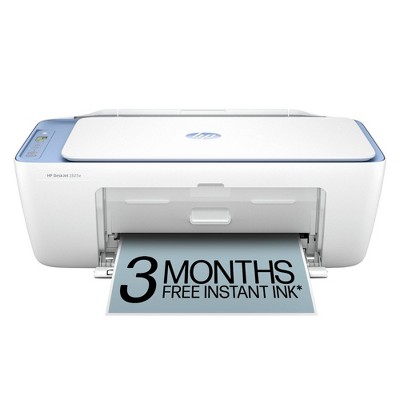
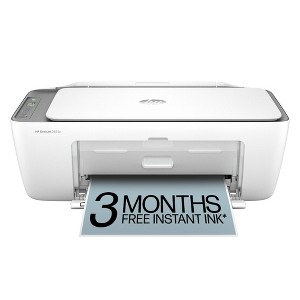
HP DeskJet 2855e Wireless All-in-One Color Printer Scanner Copier with 3 Months Free Instant Ink (588S5A)

$49.99 reg $89.99
Sale save $40.00 (44% off)

In Stock

Eligible for registries and wish lists

At a glance

Sponsored

About this item

Highlights

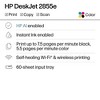
  • Best for home printing
  • Print, scan, copy and fax on the go with HP Smart app
  • 3 months of free Instant Ink included + 1 bonus month for a limited time, with code: HOLIDAY25
  • Built-in wireless with single band wifi
  • Easy mobile setup
  • Print up to 7.5 pages per minute (black), 5.5 pages per minute (color)
  • USB 2.0

Description

The HP DeskJet 2855e delivers color printing, 60-sheet paper capacity, and a flatbed scanner for easy scanning and copying. It also includes 3 months of free Instant Ink with HP+ activation at printer setup.

FROM AMERICA'S MOST TRUSTED PRINTER BRAND: The DeskJet 2855e is perfect for homes printing to-do lists, letters, financial documents and recipes. Print speeds up to 5.5 ppm color, 7.5 ppm black.

Bonus 1 month of Instant Ink
Enter code "HOLIDAY25" to get 1 bonus month in addition to the 3 months of free Instant Ink service already included with this printer.

KEY FEATURES: Color printing, copy, scan, and a 60-sheet input tray

WIRELESS PRINTING: Stay connected with our most reliable Wi-Fi®, which automatically detects and resolves connection issues

HP APP: Print, scan, copy, or fax right from your smartphone with the easiest-to-use print app

3 MONTHS OF FREE INK when you activate HP+: Subscribe to Instant Ink delivery service to get ink delivered directly to your door before you run out. After 3 months, monthly fee applies unless cancelled, and you save up to 50%.

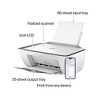
COMPACT DESIGN: Made to fit any home

ICON LCD: Print your basic documents with ease from the intuitive control panel

SUSTAINABLE DESIGN: Made with at least 60% recycled plastic

ENERGY STAR® AND EPEAT® CERTIFIED: Save energy with a printer that meets industry efficiency standards

DYNAMIC SECURITY: This printer is intended to work only with cartridges with original HP chips or circuitry and will block cartridges using non-HP chips or circuitry. Periodic firmware updates will maintain the effectiveness of these measures. More at www.hp.com/learn/ds.
Dimensions (Overall): 6.06 Inches (H) x 16.7 Inches (W) x 11.97 Inches (D)
Weight: 10.1 Pounds
B&W Print Speed: 7.5 Pages per Minute
Color Print Speed: 5.5 Pages per Minute
Electronics Condition: New
Electronics Features: Printer
Connection Type: USB
Maximum capacity: 60 Sheets
Operating System Compatibility: Microsoft Windows
Maximum Resolution: 1200 x 1200 (Black and White)
Wireless Technology: Bluetooth
Printer Ink Color: Multiple Colors
Compatible With: Up to 8.5" x 14" Documents
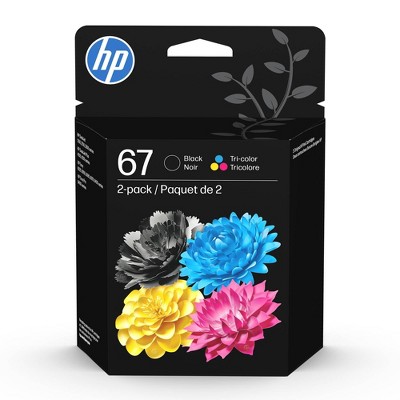
Ink Series: HP 67 series
Battery: No Battery Used
Warranty: 1 Year Limited Warranty. To obtain a copy of the manufacturer's or supplier's warranty for this item prior to purchasing the item, please call Target Guest Services at 1-800-591-3869
TCIN: 90895934
UPC: 196337380097
Item Number (DPCI): 056-03-0041
Origin: Imported
If the item details aren’t accurate or complete, we want to know about it.

Shipping details

Estimated ship dimensions: 19 inches length x 14 inches width x 8 inches height
Estimated ship weight: 10.265 pounds

Return details

This item can be returned to any Target store or Target.com.
This item must be returned within 30 days of the date it was purchased in store, shipped, delivered by a Shipt shopper, or made ready for pickup.
See the return policy for complete information.

Q: Do you have to have the app to print from your phone

submitted by Chris - 2 years ago
  • A: No you don't, you should just be able to print from any website or your photos as long as the printer is connected to your phone

    submitted byNoah Elgrably - 4 months ago
  • A: Hi Chris, thanks for reaching out about HP DeskJet 2855e Wireless All-In-One Color Printer, Scanner, Copier - White. Yes, an app is required to print to the printer; with Apple the App is AirPrint, and with Android, the app is Mopria. If you have any additional questions, we welcome you to contact MyTGTtech at 833-848-8324 every day, between 7am-11pm CST.

    submitted byMatt - 2 years ago
    Target expert support
  • A: Hello Chris and thank you for your question. For the HP DeskJet 2855e printer, you have several options for mobile printing: HP Smart app, Apple AirPrint or Wi-Fi Direct. So, while using the HP Smart app is recommended for its full range of features and ease of use, it’s not strictly necessary if you prefer to use other methods like AirPrint or Wi-Fi Direct for printing from your phone.

    submitted byHP Team - 2 years ago
    Brand expert

Q: Does this come with ink in the box? On the image it says "included in box" and shows the printer, power chord and two ink cartridges. On the description it says "3 free months of ink with activation

submitted by EL - 1 year ago
  • A: Thank you for your question. Yes, the Deskjet 2855e does come with a set of 67 ink cartridges. Instant ink is a ink subscription program that you can opt into when you set up the printer.

    submitted byHP Team - 1 year ago
    Brand expert
  • A: Thank you for your question! The HP DeskJet 2855e will come with a set of ink cartridges in the box, the '3 Free Months of Ink' is referring to the optional free trial of HP Instant Ink that is included with the printer.

    submitted byHP Team - 1 year ago
    Brand expert
  • A: EL, thank you for your question about ink coming with this HP DeskJet printer! Yes, it comes with setup cartridges right in the box so you can start printing immediately!

    submitted byHP Team - 1 year ago
    Brand expert

Q: Is the ink mailed to you?

submitted by Shanha63 - 1 year ago
  • A: And if you run out of ink prior to recieving your insta ink... you cant print anything with ink from the store. Printer wont work.

    submitted byShahri - 1 year ago
  • A: Once you sign up for the ink service you can never again use any other ink. Found this out the hard way . They upped the cost of my subscription and I ended up having to get a new printer because the service was too expensive. Basically you pay for every sheet you print after paying for the printer. Scam

    submitted byJann1033 - 5 months ago
  • A: If you choose to opt into HP+ for free with the HP DeskJet 2855e printer, you will get a trial for HP Instant Ink, and yes, the ink will be delivered to you before you need it.

    submitted byHP Team - 1 year ago
    Brand expert

Q: Does it comes with papers ? How often does the ink has to be changed?

submitted by Printer - 1 year ago
  • A: Thank you for your question! This printer does not come with paper and the ink lasts between 100 and 240 rated pages, depending on the cartridge type.

    submitted byHP Team - 1 year ago
    Brand expert
  • A: Thank you for your question. The HP DeskJet 2855e printer comes with HP 67 setup black cartridge, HP 67 setup tricolor cartridge, power cord, reference guide, regulatory flyer and setup guide. It will depend on what you are printing. The HP 67 black cartridge yields up to 120 pages, and the tri-color yields up to 100 pages. The HP 67XL high-yield black cartridge yields up to 240 pages, and the tri-color yields up to 200 pages. That is with 5% coverage. A full page photo will be 100% coverage.

    submitted byHP Team - 1 year ago
    Brand expert

Q: Can I use this with 110 and 220 plugs?

submitted by Maria - 7 months ago
  • A: Hello and thanks for asking. The HP DeskJet 2855e printer support 100 to 240 VAC power.

    submitted byHP Team - 7 months ago
    Brand expert
  • A: Hi Maria, thanks for reaching out about HP DeskJet 2855e Wireless All-in-One Color Printer Scanner Copier with Instant Ink and HP+ (588S5A). Yes, it can work on 110v and 220v. If you have any additional questions, we welcome you to contact MyTGTtech at 833-848-8324 every day, between 7am-11pm CST.

    submitted byMatt - 7 months ago
    Target expert support

Q: Is this ringer comparable to a chrome notebook?

submitted by Sandra - 7 months ago
  • A: Hello. Thank you for asking. The HP DeskJet 2855e printer is compatible with Chromebooks.

    submitted byHP Team - 7 months ago
    Brand expert
  • A: Hi Sandra, thanks for reaching out about HP DeskJet 2855e Wireless All-in-One Color Printer Scanner Copier with Instant Ink and HP+. Yes, the HP DeskJet 2855e Wireless All-in-One Color Printer Scanner Copier is compatible with Chromebooks. If you have any additional questions, we welcome you to contact MyTGTtech at 833-848-8324 every day, between 7am-11pm CST.

    submitted byJoe - 7 months ago
    Target staff support

Q: Hello, I do not have continual internet service, I just use my phone as a hot spot when needed. Would I be able to use the ink subscription, or does the printer need to remain connected to the internet for that?

submitted by Spark - 8 months ago
  • A: Hello and thank you for asking. HP Instant Ink with the HP DeskJet 2855e printer does not require a continuous internet connection, but the printer will need to 'check in' to the HP Instant Ink servers at least 2 or 3 times a week. If you have any issues with Instant Ink, you can also contact HP Instant Ink support.

    submitted byHP Team - 8 months ago
    Brand expert
  • A: Hi Spark, thanks for reaching out about HP DeskJet 2855e Wireless All-in-One Color Printer Scanner Copier with Instant Ink and HP+ (588S5A). The ink subscription service will work without constant internet. If you have any additional questions, we welcome you to contact MyTGTtech at 833-848-8324 every day, between 7am-11pm CST.

    submitted byMatt - 8 months ago
    Target expert support

Q: Does this need to be connected to WiFi?

submitted by New - 9 months ago
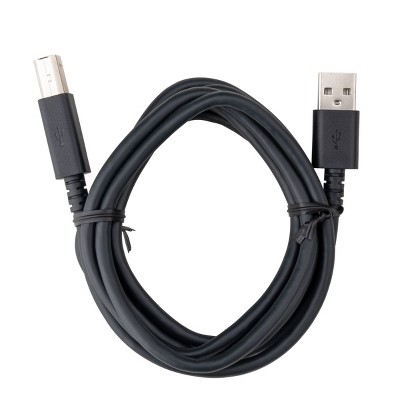
  • A: Thank you for the question. To avail yourself of HP+ and the free Instant Ink offer, you'll need to keep the printer on and connected via Wi-Fi. You can connect it directly to your computer with a USB cable (not included) if you don't want the benefit of HP+ and the additional warranty.

    submitted byHP Team - 9 months ago
    Brand expert
  • A: Thank you for your question. The DeskJet 2855e does not necessarily need to be connected to Wi-Fi. If you prefer not to use Wi-Fi, you can connect the printer to your computer via a USB cable.

    submitted byHP Team - 9 months ago
    Brand expert

Q: Will it print on fabric?

submitted by Robin - 9 months ago
  • A: Hi Robin, thanks for reaching out about HP DeskJet 2855e Wireless All-in-One Color Printer Scanner Copier with Instant Ink and HP+ (588S5A). No, the HP DeskJet 2855e Wireless All-in-One Color Printer Scanner Copier is not designed to print directly onto fabric. If you have any additional questions, we welcome you to contact MyTGTtech at 833-848-8324 every day, between 7am-11pm CST.

    submitted byJoe - 9 months ago
    Target staff support
  • A: Thank you for your question, the HP Deskjet 2855e is not designed to print on fabric.

    submitted byHP Team - 9 months ago
    Brand expert

Q: will it print black when the color ink cartridges are empty?

submitted by Kerry - 10 months ago
  • A: Thank you for your question, the HP DeskJet 2855e is a two cartridge system, so yes it will print black without the color cartridges.

    submitted byHP Team - 10 months ago
    Brand expert
  • A: Hi Kerry, thanks for reaching out about HP DeskJet 2855e Wireless All-in-One Color Printer Scanner Copier with Instant Ink and HP+ (588S5A). To print in black when the color cartridge is empty on an HP printer, you can reset the printer and change the print settings to "Print in Grayscale". If you have any additional questions, we welcome you to contact MyTGTtech at 833-848-8324 every day, between 7am-11pm CST.

    submitted byMatt - 10 months ago
    Target expert support

Related Categories

Guests are saying

The printer has received a mix of positive and negative feedback from guests. Many appreciate its affordability, ease of use, and the convenience of printing from mobile devices. However, some guests have encountered connectivity issues and concerns about the reliance on specific ink cartridges. Overall, it serves well for home use, especially for those who print occasionally and value a compact design.
    Summary created by AI from text of reviews reflecting recent feedback provided across different star ratings (includes incentivized reviews)
    3.7 out of 5 stars with 921 reviews
    quality: 2.21 out of 5
    value: 2.26 out of 5
    33% would recommend
    179 recommendations
    3 out of 5 stars
    Thumbs up graphic, would recommend
    1 January, 2026Verified purchase

    Review

    It's doing a great job printing and copying thus far.
    Carlissia
    quality: 4 out of 5
    value: 4 out of 5
    Did you find this review helpful?
    1 out of 5 stars
    Thumbs down graphic, would not recommend
    30 December, 2025Verified purchase

    Absolute Trash

    The product is a chore - if you are looking for something simple and easy, do not purchase! The customer service for this product is an absolute joke and extremely frustrating. If you can actually get through to a human being, get ready to listen to them SNORING between troubleshooting and taking 20min to get you a PIN number to document your case. I cannot emphasize enough how I would advise against purchasing this product!
    Gina
    quality: 1 out of 5
    value: 1 out of 5
    Did you find this review helpful?
    1 out of 5 stars
    Thumbs down graphic, would not recommend
    30 December, 2025Verified purchase

    (no review title)

    You only can use ink they send and after 3 months even if there’s ink in the cartridges, the printer does not work. Went and bought more ink it still won’t work
    Phillips
    quality: 1 out of 5
    value: 1 out of 5
    1 guest found this review helpful. Did you?
    1 out of 5 stars
    Thumbs down graphic, would not recommend
    28 December, 2025Verified purchase

    Ink is barley visible

    Had it for almost 6 months but used it less than 15x and it's already having problems. Paper gets stuck and when it does want to work the ink on the paper is barley visible while show the ink cartridges half full. Is there a fix for this?!
    Isaac
    quality: 2 out of 5
    value: 1 out of 5
    2 guests found this review helpful. Did you?
    1 out of 5 stars
    Thumbs down graphic, would not recommend
    23 December, 2025

    Subscription Based Printer

    DO NOT BUY! this printer will not work if you don’t have the subscription which is ridiculous. I bought my own ink and my own paper and I still have to pay a subscription to print. The ink is blurred sometimes as well. It doesn’t even print good. I wish I never got this as a gift.
    Urtargetgirl
    quality: 1 out of 5
    value: 1 out of 5
    4 guests found this review helpful. Did you?
    2 out of 5 stars
    21 December, 2025
    originally posted on store.hp.com
    Image

    Networking

    When purchasing this printer, it was not made clear that it only operates on its own (HP) wireless that needs to be purchased as an app. I expected it to connect to an existing network. Its use will therefore be limited
    Triangle Tool Library
    5 guests found this review helpful. Did you?
    2 out of 5 stars
    21 December, 2025
    originally posted on hp.com
    Image

    Old one better

    It’s ok don’t like can’t put enough paper
    V Anna
    Did you find this review helpful?
    5 out of 5 stars
    20 December, 2025
    originally posted on hp.com
    Image

    New HP printer

    Printer works very well. So far I can rely on it.
    Pat Br
    1 guest found this review helpful. Did you?
    5 out of 5 stars
    20 December, 2025
    originally posted on hp.com
    Image

    Easy to set up with the Hp app. Didn’t need a computer just my phone. Printing is easy and I’m happy

    So Far So Good
    DonnaLR
    1 guest found this review helpful. Did you?
    5 out of 5 stars
    19 December, 2025
    originally posted on hp.com
    Image

    (no review title)

    Good job excellent
    Max d
    1 guest found this review helpful. Did you?
    5 out of 5 stars
    19 December, 2025
    originally posted on hp.com
    Image

    Great printer

    My printer is great, just what I wanted.
    SBG1
    Did you find this review helpful?
    5 out of 5 stars
    17 December, 2025
    originally posted on hp.com
    Image

    Can't go wrong...

    So far so good for what 1 person needs & simple set-up etc.
    Did you find this review helpful?
    1 out of 5 stars
    17 December, 2025Verified purchase

    (no review title)

    What do you mean I have to have a subscription to use the ink?! This is the worst printer ever. I need a subscription to print double sided? I can’t believe the money grab this company is. If I could return this thing I would.
    Kat
    9 guests found this review helpful. Did you?
    1 out of 5 stars
    17 December, 2025
    originally posted on hp.com
    Image

    Bad Printer

    I am very disappointed with this printer. I have spent hours to get this printer set up to no avail. I cannot get it online or to stay online. Also, the cord does not stay attached.
    SheilaLL
    Did you find this review helpful?
    5 out of 5 stars
    17 December, 2025
    originally posted on hp.com
    Image

    Great!

    Great printer!
    Jez Coach ASL
    Did you find this review helpful?
    5 out of 5 stars
    15 December, 2025
    originally posted on hp.com
    Image

    Hp deskjet 2820e injet printer

    Like my printer .easy to operate and very happy with my purchase .Was reasonably priced and worth the money .The only criticism is thd grey cable that plugs into my laptop and into printer was missing .Lucky I had a spare one .
    bobbydaz5006671
    Did you find this review helpful?
    1 out of 5 stars
    Thumbs down graphic, would not recommend
    15 December, 2025Verified purchase

    Junk!

    I have had this printer since Feb 2025. It’s junk! Off line , paper jams, very little ink in cartridges and my WiFi is fine. this thing is a complete joke. I’m never buying HP again. Target should be ashamed of such poor quality product. Zero joy in this printer!
    Joy and peace
    quality: 1 out of 5
    value: 1 out of 5
    3 guests found this review helpful. Did you?
    5 out of 5 stars
    14 December, 2025
    originally posted on hp.com
    Image

    Compact and efficient

    Compact and just enough for minimal printing
    Slim Archer
    Did you find this review helpful?
    5 out of 5 stars
    Thumbs up graphic, would recommend
    13 December, 2025Verified purchase

    (no review title)

    Works great
    Viola
    quality: 5 out of 5
    value: 5 out of 5
    Did you find this review helpful?
    1 out of 5 stars
    13 December, 2025

    Do not buy

    Horrible
    Shopper
    2 guests found this review helpful. Did you?

    Get top deals, latest trends, and more.

    Privacy policy

    Footer

    About Us

    About TargetCareersNews & BlogTarget BrandsBullseye ShopSustainability & GovernancePress CenterAdvertise with UsInvestorsAffiliates & PartnersSuppliersTargetPlus

    Help

    Target HelpReturnsTrack OrdersRecallsContact UsFeedbackAccessibilitySecurity & FraudTeam Member ServicesLegal & Privacy

    Stores

    Find a StoreClinicPharmacyTarget OpticalMore In-Store Services

    Services

    Target Circle™Target Circle™ CardTarget Circle 360™Target AppRegistrySame Day DeliveryOrder PickupDrive UpFree 2-Day ShippingShipping & DeliveryMore Services
    PinterestFacebookInstagramXYoutubeTiktokTermsCA Supply ChainPrivacy PolicyCA Privacy RightsYour Privacy ChoicesInterest Based AdsHealth Privacy Policy