New ArrivalsHealth & WellnessValentine’s DayClothing, Shoes & AccessoriesHomeKitchen & DiningGroceryHousehold EssentialsFurnitureOutdoor Living & GardenBabyToysVideo GamesElectronicsMovies, Music & BooksBeautyPersonal CareGift IdeasParty SuppliesCharacter ShopSports & OutdoorsBackpacks & LuggageSchool & Office SuppliesPetsUlta Beauty at TargetTarget OpticalGift CardsBullseye’s PlaygroundDealsClearanceTarget New Arrivals Target Finds #TargetStyleHanukkahStore EventsAsian-Owned Brands at TargetBlack-Owned or Founded Brands at TargetLatino-Owned Brands at TargetWomen-Owned Brands at TargetLGBTQIA+ ShopTop DealsTarget Circle DealsWeekly AdShop Order PickupShop Same Day DeliveryRegistryRedCardTarget CircleFind Stores
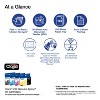
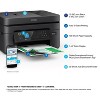
Epson WorkForce WF-2930 Wireless All-in-One Color Inkjet Printer, Copier, Scanner - Black: Smartphone App, USB, Automatic 2-Sided Printing - 2 of 4Epson WorkForce WF-2930 Wireless All-in-One Color Inkjet Printer, Copier, Scanner - Black: Smartphone App, USB, Automatic 2-Sided Printing - 3 of 4Epson WorkForce WF-2930 Wireless All-in-One Color Inkjet Printer, Copier, Scanner - Black: Smartphone App, USB, Automatic 2-Sided Printing - 4 of 4
Epson WorkForce WF-2930 Wireless All-in-One Color Inkjet Printer, Copier, Scanner - Black: Smartphone App, USB, Automatic 2-Sided Printing - 1 of 4

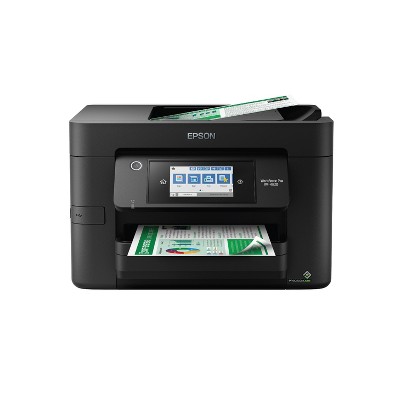
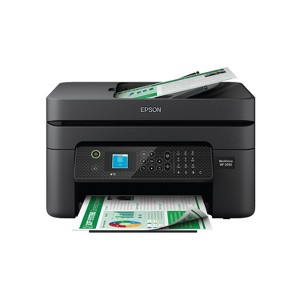
Epson WorkForce WF-2930 Wireless All-in-One Color Inkjet Printer, Copier, Scanner - Black: Smartphone App, USB, Automatic 2-Sided Printing

$79.99 reg $119.99
Sale save $40.00 (33% off)

In Stock

Eligible for registries and wish lists

Sponsored

About this item

Highlights

  • Professional-Quality Home Office Printing — Epson’s leading-edge printing technology delivers sharp text and vibrant color graphics
  • Stress-Free Setup and Operation — Features a color display for effortless navigation, plus easy installation and operation through your smartphone or tablet using the Epson Smart Panel app
  • Engineered for Reliability — Consistently delivers high-quality prints with heat-free technology and a permanent printhead designed to last the life of the printer
  • Convenient Connectivity — Supports easy wireless connections and printing from Android or iOS devices
  • Efficient, Economical Design — Automatic 2-sided printing helps you save paper and reduce paper waste
  • Easy, Affordable Color Printing — Individual ink cartridges make it easy to only replace the ink you need
  • Hands-Free, Voice-Activated Printing — Easily print on the go using Alexa
  • Versatile Functionality — Create searchable PDFs and more with included Epson ScanSmart scanning software
  • Epson Printing System Is Designed to Be Used Exclusively with Epson Genuine Cartridges — Use of non-genuine ink could cause damage not covered under the printer’s limited warranty

Description

Enjoy hassle-free business printing with the WorkForce WF-2930. An efficient, all-in-one solution, the WF-2930 streamlines workflow with a built-in scanner, copier, fax and Auto Document Feeder. Perfect for printing presentations, contracts and corporate graphics, as well as occasional prints for the home or family, it features Epson’s industry-leading printing technology to consistently deliver documents with sharp text and vivid colors. Plus, with effortless setup and wireless connectivity, it’s the convenient choice for everyday home office printing.
Dimensions (Overall): 9.5 Inches (H) x 14.8 Inches (W) x 22.7 Inches (D)
Weight: 11.5 Pounds
B&W Print Speed: 10 Pages per Minute
Color Print Speed: 5 Pages per Minute
Electronics Condition: New
Electronics Features: Printer, Copier, Scanner, Controlled by Smartphone App, Automatic 2-Sided Printing, Print From Mobile Device
Connection Type: USB
Maximum capacity: 100 Sheets
Operating System Compatibility: Android, Apple iOS, Microsoft Windows, Google Chrome OS
Maximum Resolution: 5760 x 1440 (Color)
Wireless Technology: Wi-Fi, Apple AirPrint
Printer Ink Color: Multiple Colors
Compatible With: Up to 8.5" x 14" Documents
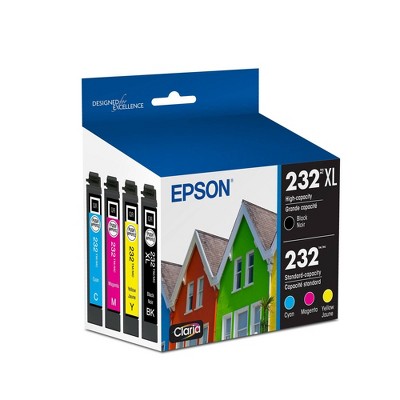
Ink Series: Epson 232 series
Battery: No Battery Used
Warranty: 1 Year Limited Warranty. To obtain a copy of the manufacturer's or supplier's warranty for this item prior to purchasing the item, please call Target Guest Services at 1-800-591-3869
TCIN: 90762987
UPC: 010343968554
Item Number (DPCI): 056-03-9955
Origin: Imported
If the item details aren’t accurate or complete, we want to know about it.

Shipping details

Estimated ship dimensions: 15.3 inches length x 17.6 inches width x 11.5 inches height
Estimated ship weight: 13.9 pounds

Return details

This item can be returned to any Target store or Target.com.
This item must be returned within 30 days of the date it was purchased in store, shipped, delivered by a Shipt shopper, or made ready for pickup.
See the return policy for complete information.

Q: Does this printer use a subscription service? Or can I buy and use the compatible ink cartridges myself?

submitted by MsGraham - 1 year ago
  • A: It doesn't work at all. It's a total waste of time and money. And, you can't reach Epson or anyone else to help with installation. Just save your money; get something else. Anything else.

    submitted byUnhappy purchaser - 21 days ago
  • A: Hi MsGraham, thanks for reaching out about Epson WorkForce WF-2930 Wireless All-in-One Color Inkjet Printer, Copier, Scanner - Black This printer is compatible with a subscription service called Epson ReadyPrint, however it is optional. The Epson 232 and 232XL ink cartridges are compatible with this printer if you choose to purchase and replacethem as needed. If you have any additional questions, we welcome you to contact MyTGTtech at 833-848-8324 every day, between 7am-11pm CST.

    submitted byMike - 1 year ago
    Target expert support
  • A: Hello MsGraham. The WF-2930 does not require a subscription service. The printer is compatible to work with Epson 232 and 232 XL Ink Cartridges. Regards, Kevin - The Epson Team.

    submitted byEpson - 1 year ago
    Brand expert

Q: Can it print legal and ledger sizes as well?

submitted by Andy - 18 days ago
  • A: Hello Andy. The largest paper size supported by the printer is 8.5 × 14 inches (legal size). Unfortunately, ledger paper is not compatible. Regards, Kevin - The Epson Team.

    submitted byEpson - 17 days ago
    Brand expert
  • A: Hi, thanks for reaching out about Epson WorkForce WF-2930 Wireless All-in-One Color Inkjet Printer, Copier, Scanner - Black: Smartphone App, USB, Automatic 2-Sided Printing Yes, the Epson WorkForce WF-2930 can print legal and ledger-sized documents. It is designed to handle various paper sizes, including legal and ledger, making it suitable for both standard and specialty paper types. If you have any additional questions, we welcome you to contact MyTGTtech at 833-848-8324 every day, between 7am-11pm CST.

    submitted byJustin - 18 days ago
    Target expert support

Q: Is this a sublimation printer?

submitted by Bubbasmommy - 1 month ago
  • A: Hello. The WF-2930 is not designed for dye-sublimation printing or the use of non-genuine Epson Ink Cartridges. We recommend using Genuine Epson Ink for optimal print quality and performance. Non-genuine ink could cause damage not covered by the printer’s limited warranty. Regards, Kevin - The Epson Team.

    submitted byEpson - 1 month ago
    Brand expert
  • A: Hi, thank you for reaching out about Epson WorkForce WF-2930 Wireless All-in-One Color Inkjet Printer, Copier, Scanner - Black: Smartphone App, USB, Automatic 2-Sided Printing. No, the Epson WorkForce WF-2930 is not a sublimation printer; it is a standard inkjet printer that uses regular Claria® ink. If you have any additional questions, we welcome you to contact MyTGTtech at 833-848-8324 every day, between 7am-11pm CST.

    submitted byMatt - 1 month ago
    Target expert support

Q: Can it use cardstock

submitted by slove - 3 months ago
  • A: Hello slove. The WF-2930 can print on cardstock, but feeding reliability can vary when using third-party paper based on the brand, texture, thickness, and weight. We recommend testing a sample first to make sure it works well, since Epson doesn’t guarantee compatibility with all paper types. Regards, Kevin - The Epson Team.

    submitted byEpson - 3 months ago
    Brand expert
  • A: Hi, thanks for reaching out about Epson WorkForce WF-2930 Wireless All-in-One Color Inkjet Printer, Copier, Scanner - Black: Smartphone App, USB, Automatic 2-Sided Printing. Yes, the Epson WorkForce WF-2930 can print on cardstock, but there are some important limits you need to be aware of: The Safe Limits for Cardstock Epson's Tested Weight: Epson states that the WF-2930 has been tested to work with genuine Epson paper up to 79 lb. (Epson Ultra Premium Photo Paper Glossy). They have also tested similar Epson paper around 44 lb. that falls into the cardstock range. Recommendation: To ensure the best results and avoid jamming, you should stick to cardstock that is 44 lb. to 79 lb. in weight. Third-Party Paper: Be cautious with generic or very thick cardstock from other brands. The feeding quality can vary, and if the paper is too thick or stiff, it may jam or not feed at all, as the printer is designed primarily for standard office paper. In short, use lightweight to mid-weight cardstock, and always test a single sheet before attempting a large print job. If you have any additional questions, we welcome you to contact MyTGTtech at 833-848-8324 every day, between 7am-11pm CST.

    submitted byJoe - 3 months ago
    Target staff support

Q: Is this printer able to enlarge print, patterns?

submitted by hkay - 3 months ago
  • A: Hello hkay. Yes, you can reduce or enlarge copies from 25% to 400% using the WF-2930's front control panel. If you are printing from a computer, you can adjust the "Reduce/Enlarge Document" settings under "More Options" in the printer driver. Regards, Kevin - The Epson Team.

    submitted byEpson - 3 months ago
    Brand expert
  • A: Hi, thank you for reaching out about Epson WorkForce WF-2930 Wireless All-in-One Color Inkjet Printer, Copier, Scanner - Black: Smartphone App, USB, Automatic 2-Sided Printing. Yes, the Epson WorkForce WF-2930 is able to enlarge patterns and other originals, both by making a copy and by scanning to a computer and printing. If you have any additional questions, we welcome you to contact MyTGTtech at 833-848-8324 every day, between 7am-11pm CST.

    submitted byMatt - 3 months ago
    Target expert support

Q: CAN THIS PRINTER BE CONNECTED TO PC WITHOUT USING WIFI BUT CABLE TO PC

submitted by Franco - 1 year ago
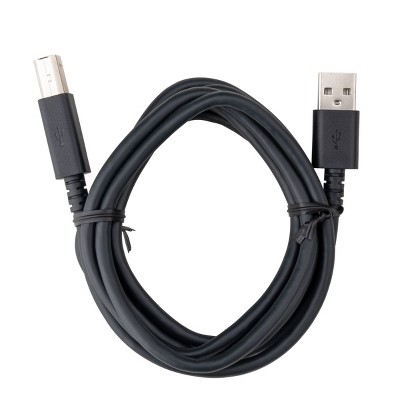
  • A: Hello Franco. Yes, you can physically connect the WF-2930 to a computer using a USB "A to B" or "B to C" cable. Regards, Kevin - The Epson Team.

    submitted byEpson - 1 year ago
    Brand expert
  • A: Hi Franco, thanks for reaching out about Epson WorkForce WF-2930 Wireless All-in-One Color Inkjet Printer, Copier, Scanner - Black. Yes, it supports connecting directly to the computer via USB. Please note a USB cable is not included. If you have any additional questions, we welcome you to contact MyTGTtech at 833-848-8324 every day, between 7am-11pm CST.

    submitted byMatt - 1 year ago
    Target expert support

Q: What paper can you use H and W

submitted by 12 - 1 year ago
  • A: Hi 12, thanks for reaching out about Epson WorkForce WF-2930 Wireless All-in-One Color Inkjet Printer, Copier, Scanner - Black. The largest paper size this printer supports is Legal Size 8.5in x 14in. If you have any additional questions, we welcome you to contact MyTGTtech at 833-848-8324 every day, between 7am-11pm CST.

    submitted byMatt - 1 year ago
    Target expert support
  • A: Hello 12. The WF-2930 supports paper sizes ranging from 2.2" x 3.4" to 8.5" x 47.2". Regards, Kevin - The Epson Team.

    submitted byEpson - 1 year ago
    Brand expert

Q: What Epson printers work with lenovo chrome book?

submitted by chromebook compatability - 1 year ago
  • A: Hello chromebook compatibility. Any wireless Epson printer available on Target's website will work with a Chromebook computer. For more details, please visit our official Epson Chromebook Support page. Regards, Kevin - The Epson Team.

    submitted byEpson - 1 year ago
    Brand expert
  • A: Hi chromebook compatability, thanks for reaching out about Epson WorkForce WF-2930 Wireless All-in-One Color Inkjet Printer, Copier, Scanner - Black Most newer printers, regardless of manufacturer, do have compatability for ChromeOS. It can depend on the printer itself and for some manufacturers you may need to use their app. If you have any additional questions, we welcome you to contact MyTGTtech at 833-848-8324 every day, between 7am-11pm CST.

    submitted byMike - 1 year ago
    Target expert support

Q: Will this printer connect to a Dell laptop

submitted by Marti - 2 years ago
  • A: Hello Marti. Yes, the WF-2930 will work with your Dell laptop if you are using Windows 7 - 11. Regards, Kevin - The Epson Team.

    submitted byEpson - 2 years ago
    Brand expert
  • A: Hi Marti, thanks for reaching out about the Epson WorkForce WF-2930 Wireless All-in-One Color Inkjet Printer, Copier, Scanner - Black. The Epson WorkForce WF-2930 Wireless All-in-One Color Inkjet Printer, Copier, Scanner - Black is compatible to work with a Dell laptop. If you have any additional questions, we welcome you to contact MyTGTtech at 833-848-8324 every day, between 7 am-11 pm CST.

    submitted byRena - 2 years ago
    Target expert support

Q: Will this copier connect with my dell laptop wireless

submitted by Marti - 2 years ago
  • A: Hello Marti. The WF-2930 should wirelessly work with your Dell laptop if you are using Windows 7 - 11. Please note to use the copier on the printer, no computer is required. Regards, Kevin - The Epson Team.

    submitted byEpson - 2 years ago
    Brand expert
  • A: Hi Marti, thanks for reaching out about the Epson WorkForce WF-2930 Wireless All-in-One Color Inkjet Printer, Copier, Scanner - Black. The Epson WorkForce WF-2930 Wireless All-in-One Color Inkjet Printer, Copier, Scanner - Black is compatible to work with a Dell laptop wireless. If you have any additional questions, we welcome you to contact MyTGTtech at 833-848-8324 every day, between 7 am-11 pm CST.

    submitted byRena - 2 years ago
    Target expert support

Related Categories

Guests are saying

The Epson Workforce WF 2930 wireless printer offers a compact design and a range of features, including wireless printing, scanning, and copying. Many guests appreciate its easy setup and decent print quality. However, concerns about ink consumption and connectivity issues are prevalent. While some guests find it suitable for light use, others express frustration with its performance and reliability, particularly regarding ink cartridge recognition and frequent error messages.
    Summary created by AI from text of reviews reflecting recent feedback provided across different star ratings (includes incentivized reviews)
    2.5 out of 5 stars with 142 reviews
    quality: 1.75 out of 5
    value: 1.96 out of 5
    17% would recommend
    28 recommendations
    1 out of 5 stars
    29 December, 2025Verified purchase

    (no review title)

    Not sure about the product yet, but whoever they hired to deliver it... instead of putting it at the door, which is only 20' from the curb, decided to set it out at the end of the drive by street like it was trash. I just happened to see the email that it was delivered and went outside, just in time to see someone stopping to pick it up because they thought it was being thrown out with the trash! I generally get at least one or more deliveries a day, and have never had this happen.
    1 reply from Epson team - 5 days ago
    Hi Steven, thank you for sharing your experience. Epson takes into consideration all feedback to improve the performance and quality of our products. We will forward your feedback to the relevant Epson department, as we are always looking to make future Epson products better. Once again, thank you. Regards, Joseph – The Epson Team.
    Steven
    Did you find this review helpful?
    5 out of 5 stars
    21 December, 2025Verified purchase

    (no review title)

    For the most part it does why at it suppose to.
    Antonio
    1 guest found this review helpful. Did you?
    4 out of 5 stars
    Thumbs up graphic, would recommend
    19 December, 2025Verified purchase

    New printer

    It works great. I've printed several things , after I got it installed.
    Kathy
    quality: 4 out of 5
    value: 4 out of 5
    2 guests found this review helpful. Did you?
    1 out of 5 stars
    17 December, 2025
    originally posted on epson.com
    Image

    NEED COLOR TO PRINT BLACK AND WHITE?!?

    I cannot print black and white without full color cartridges?!? I didn't know I needed yellow to print a black and white paper.... Guess I will be waiting another week before I can print what I need. Very unhappy!
    1 reply from The Epson Team team - 16 days ago
    Hi Dw2002, Epson printers contain a permanent print head that must be charged with all colors to work. Even when you are printing only black text, a small amount of color ink is used to keep air bubbles from entering. Air bubbles can damage the print head. If we can help you with anything else, please contact Epson Support at (562) 276-4382; Hours: Monday – Friday, 7 a.m. to 4 p.m. (PT). Sincerely, Joseph – The Epson Team.
    Dw2002
    1 guest found this review helpful. Did you?
    1 out of 5 stars
    Thumbs down graphic, would not recommend
    15 December, 2025Verified purchase

    (no review title)

    return
    1 reply from Epson team - 19 days ago
    Hi chunli, we value your business, and will be sure to pass your feedback along to our product teams. Best, Joseph – The Epson Team.
    chunli
    quality: 1 out of 5
    value: 1 out of 5
    1 guest found this review helpful. Did you?
    1 out of 5 stars
    Thumbs down graphic, would not recommend
    11 December, 2025

    Do not get. Awful

    Had firmware update that does not recognize the generic cartridges I’ve been using since I got this. Criminal.
    1 reply from Epson team - 19 days ago
    Hello Kat, Epson periodically provides firmware updates to address issues of security, performance, minor bug fixes, and to ensure your printer functions as designed. Your WF-2930 was designed to work only with genuine Epson ink cartridges, therefore some updates may affect the functionality of third-party ink. Non-Epson branded or altered Epson cartridges that functioned prior to a firmware update may not continue to function. If we can help with anything else, please reach out to our Epson Support Team at (562) 276-4382; Hours: Monday – Friday, 7 a.m. to 4 p.m. (PT). Sincerely, Joseph – The Epson Team.
    Kat
    quality: 1 out of 5
    value: 1 out of 5
    3 guests found this review helpful. Did you?
    1 out of 5 stars
    11 December, 2025
    originally posted on epson.com
    Image

    Terrible

    This machine has wasted hours of my time. Setup was a pain. I still can't seem to operate it from my computer. After about 4 or 5 cleaning cycles, it is still not printing properly AND it is already showing low ink. The cartridges are so light, they seem empty- I can't imagine there is more than a teaspoon of ink in them. I am returning this asap. The pathetic amount they put in them is a SCAM!!
    1 reply from The Epson Team team - 23 days ago
    Hi tktk, we are sorry to hear you are having issues with your Epson printer. Your WF-2930 includes a 1-year limited warranty plus free technical support for the life of your product. Our Epson Support Team would be happy to hear from you and can be reached at (562) 276-4382; Hours: Monday – Friday, 7 a.m. to 4 p.m. (PT). Sincerely, Joseph – The Epson Team.
    tktk
    1 guest found this review helpful. Did you?
    1 out of 5 stars
    28 November, 2025Verified purchase

    (no review title)

    Would not read the ink and Epson help line was NO help at all.
    1 reply from Epson team - 1 month ago
    Hi Laura, we are sorry to hear about the disappointing experience you've encountered with our Customer Support team. Epson takes into consideration all feedback to improve the performance, quality, and support of our products. We will forward your feedback to the relevant department. If the issue still persists, you may reach out directly to our Advanced Epson Support Team at 1-800-241-5794. We appreciate your time and we look forward to your call. Kind Regards, Joseph – The Epson Team.
    Laura
    5 guests found this review helpful. Did you?
    5 out of 5 stars
    Thumbs up graphic, would recommend
    24 November, 2025Verified purchase

    (no review title)

    Came Quickly. Esay to install. Working fine. Thank You!
    Tony
    quality: 5 out of 5
    value: 5 out of 5
    4 guests found this review helpful. Did you?
    2 out of 5 stars
    Thumbs down graphic, would not recommend
    15 October, 2025Verified purchase

    Look elsewhere, seriously.

    The ink life of this printer is really disappointing. Quality of the print is fine for some basic documents and color. But I hardly use it and it wants me to replace the ink after about 10 print jobs.
    1 reply from Epson team - 3 months ago
    Hi Amber, we are sorry to hear you are having issues with your Epson printer. Your WF-2930 includes free technical telephone support for the life of your product. Our Epson Support Team would be happy to help you and can be reached at (562) 276-4382; Hours: Monday – Friday, 7 a.m. to 4 p.m. (PT). Sincerely, Joseph – The Epson Team.
    Amber
    quality: 2 out of 5
    value: 2 out of 5
    6 guests found this review helpful. Did you?
    1 out of 5 stars
    14 October, 2025
    originally posted on epson.com
    Image

    You'll pay 10x in ink for the $20 you save on this garbage

    Easily the worst printer I've owned in the last 20 years. In addition to constant firmware issues and random resets, you'll need to replace your ink cartridges about every 3-5 documents. It's completely unusable if you're doing anything more than printing a couple one-page documents per month.
    1 reply from The Epson Team team - 3 months ago
    Hello Epson Customer, we apologize for the disappointing experience you’ve encountered with your Epson printer. Your WF-2930 includes free technical support for the life of your product. Please reach out to our Epson Support Team for assistance at (562) 276-4382; Hours: Monday – Friday, 7 a.m. to 4 p.m. (PT). We’re here to help. Sincerely, Joseph
    5 guests found this review helpful. Did you?
    1 out of 5 stars
    27 September, 2025
    originally posted on epson.com
    Image

    Needy

    Absolutely the neediest printer I have ever owned. It is in constant need of a software update, firmware update, or a new cartridge. I should have spent 4 times the money and it would have been worth it to avoid this machine. I don't print things when I have all day to massage this thing's shoulders. I am printing when I am busy and have things to do.
    1 reply from The Epson Team team - 3 months ago
    Hello SpikeJ, we apologize for the disappointing experience you’ve encountered with your Epson printer. Your WF-2930 includes free technical support for the life of your product. Please reach out to our Epson Support Team for assistance at (562) 276-4382; Hours: Monday – Friday, 7 a.m. to 4 p.m. (PT). We’re here to help. Sincerely, Joseph
    SpikeJ
    7 guests found this review helpful. Did you?
    1 out of 5 stars
    22 September, 2025
    originally posted on epson.com
    Image

    Worst of ALL TIME

    Worst printer of all time. First use ran out of ink, continuously offline. Will run out of ink in one use. DO NOT BUY SUPER RIP OFF!!!!!
    1 reply from The Epson Team team - 3 months ago
    Hi unhappy teacher, we are sorry you are disappointed with your Epson printer. Your WF-2930 includes free technical support for the life of your product. Our Epson Support Team may be able to help you customize your settings for a more efficient performance. Please contact us at (562) 276-4382; Hours: Monday – Friday, 7 a.m. – 4 p.m. PT. We look forward to your call. Regards, Joseph
    unhappy teacher
    7 guests found this review helpful. Did you?
    1 out of 5 stars
    13 September, 2025
    originally posted on epson.com
    Image

    Don't

    Worst printer ive ever had in my 53 years. Constantly running out of ink. Always lines going through any graphics. To do maintenance/cleaning uses up all the ink. Even after mainetrnance thete are lines through it. I hate this printer.
    1 reply from The Epson Team team - 4 months ago
    Hi Dog mom, we are sorry to hear you are having issues with your Epson printer. Your WF-2930 includes a 1-year limited warranty plus free technical support for the life of your product. Our Epson Support Team would be happy to hear from you and can be reached at (562) 276-4382; Hours: Monday – Friday, 7 a.m. to 4 p.m. (PT). Sincerely, Joseph
    Dog mom
    5 guests found this review helpful. Did you?
    1 out of 5 stars
    Thumbs down graphic, would not recommend
    24 August, 2025Verified purchase

    Ink does not last

    If you teach and need a color printer, don't waist your money. You'll be buying new ink cartereage every 20 pages. It's not worth it.
    1 reply from Epson team - 4 months ago
    Hi Love it, we are sorry you are disappointed with your Epson printer. Your WF-2930 includes free technical support for the life of your product. Our Epson Support Team may be able to help you customize your settings for a more efficient performance. Please contact us at (562) 276-4382; Hours: Monday – Friday, 7 a.m. – 4 p.m. PT. We look forward to your call. Regards, Joseph – The Epson Team.
    Love it
    quality: 1 out of 5
    value: 1 out of 5
    5 guests found this review helpful. Did you?
    1 out of 5 stars
    Thumbs down graphic, would not recommend
    19 August, 2025Verified purchase

    Thumbs down!

    This is by far the WORST printer I have EVER purchased or utilized. Completely a waste of money, it prints/copies so slow, the scanning part (ADF) tray DOES NOT WORK, constantly stops mid scan and claims there's a paper jam when there is NOT. Legit the worse printer to date my HP was so much better than this garbage. & Epson customer care is full of incompetent people, completely useless.
    1 reply from Epson team - 4 months ago
    Hi Target Customer, please visit www.epson.com/support/wf2930 for useful product information on optimizing print settings and avoiding paper jams. Your Epson includes free technical support for the life of your product. Our Epson Support Team would be happy to help you and can be reached at (562) 276-4382; Hours: Monday – Friday, 7 a.m. to 4 p.m. (PT). We appreciate your purchase, and we value your feedback. Sincerely, Joseph – The Epson Team.
    Dissatisfied
    quality: 1 out of 5
    value: 1 out of 5
    4 guests found this review helpful. Did you?
    1 out of 5 stars
    Thumbs down graphic, would not recommend
    19 August, 2025Verified purchase

    Still waiting for item delivery

    Target & FedEx said item delivered vs not at my apartment door step
    1 reply from Epson team - 4 months ago
    Hi Target Customer, thank you for sharing your experience. Epson takes into consideration all feedback to improve the performance and quality of our products. We will forward your feedback to the relevant Epson department, as we are always looking to make future Epson products better. Once again, thank you. Regards, Joseph – The Epson Team.
    Still waiting for item
    quality: 1 out of 5
    value: 1 out of 5
    1 guest found this review helpful. Did you?
    1 out of 5 stars
    8 August, 2025
    originally posted on epson.com
    Image

    Bad product. Bad company.

    The ink cartridges do not work when you try to replace them. The machine will not let you print. I paid money for this machine. And apparently the company doesn’t care.
    1 reply from The Epson Team team - 5 months ago
    Hello Brad1964, the Epson WF-2930 is designed to use only genuine Epson-brand ink cartridges. Other brands of ink cartridges, and ink supplies, are not compatible, and even if described as compatible, may not function properly or at all. Please ensure you have installed Epson genuine cartridges. If you are still having problems, you may contact our Epson Advanced Support Team at (800) 241-5794; Hours: Monday – Friday, 7 a.m. to 4 p.m. (PT). Sincerely, Joseph – The Epson Team
    Brad1964
    2 guests found this review helpful. Did you?
    1 out of 5 stars
    23 July, 2025
    originally posted on epson.com
    Image

    DO NOT BUY!!!

    I bought this and used it a handful of times and had to replace the ink 2 times. I replaced the ink a few days ago and printed ONE DOCUMENT and already the ink is LOW and I buy the xls to last but they don’t. Printer won’t work if one of the colored ink is low. TOTAL WASTE OF MONEY!!!!!
    1 reply from The Epson Team team - 5 months ago
    Hi Ecia, we are sorry you are disappointed with your Epson printer. Your WF-2930 includes free technical support for the life of your product. Our Epson Support Team may be able to help you customize your settings for a more efficient performance. Please contact us at (562) 276-4382; Hours: Monday – Friday, 7 a.m. – 4 p.m. PT. We look forward to your call. Regards, Joseph
    Ecia
    2 guests found this review helpful. Did you?
    1 out of 5 stars
    23 July, 2025
    originally posted on epson.com
    Image

    Epson WF-2930

    Worst printer I have ever used. Every time I try and use a different problem pops up. Ink is only good for about a month and then dried out. Can't keep printer drivers loaded. Can't find them on website, Just a pain.
    1 reply from The Epson Team team - 5 months ago
    Hi Eoson Customer, we are sorry to hear that you are experiencing issues with your printer. Your WF-2930 includes free technical support for the life of your product. Our Epson Support Team would be happy to help and can be reached at (562) 276-4382; Hours: Monday – Friday, 7 a.m. – 4 p.m. PT. Sincerely, Joseph
    Printer Problems
    1 guest found this review helpful. Did you?

    Get top deals, latest trends, and more.

    Privacy policy

    Footer

    About Us

    About TargetCareersNews & BlogTarget BrandsBullseye ShopSustainability & GovernancePress CenterAdvertise with UsInvestorsAffiliates & PartnersSuppliersTargetPlus

    Help

    Target HelpReturnsTrack OrdersRecallsContact UsFeedbackAccessibilitySecurity & FraudTeam Member ServicesLegal & Privacy

    Stores

    Find a StoreClinicPharmacyTarget OpticalMore In-Store Services

    Services

    Target Circle™Target Circle™ CardTarget Circle 360™Target AppRegistrySame Day DeliveryOrder PickupDrive UpFree 2-Day ShippingShipping & DeliveryMore Services
    PinterestFacebookInstagramXYoutubeTiktokTermsCA Supply ChainPrivacy PolicyCA Privacy RightsYour Privacy ChoicesInterest Based AdsHealth Privacy Policy