
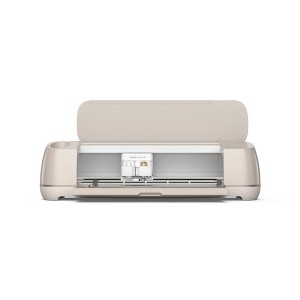
Cricut Maker 4 Electric Die Cutting Tool/Cutting Machine/Seashell
Highly rated
$399.00
In Stock
Eligible for registries and wish lists
At a glance
About this item
Additional product information and recommendations
Discover more options
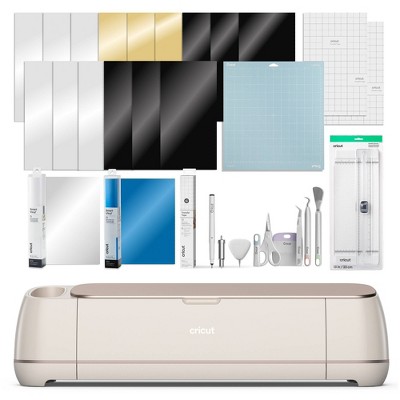
Frequently bought together

Guests also viewed
Related Categories
Guests are saying
The Cricut Maker 4 has received enthusiastic feedback for its impressive speed and cutting precision, making it a favorite among crafting enthusiasts. Guests appreciate its ability to handle various materials, including vinyl and cardstock, with ease. While some users have encountered challenges with specific materials like faux leather, the overall performance and versatility of the machine have inspired many to explore new crafting projects. Its sleek design and user-friendly features further enhance the crafting experience.
Summary created by AI from text of reviews reflecting recent feedback provided across different star ratings (includes incentivized reviews)
4.5 out of 5 stars with 388 reviews
quality: 3.5 out of 5
value: 3.25 out of 5
28% would recommend
7 recommendations
1 out of 5 stars
Thumbs down graphic, would not recommend
22 April, 2026Verified purchase
A Warning Before You Make That Jump -Don't Do It!
Here is the issue. I had the Cricut Maker 3, and as far as I’m concerned, it’s not worth upgrading to the Maker 4. And this is where YouTube content creators don’t tell you: all of Cricut’s models will waste cardstock, vinyl, or any materials used. Cricut has limitations with its mats, where cuts can only be made within a restricted area. Now, take the Brother Scan & Cut—you can use all of your leftover materials, even the smallest bits and pieces, and still perform your cuts no matter what. That’s not the case with any of Cricut’s cutter models. Even with xTool’s M1 Ultra, you can complete the same projects using leftover materials and cut those small pieces. And when using vinyl, it’s a must to save as much as you can due to the high cost. Cricut is too restrictive with what you can cut on their mats. Also, the issue I have with Cricut as a company is that they’re no longer innovating. Cricut was once a company that brought us crafting tools that had never been seen before in a user-friendly format—but not anymore. Every model they come out with (as an upgrade) is really the same thing, with only changes to the housing—nothing new that gives you that “wow” factor. It’s really sad to see where Cricut is heading, and it’s not looking good. Cricut’s hardware division is in decline, and you can see why—no innovation. What is keeping them above water is their supplies, in my opinion. Again, in my opinion, I wish they would make changes within their project design management team and among those who are responsible for allocating funds to that department. They need an overhaul, if you ask me. If Cricut doesn’t get their act together, it’s just a matter of time before the boat sinks completely. I want to see Cricut succeed, but to do that, they need to get back to their roots instead of focusing only on pleasing shareholders—they need to innovate. So honestly, if anyone is reading this and thinking about investing in—or must have—a Cricut machine, you’re better off getting the Cricut Maker 3. The Maker 3 has been their best model by far, especially if you can get it for under $250. Although, based on what I explained earlier about the limits of the cutting area and lack of innovation, I highly recommend the Brother Scan N Cut. It is an amazing product and can change the way you craft. I will say that Brother’s Workspace is by no means anything close to Cricut’s Design Space—it needs work. However, most of your projects can be done directly on the Brother Scan N Cut’s LCD—no computer needed. Yes, you heard me right—you don’t need a computer to use the Brother Scan N Cut. And yes, many of the Brother Scan N Cut models support a rotary blade, and it cuts fabric better than the Maker 3 or 4. Just so you know, I’m not a fan of Brother, but that Scan N Cut is absolutely amazing. And if you can afford the xTool M1 or M1 Ultra, go for it. xTool has been innovating since the company started, and there’s no stopping them. Their customer service is also among the best out there—similar to the experience you get with Apple. Either way, you can’t go wrong with the Brother Scan N Cut or xTool’s M1 or M1 Ultra. But you will go wrong with any of Cricut’s cutters due to material waste and the lack of innovation. So, yes—I am returning the Maker 4 and distancing myself from Cricut altogether. It was a happy relationship that could only last so long. The photos show the Maker 4 before it goes back, along with the Scan N Cut and the xTool M1 Ultra—so you know I’m a real user of these crafting products. I'm a real user with these products.
5 out of 5 stars
21 April, 2026
originally posted on Cricut

I purchased a Cricut Maker 4.
I just got my NEW Cricut Maker 4!!! And I am SO happy!!! I have a former Cricut Maker that my children bought for me for a significant birthday a few years ago. I have a girl and boy and both and both families have 3 children each. Some years ago, I made them ALL some cute shirts - all different (10 of them) and they still talk about how much they love them! I was unable to use my first Cricut as the little rubber bands on the rods interfered with my projects!! So, I have not used my first Cricut since. I hope to also get in touch with you sometime to have the problem fixed. I have again decided to get another Cricut Maker 4, and it came just this week. I love it!!!! And I called "Raphael" for some help and he helped me SO much!!! He explained so many things to me and I was very grateful! I know there are people in your organization there that also can help me when I need help!! I promise I will use them for their expertise!!! Raphael was so helpful and I felt comfortable telling him all this! I look forward to a long relationship with your company!!
5 out of 5 stars
20 April, 2026
originally posted on Cricut
Easy to learn
I am enjoying making cards with my machine. I love that there are templates and can make them fast and easy.
5 out of 5 stars
20 April, 2026
originally posted on Cricut
Great product highly recommend!
So far, it has been pretty easy to use. The times where I am unsure of how to do something, I’ve been able to Google or YouTube pretty easily. The good thing about Cricut is that there’s a lot of content out there on all platforms, so you will be able to find the project you are working on somewhere. The only negative is that you will be spending a lot of money on materials: like vinyl, transfer tape, etc. Didn’t realize, that you go through materials pretty quickly, so make sure you find online stores to get supplied for lower than what they sell at retail stores.
5 out of 5 stars
17 April, 2026
originally posted on Cricut
Happy that i got it
Works great i can not wait to make new proyects on my new machine
5 out of 5 stars
17 April, 2026
originally posted on Cricut
Love the Maker 4
I purchased this in March 2025. I still have my Maker 3, but I wanted the advanced speed and using Smart materials. I wanted to cut large decor for my master bath.
5 out of 5 stars
8 April, 2026
originally posted on Cricut
Lightening fast
I can not believe how fast my new cricut maker cuts!
5 out of 5 stars
7 April, 2026
originally posted on Cricut
New Materials use.
Looks good so far. It would be helpful if there was a step by step introduction to the new materials that are in the box with the Cricut Maker 4. Did I miss something?
5 out of 5 stars
5 April, 2026
originally posted on Cricut
Love love
Obsessed with my new machine! I love I can do it all!
3 out of 5 stars
3 April, 2026
originally posted on Cricut
Sloppy Work
While the speed is fun I am finding accuracy and definitive and thorough cuts have been replaced by the speed. Don’t like that at all.
1 reply from Cricut team - 22 days ago
Thank you so much for reaching out and sharing your experience. We’re truly sorry to hear about the trouble you’ve had with the Maker 4. This is not the experience we want for our members. Our team would be happy to help and ensure everything gets resolved for you as quickly as possible. Please contact our Member Care team with your details, and they’ll work with you to get you up and running right away.
5 out of 5 stars
2 April, 2026
originally posted on Cricut
Maker 4
I just got my cricut maker a week ago. Just starting to learn how to use new things I didn’t have before. I like that I have tutorials to help me learn. I also like how much faster it is.
5 out of 5 stars
29 March, 2026
originally posted on Cricut
Upgrade
I have had a Cricut Maker for about 3 years and wore it out, wanted an upgrade and I am so pleased with the Cricut Maker 4.
5 out of 5 stars
27 March, 2026
originally posted on Cricut
great machine
The machine is was such a great deal, it worked out of the box as it was advertised and was an easy plug and play hookup. The part that was a bit difficult was setting up the design that the machine was going to cut, i looked at a few videos and seemed like the videos and real life were not the same, so as with any tool i takes a bit of time to get them to do what you want them to do, and in the end i did get my project finished just took a bit longer than i expected but its that way in life as well
5 out of 5 stars
27 March, 2026
originally posted on Cricut
Maker 4
I bought this a week ago and received it on Tuesday. I have been testing, designing and cutting all sorts of designs. The Maker 4 is so fast and it cuts with such precision and the seashell color is just beautiful. The sage one from Michael’s craft store will be nice to add to my collection soon.
1 out of 5 stars
26 March, 2026
originally posted on Cricut
Maker 4
Maker 4, the only thing it does is goes in faster and comes out faster. Not impressed. It does not cut fine cuts very well and always tears the papers and I am very used to changing the setting. I have to run my Maker 3 for fine cuts. I did not expect that. When you close the front one side pushes all the way in and then it does not open automatically so I have to watch out for that and be so careful to close it up. I could of done without this machine not impressed at all.
1 reply from Cricut team - 25 days ago
We’re sorry your experience with the Maker 4 didn’t meet expectations. Our knowledgeable Member Care team is available to assist you at Cricut.com/contact. Please reach out if you’d like support. Thank you for sharing your feedback.
5 out of 5 stars
26 March, 2026
originally posted on Cricut
Great Machine!
Great machine with the capabilities to cut a wd range of materials.
5 out of 5 stars
21 March, 2026
originally posted on Cricut
Crafting at a whole new level!
I love my Cricut Maker 4! The speed, accuracy, and versatilty make crafting smoother and more polished than ever.
5 out of 5 stars
21 March, 2026
originally posted on Cricut
Awesome machine
I have had my Maker 4 for almost a year and I still love it as much as I did on the first day. It’s a pleasure to use and so versatile! Im excited to what Cricut brings in the future
4 out of 5 stars
17 March, 2026
originally posted on Cricut
There’s a learning curve.
Just received my Maker 4. It takes a bit to get used to all the new features. I had an Explore 2 before upgrading. While this machine is MUCH faster with cutting, printing with pens, some of the other features take a bit to get used to. I liked the old machine for the dial you used to pick the medium you are using. The 4 you have to find the medium you use in a long list. Best to bookmark if there is a medium you use a lot. I make mostly cards and prints for infusible ink projects. For tools, it automatically goes to a scoring wheel, I only have a scoring pen tool, so I have to change the tool selection every time I need to score. Guess I’ll have to buy a wheel now. All in all, this machine is definitely a good upgrade from my dinosaur Explore 2. Just as the 4 arrived, they announced the new 5! Wish I had known about that one before buying the 4.
5 out of 5 stars
17 March, 2026
originally posted on Cricut
So much faster
Really impressed with how much faster it is and how easy it is to connect to it. My explore air 2 had to be connected via a cord so I’m grateful to be able to connect wirelessly an effortlessly