New ArrivalsHealth & WellnessValentine’s DayClothing, Shoes & AccessoriesHomeKitchen & DiningGroceryHousehold EssentialsFurnitureOutdoor Living & GardenBabyToysVideo GamesElectronicsMovies, Music & BooksBeautyPersonal CareGift IdeasParty SuppliesCharacter ShopSports & OutdoorsBackpacks & LuggageSchool & Office SuppliesPetsUlta Beauty at TargetTarget OpticalGift CardsBullseye’s PlaygroundDealsClearanceTarget New Arrivals Target Finds #TargetStyleStore EventsAsian-Owned Brands at TargetBlack-Owned or Founded Brands at TargetLatino-Owned Brands at TargetWomen-Owned Brands at TargetLGBTQIA+ ShopTop DealsTarget Circle DealsWeekly AdShop Order PickupShop Same Day DeliveryRegistryRedCardTarget CircleFind Stores
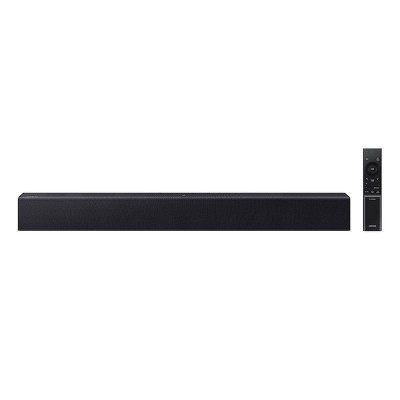
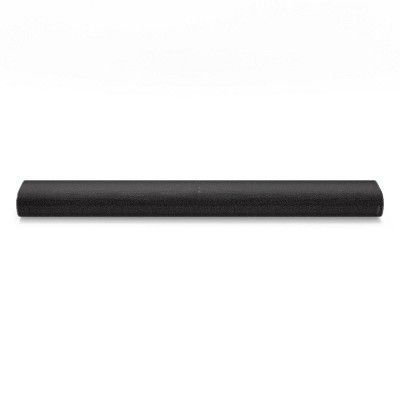
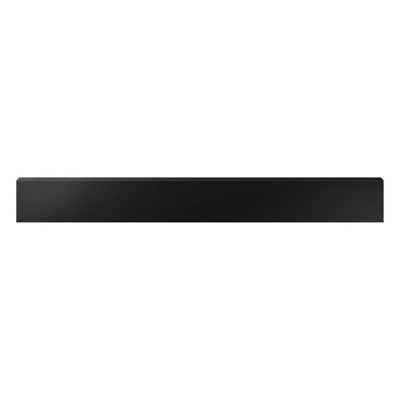
Samsung 3.0Ch Soundbar with Built-in Woofer - Gray (HW-S50B): Bluetooth & HDMI Connectivity - 2 of 4Samsung 3.0Ch Soundbar with Built-in Woofer - Gray (HW-S50B): Bluetooth & HDMI Connectivity - 3 of 4Samsung 3.0Ch Soundbar with Built-in Woofer - Gray (HW-S50B): Bluetooth & HDMI Connectivity - 4 of 4
Samsung 3.0Ch Soundbar with Built-in Woofer - Gray (HW-S50B): Bluetooth & HDMI Connectivity - 1 of 4

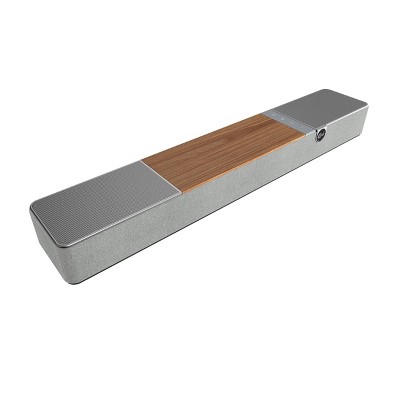
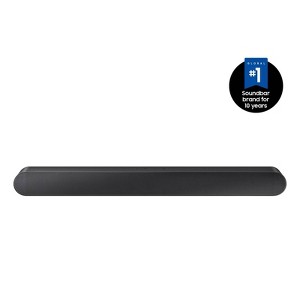
Samsung 3.0Ch Soundbar with Built-in Woofer - Gray HW-S50B: Bluetooth & HDMI Connectivity

$179.99 reg $279.99
Sale save $100.00 (36% off)

In Stock

Eligible for registries and wish lists

At a glance

Sponsored

About this item

Highlights

  • All in one - Everything you need in a single soundbar with two woofers and tweeters built in, so you can enjoy rich sound that will fill your room.
  • Dolby Digital 5.1 / DTS Virtual:X - You’ll be truly captivated with multi directional sound that draws you into the action with Dolby Digital 5.1 capable and DTS Virtual X. Dolby Digital 5.1 creates realistic surround sound by projecting it from all around you, while DTS Virtual: X expands your listening experience without having to add extra speakers putting you at the center of every epic battle and heart stopping car chase.
  • Q Symphony - Perfectly synchronized, fully immersive audio floods your room all at once, using every speaker in compatible Samsung TV and soundbars.*
  • Built in Center Speaker - The built in center speaker is dedicated to delivering enhanced dialogue so you won't miss a word, no matter how faint the conversation or how intense the background music or action is.
  • Adaptive Sound Lite - Enjoy dynamically optimized audio with enhanced voice clarity so you can follow along with action packed games and blockbuster films.
  • Music Mode - Experience vocals and instruments in studio grade clarity, allowing you to hear every note as the artists intended.
  • Bluetooth® Multi Connection - Connect two smart devices at the same time so you can conveniently switch and play songs from different devices.* Soundbar mobile connection is not available when connected to the TV. Requires Bluetooth® compatible devices.
  • Tap Sound - Play your music or podcasts from your mobile device to your soundbar with a simple tap.*Tap sound is only compatible with select Samsung mobile devices, with Android 8.1 and above. Tap Sound requires SmartThings app to activate and set up. This service only works when Soundbar and mobile are on.

Description

The all in one S50B premium soundbar, delivers sharp and rich audio. Experience captivating 3D audio with Dolby Digital 5.1 capable and DTS Virtual:X. Perfectly synchronized TV and soundbar sound brings a new level of immersion to your favorite content. soundbar sound brings a new level of immersion to your favorite content. Don't miss a word with crisp and clear dialogue thanks to a built in center speaker.
Dimensions (Overall): 2.4 Inches (H) x 26.4 Inches (W) x 4.1 Inches (D)
Weight: 5.3 Pounds
Electronics Features: Dolby Digital, DTS, HDMI Audio Return Channel (ARC)
Connection Type: Optical Audio, HDMI, USB
Wireless Technology: Bluetooth
Voice assistant built-in: Siri Built-in
Number of channels: 3 Speaker Channels
Frequency Response: 50Hz ~20kHz
Number of audio inputs: 1
Battery: 2 AAA Alkaline, Required, Packaged With
Warranty: 1 Year Limited Warranty. To obtain a copy of the manufacturer's or supplier's warranty for this item prior to purchasing the item, please call Target Guest Services at 1-800-591-3869
TCIN: 85667336
UPC: 887276637587
Item Number (DPCI): 008-02-0004
Origin: Imported
If the item details aren’t accurate or complete, we want to know about it.

Shipping details

Estimated ship dimensions: 6.1 inches length x 36.8 inches width x 4.7 inches height
Estimated ship weight: 7.9 pounds
This item ships in its manufacturer’s packaging, revealing what’s inside. ·

Return details

This item can be returned to any Target store or Target.com.
This item must be returned within 30 days of the date it was purchased in store, shipped, delivered by a Shipt shopper, or made ready for pickup.
See the return policy for complete information.

Q: can this be used with a 70 inch tv?

submitted by Beverly - 2 years ago
  • A: Hi Beverly, The HW-S50B Soundbar can be used with TVs that support Bluetooth, Digital Optical or HDMI. ~Samsung Solutions

    submitted bySamsung - 2 years ago
    Brand expert
  • A: Hi Beverly, thanks for reaching out about Samsung 3.0Ch Soundbar with Built-in Woofer - Gray (HW-S50B). Yes, it can be used with any television, just as long as long as it has Optical Audio, HDMI or USB. If you have any additional questions, we welcome you to contact MyTGTtech at 833-848-8324 every day, between 7am-11pm CST.

    submitted byJoe - 2 years ago
    Target staff support

Q: Does it come with an HDMI cable?

submitted by target22 - 2 years ago
  • A: Hi target22, The HW-S50B Soundbar comes with the Soundbar remote, HDMI cable, power cords, wall mount guide, and mounting brackets. ~Samsung Solutions

    submitted bySamsung - 2 years ago
    Brand expert
  • A: Hi, Target22 thanks for reaching out about the Samsung 3.0Ch Soundbar with Built-in Woofer - Gray (HW-S50B) Yes, the HDMI Cable, Micro USB to USB adapter cable, and power adapter are included. If you have any additional questions, we welcome you to contact MyTGTtech at 833-848-8324 every day, between 7 am-11 pm CST.

    submitted byRena - 2 years ago
    Target expert support
  • A: Yes it does come with a hdmi cable

    submitted byTlovecky - 1 year ago

Q: I just purchased. I have hooked up to Samsung tv but none of the sound bar remote control options work. Can turn volume up/down on tv remote.

submitted by Tc - 9 months ago
  • A: Hi Tc, thanks for reaching out about Samsung 3.0Ch Soundbar with Built-in Woofer - Gray (HW-S50B) To pair a Samsung HW-S50B soundbar remote, you'll need to put the soundbar into pairing mode and then connect it to your TV or another device via Bluetooth. First, press the Pair button on the remote or, if you don't have the remote, press the Multi-Function or Source button on the soundbar until "BT PAIRING" appears on the display. Then, activate Bluetooth on your TV or device and select the soundbar from the list of available devices. Once paired, the device name will appear on the soundbar display. If you have any additional questions, we welcome you to contact MyTGTtech at 833-848-8324 every day, between 7am-11pm CST.

    submitted byJustin - 9 months ago
    Target expert support
  • A: Hi Tc, You can try to repair the soundbar using Bluetooth put the soundbar into pairing mode and then connect it to your TV or another device via Bluetooth. First, press the Pair button on the remote or, if you don't have the remote, press the Multi-Function or Source button and set the soundbar to Bluetooth. Then, activate Bluetooth on your TV or device and select the soundbar from the list of available devices. If you need more help, Samsung is here for you. Please call us at 1-800-SAMSUNG, 8AM - 12AM EST (Ask for Soundbars), 7 days a week. Our Live Chat agents are also available by clicking on the ‘Support’ link on our website. ~ Samsung Solutions

    submitted bySamsung - 9 months ago
    Brand expert

Q: Can the treble be adjusted on this soundbar?

submitted by Bw - 9 months ago
  • A: Hi Bw, thanks for reaching out about Samsung 3.0Ch Soundbar with Built-in Woofer - Gray (HW-S50B) Yes, on the remote there is a button labeled "Tone Control" or sometimes just "Treble/Bass" that will allow you to make adjustments. If you have any additional questions, we welcome you to contact MyTGTtech at 833-848-8324 every day, between 7am-11pm CST.

    submitted byMike - 9 months ago
    Target expert support
  • A: Hi Bw, Yes, you can further adjust TREBLE and BASS via the TONE CONTROL button using the UP/DOWN buttons on the remote between -6 to +6. ~ Samsung Solutions

    submitted bySamsung - 9 months ago
    Brand expert

Q: Can this soundbar double as a Bluetooth smart speaker so we can play..like Spotify from our smartphones ? We have iPhone 16 pro

submitted by Bluetooth speaker capable - 1 year ago
  • A: Hi Bluetooth speaker capable, thanks for reaching out about Samsung 3.0Ch Soundbar with Built-in Woofer - Gray (HW-S50B) This device allows you to connect two smart devices at the same time so you can conveniently switch and play songs from different devices.* Soundbar mobile connection is not available when connected to the TV If you have any additional questions, we welcome you to contact MyTGTtech at 833-848-8324 every day, between 7am-11pm CST.

    submitted byJustin - 1 year ago
    Target expert support
  • A: Hi there Bluetooth speaker capable, Yes the HW-S50B Soundbar can be connected to your phone to be used to play music. ~ Samsung Solutions

    submitted bySamsung - 1 year ago
    Brand expert

Q: How many watts is this soundbar capable of

submitted by ET - 1 year ago
  • A: Hi ET, thanks for reaching out about Samsung 3.0Ch Soundbar with Built-in Woofer - Gray (HW-S50B) 140W If you have any additional questions, we welcome you to contact MyTGTtech at 833-848-8324 every day, between 7am-11pm CST.

    submitted byJustin - 1 year ago
    Target expert support
  • A: Hello ET, The Samsung HW-S50B Soundbar has a total of 140W. ~ Samsung Solutions

    submitted bySamsung - 1 year ago
    Brand expert

Q: Does this speaker have Night Mode?? Thanks.

submitted by Liss - 1 year ago
  • A: Hi Liss, thanks for reaching out about Samsung 3.0Ch Soundbar with Built-in Woofer - Gray (HW-S50B) Yes. If you have any additional questions, we welcome you to contact MyTGTtech at 833-848-8324 every day, between 7am-11pm CST.

    submitted byJustin - 1 year ago
    Target expert support
  • A: Hi there Liss, Yes, the HW-S50B Soundbar does have the Night Mode feature to lower the volume and compress the bass, to prevent disturbing others while they sleep. ~ Samsung Solutions

    submitted bySamsung - 1 year ago
    Brand expert

Q: Can you use this speaker with an old 2012 Samsung 55" TV without bluetooth capability?

submitted by SD - 2 years ago
  • A: Hi SD, The HW-S50B Soundbar can be connect using Digital Optical, HDMI or Bluetooth. IF your TV supports Digital Optical (look for a red light where the inputs are) then you're good to go. ~Samsung Solutions

    submitted bySamsung - 2 years ago
    Brand expert
  • A: Hi SD, thanks for reaching out about the Samsung 3.0Ch Soundbar with Built-in Woofer - Gray (HW-S50B). Yes, you can connect wired using optical Audio or HDMI Out (TV-ARC) ports on the soundbar to connect to the TV. If you have any additional questions, we welcome you to contact MyTGTtech at 833-848-8324 every day, between 7 am-11 pm CST.

    submitted byRena - 2 years ago
    Target expert support

Q: can this be used as a center channel speaker.?

submitted by Lane - 3 years ago
  • A: Hi Lane, thanks for reaching out about Samsung 3.0Ch Soundbar with Built-in Woofer. You may only use the soundbar as expected. It’s only exclusive with the SWA-9200S Wireless Rear Speaker Kit and the SWA-W510 Wireless Subwoofer. If you have any additional questions, we welcome you to contact MyTGTtech at 833-848-8324 every day, between 7am-11pm CST.

    submitted byJoe - 3 years ago
    Target staff support
  • A: Hello Lane, The HW-S50B Soundbar is not designed to be used with a receiver setup. It is a 3.0 Channel Soundbar System with a built-in Center Channel allowing for improved dialogue. If you are wanting to add on a wireless subwoofer you are able to with the SWA-W510 Subwoofer. You will also have the ability to add surround sound speakers using the SWA-9200S Wireless Rear Speaker Kit. ~Samsung Solutions

    submitted bySamsung - 3 years ago
    Brand expert

Q: Does the sound bar come with a remote control?

submitted by Tom servo - 24 days ago
  • A: Hello Tom servo! Yes, the HW-S50B does come with one remote. ~ Samsung Solutions

    submitted bySamsung - 18 days ago
    Brand expert
WARNING:Cancer and Reproductive Harm - www.P65Warnings.ca.gov www.p65warnings.ca.gov For more information, go to https://www.p65warnings.ca.gov/

Related Categories

Guests are saying

The Samsung S Series 3.0ch All-in-One Soundbar offers an impressive audio experience, enhancing your home entertainment with its Dolby 5.1 and DTS technologies. Guests appreciate its compact design, making it ideal for small spaces while delivering clear dialogue and immersive sound for movies, gaming, and music. Although some users noted a learning curve with settings and occasional connectivity issues, many find it a worthwhile investment for a theater-like experience at home.
    Summary created by AI from text of reviews reflecting recent feedback provided across different star ratings (includes incentivized reviews)
    4.3 out of 5 stars with 418 reviews
    material quality: 4.24 out of 5
    sound quality: 3.43 out of 5
    value: 3.49 out of 5
    48% would recommend
    43 recommendations
    3 out of 5 stars
    5 January, 2026
    originally posted on Samsung US
    Image

    sound adjustments too slow annoying etc

    The only problem I have that is annoying. Is turning the sound down or evening turning it louder. It takes the LOngest time to get the sound you want.
    1 reply from Samsung Solutions team - 3 days ago
    Hello Kame, Thank you for sharing your review of the HW-S50B Soundbar. We value your feedback and will share it with our teams. Updating the firmware on your soundbar gives you all the benefits of the latest improvements. When an update is available, you can update the Soundbar by connecting the USB drive that contains the update firmware to the Micro USB port of the Soundbar. 1.Go to the Samsung Electronics website (www.samsung.com) → click on the “Support” option in the upper right corner. 2.Click on “Manuals & Software” from the pop-up list > TVs & Home Theater > Home Theater > Select your model 2. Download the firmware file (USB type). 3. Save the downloaded software to a USB memory stick and select “Extract Here” to unzip the folder. 4. Turn on the Soundbar and connect the USB memory stick containing the software update to the female port on a Micro USB adapter cable (not supplied). Connect the cable to the USB port on the Soundbar. 5. Plug USB into Soundbar and switch to USB source, the software will update automatically and will complete update within 2 minutes. During the update process, the 5 LEDs will start flashing in a loop, and then the 5 LEDs will all be bright white, and then the 5 LEDs will flash in a loop again. When the update is complete, the cyan indicator blinks 3 times, and the soundbar automatically restarts. If LED sequence flashing is not displayed: 1. Turn off the Soundbar, disconnect and then reconnect the USB storage device that contains the update files to the Soundbar’s USB port. 2. Disconnect the Soundbar’s power cord, reconnect it, and then turn on the Soundbar. If there is anything we can do to improve your enjoyment, such as helping to optimize settings for your specific sound scenario, please contact Samsung Customer Support. Just give us a call at 1-800-SAMSUNG (Ask for Soundbars), 8AM - 12AM EST, 7 days a week. Our Live Chat agents are also available by clicking on the ‘Support’ link on our website. ~ Samsung Solutions
    Kame
    Did you find this review helpful?
    1 out of 5 stars
    5 January, 2026
    originally posted on Samsung US
    Image

    Terrible

    Horrible sound. Sounds like listening in a tin can
    1 reply from Samsung Solutions team - 3 days ago
    Hi Msbulbic, We appreciate you taking a few moments to review the Samsung HW-S50B Soundbar. To optimize your audio experience, please try the various sound modes this model offers. Press the SOUND MODE button on your remote, and then select your desired sound effect: DTS VIRTUAL:X, STANDARD, MUSIC, or ADAPTIVE. When you press the CH LEVEL button on the remote, you can adjust the volume of the CENTER speaker using the UP/DOWN buttons between -6 to +6. If the Rear Speakers (sold separately) are connected, the setting “Rear Level” is supported. You can further adjust TREBLE and BASS via the TONE CONTROL button using the UP/DOWN buttons on the remote between -6 to +6. Press and hold the SOUND CONTROL button for about 5 seconds to adjust the sound for each frequency band. 150Hz, 300Hz, 600Hz, 1.2kHz, 2.5kHz, 5kHz, and 10kHz are selectable using the Left/Right buttons, and each can be adjusted to a setting between -6 to +6 using the Up/Down buttons. (Make sure the Sound mode is set to "Standard". I hope this tip helps improve your sound experience. Should you need further assistance with features, functions, settings, or adjustments, please contact Samsung Customer Support. Call us at 1-800-SAMSUNG (Ask for Soundbars), 8AM - 12AM EST, 7 days a week. Or visit us on the Samsung website and click on the ‘Support’ link for: • Live Chat • Manuals, Software, & Warranty Info • Creating a service ticket ~ Samsung Solutions
    Msbulbic
    Did you find this review helpful?
    5 out of 5 stars
    Thumbs up graphic, would recommend
    31 December, 2025Verified purchase

    (no review title)

    Easy setup, great sound, nice subtle design.
    Targetmomof2
    material quality: 5 out of 5
    sound quality: 5 out of 5
    value: 5 out of 5
    Did you find this review helpful?
    2 out of 5 stars
    Thumbs down graphic, would not recommend
    30 December, 2025Verified purchase

    (no review title)

    Don’t be fooled by the 5 star reviews. While this sound bar was relatively easy to setup and work out of the box (using the included HDMI e/arc cable), the sound is quite tinny and lacking fullness despite trying every combination of eq and tuning tips, including turning off all processing etc. Even when on sale for $180, this thing is totally not worth it - I get better sound from a cheaper Yamaha soundbar from years ago
    1 reply from Samsung team - 10 days ago

    Hi Steve, Thank you for sharing your review of the HW-S50B Soundbar. We value your feedback and will share it with our teams. To optimize your audio experience, please try the various sound modes this model offers. Press the SOUND MODE button on your remote, and then select your desired sound effect: DTS VIRTUAL:X, STANDARD, MUSIC, or ADAPTIVE. When you press the CH LEVEL button on the remote, you can adjust the volume of the CENTER speaker using the UP/DOWN buttons between -6 to +6. If the Rear Speakers (sold separately) are connected, the setting “Rear Level” is supported. You can further adjust TREBLE and BASS via the TONE CONTROL button using the UP/DOWN buttons on the remote between -6 to +6. Press and hold the SOUND CONTROL button for about 5 seconds to adjust the sound for each frequency band. 150Hz, 300Hz, 600Hz, 1.2kHz, 2.5kHz, 5kHz, and 10kHz are selectable using the Left/Right buttons and each can be adjusted to a setting between -6 to +6 using the Up/Down buttons. (Make sure the Sound mode is set to "Standard". I hope this tip helps improve your sound experience. Should you need further assistance with features, functions, settings, or adjustments, please contact Samsung Customer Support. Please call us at 1-800-SAMSUNG, 8AM - 12AM EST (Ask for Soundbars), 7 days a week. Live Chat with an agent as well as manuals, software, creating a service ticket, and warranty info can be found at the ‘Support’ link on our Samsung website. ~ Samsung Solutions
    Steve
    material quality: 4 out of 5
    sound quality: 1 out of 5
    value: 1 out of 5
    Did you find this review helpful?
    4 out of 5 stars
    30 December, 2025
    originally posted on Samsung Canada
    Image

    Great Sound But...

    Happy with the sound, but the bar doesn't always automatically come on when connecting via HDMI ARC to my 2013 Samsung UN55F7100AFXZC TV
    DreadNaughts
    Did you find this review helpful?
    2 out of 5 stars
    Thumbs down graphic, would not recommend
    27 December, 2025Verified purchase

    Dont waste your money

    I had a previous Samsung sound bar I Paid only $99. I went ahead and ordered another more expensive better speaker quality at $179. It is nothing but a headache . It's too bulky. The remote does not work properly. The sound quality and sound mode is poor and hard to see any change in sound. If the volume is at 50 it's the same at max 100. The less expensive version is way better and easier to understand. Save your money .
    1 reply from Samsung team - 11 days ago
    Hello Sharon, Thank you for taking a moment to review the Samsung HW-S50B Soundbar. To optimize your audio experience, please try the various sound modes this model offers. Press the SOUND MODE button on your remote, and then select your desired sound effect: DTS VIRTUAL:X, STANDARD, MUSIC, or ADAPTIVE. When you press the CH LEVEL button on the remote, you can adjust the volume of the CENTER speaker using the UP/DOWN buttons between -6 to +6. If the Rear Speakers (sold separately) are connected, the setting “Rear Level” is supported. You can further adjust TREBLE and BASS via the TONE CONTROL button using the UP/DOWN buttons on the remote between -6 to +6. Press and hold the SOUND CONTROL button for about 5 seconds to adjust the sound for each frequency band. 150Hz, 300Hz, 600Hz, 1.2kHz, 2.5kHz, 5kHz, and 10kHz are selectable using the Left/Right buttons and each can be adjusted to a setting between -6 to +6 using the Up/Down buttons. (Make sure the Sound mode is set to "Standard". If you need more help, Samsung is here for you. Please call us at 1-800-SAMSUNG, 8AM - 12AM EST (Ask for Soundbars), 7 days a week. Live Chat with an agent as well as manuals, software, creating a service ticket, and warranty info can be found at the ‘Support’ link on our Samsung website. ~ Samsung Solutions
    Sharon
    material quality: 4 out of 5
    sound quality: 1 out of 5
    value: 1 out of 5
    Did you find this review helpful?
    5 out of 5 stars
    20 December, 2025
    originally posted on Samsung US
    Image

    It's a bargain

    [This review was collected as part of a promotion.] Good quality for the price. Easy install, plug and play.
    DMenacing1
    Did you find this review helpful?
    5 out of 5 stars
    20 December, 2025
    originally posted on Samsung US
    Image

    Has great features

    [This review was collected as part of a promotion.] Easy to use comes with parts to put on Walsall wires comes with it
    Jerryr1
    Did you find this review helpful?
    5 out of 5 stars
    Thumbs up graphic, would recommend
    15 December, 2025Verified purchase

    Finally can hear the words on the TV

    excellent sound qualities
    megt
    material quality: 5 out of 5
    sound quality: 5 out of 5
    value: 5 out of 5
    Did you find this review helpful?
    3 out of 5 stars
    9 December, 2025
    originally posted on Samsung US
    Image

    Over all a great buy.

    [This review was collected as part of a promotion.] Just wish it would get louder. I have a large living room. Still have trouble hearing when there just a small amount of background noise
    1 reply from Samsung Solutions team - 1 month ago
    Hello Goat61, Thank you for sharing your review of the HW-S50B Soundbar. We value your feedback and will share it with our teams. To optimize your audio experience, please try the various sound modes this model offers. Press the SOUND MODE button on your remote, and then select your desired sound effect: DTS VIRTUAL:X, STANDARD, MUSIC, or ADAPTIVE. When you press the CH LEVEL button on the remote, you can adjust the volume of the CENTER speaker using the UP/DOWN buttons between -6 to +6. If the Rear Speakers (sold separately) are connected, the setting “Rear Level” is supported. You can further adjust TREBLE and BASS via the TONE CONTROL button using the UP/DOWN buttons on the remote between -6 to +6. Press and hold the SOUND CONTROL button for about 5 seconds to adjust the sound for each frequency band. 150Hz, 300Hz, 600Hz, 1.2kHz, 2.5kHz, 5kHz, and 10kHz are selectable using the Left/Right buttons and each can be adjusted to a setting between -6 to +6 using the Up/Down buttons. (Make sure the Sound mode is set to "Standard". I hope these tips help you enjoy your new product. You can always contact us for further help at 1-800-SAMSUNG (Ask for Soundbars), 8 AM – 12 AM EST, 7 days a week. Our Live Chat agents are also available by clicking on the ‘Support’ link on our website. ~ Samsung Solutions
    Goat61
    Did you find this review helpful?
    3 out of 5 stars
    Thumbs down graphic, would not recommend
    8 December, 2025Verified purchase

    Not worth the price

    It’s not worth $300. The sound to me isn’t the best! Just a tab bit better than the built in tv speakers! I decided to return it because there really wasn’t a benefit in having it! I would pay $100 at best. Oh and also, I used the Bluetooth option to connect to the tv…the tv audio and the speaker audio doesn’t match! Like the peoples lips moving on the tv didn’t line up with what was being played on the speaker.
    1 reply from Samsung team - 30 days ago
    HI Tmarie, Thank you for taking a moment to review the HW-S50B Samsung Soundbar. We value your feedback and will share it with our teams. To optimize your audio experience, please try the various sound modes this model offers. Press the SOUND MODE button on your remote, and then select your desired sound effect: DTS VIRTUAL:X, STANDARD, MUSIC, or ADAPTIVE. When you press the CH LEVEL button on the remote, you can adjust the volume of the CENTER speaker using the UP/DOWN buttons between -6 to +6. If the Rear Speakers (sold separately) are connected, the setting “Rear Level” is supported. You can further adjust TREBLE and BASS via the TONE CONTROL button using the UP/DOWN buttons on the remote between -6 to +6. Press and hold the SOUND CONTROL button for about 5 seconds to adjust the sound for each frequency band. 150Hz, 300Hz, 600Hz, 1.2kHz, 2.5kHz, 5kHz, and 10kHz are selectable using the Left/Right buttons and each can be adjusted to a setting between -6 to +6 using the Up/Down buttons. (Make sure the Sound mode is set to "Standard". I hope this tip helps improve your sound experience. Should you need further assistance with features, functions, settings, or adjustments, please contact Samsung Customer Support. Just give us a call at 1-800-SAMSUNG (Ask for Soundbars), 8AM - 12AM EST, 7 days a week. Our Live Chat agents are also available by clicking on the ‘Support’ link on our website. ~ Samsung Solutions
    Tmarie
    material quality: 4 out of 5
    sound quality: 3 out of 5
    value: 2 out of 5
    1 guest found this review helpful. Did you?
    5 out of 5 stars
    6 December, 2025Verified purchase

    (no review title)

    The order was promised 1 day before but did not arrive on time.
    David
    Did you find this review helpful?
    5 out of 5 stars
    5 December, 2025Verified purchase

    (no review title)

    Quality sound!!! Amazing purchase
    Cindy
    Did you find this review helpful?
    1 out of 5 stars
    Thumbs down graphic, would not recommend
    2 December, 2025Verified purchase

    Worse than built in speakers

    Sound quality is terrible! I purchased this to replace an older Vizio soundbar and to pair with my Samsung TV. The sound is worse than just using the TV’s built in speakers. No real bass at all. The voice letting you know what option you are on is so loud it nearly knocks you down. But the speaker itself never gets that loud for your shows. This will be getting returned tomorrow. I expected more for the price of this soundbar. Don’t waste your money, if you’re looking for a quality soundbar with good sound, this one isn’t it!
    1 reply from Samsung team - 1 month ago
    Hello Jason, Thank you for taking a few moments to review the HW-S50B Samsung Soundbar. To optimize your audio experience, please try the various sound modes this model offers. Press the SOUND MODE button on your remote, and then select your desired sound effect: DTS VIRTUAL:X, STANDARD, MUSIC, or ADAPTIVE. When you press the CH LEVEL button on the remote, you can adjust the volume of the CENTER speaker using the UP/DOWN buttons between -6 to +6. If the Rear Speakers (sold separately) are connected, the setting “Rear Level” is supported. You can further adjust TREBLE and BASS via the TONE CONTROL button using the UP/DOWN buttons on the remote between -6 to +6. Press and hold the SOUND CONTROL button for about 5 seconds to adjust the sound for each frequency band. 150Hz, 300Hz, 600Hz, 1.2kHz, 2.5kHz, 5kHz, and 10kHz are selectable using the Left/Right buttons and each can be adjusted to a setting between -6 to +6 using the Up/Down buttons. (Make sure the Sound mode is set to "Standard". I hope this tip helps improve your sound experience. Should you need further assistance with features, functions, settings, or adjustments, please contact Samsung Customer Support. Just give us a call at 1-800-SAMSUNG (Ask for Soundbars), 8AM - 12AM EST, 7 days a week. Our Live Chat agents are also available by clicking on the ‘Support’ link on our website. ~ Samsung Solutions
    Jason
    material quality: 3 out of 5
    sound quality: 1 out of 5
    value: 1 out of 5
    Did you find this review helpful?
    3 out of 5 stars
    1 December, 2025Verified purchase

    (no review title)

    Not worth the price, bass is better with detached subwoofer. This is subpar at best, a beats pill has more bass than this
    1 reply from Samsung team - 1 month ago
    Hello AUJANA BAILEY, I’m sorry to hear that you’re dissatisfied with the performance of your HW-S50B Soundbar. To optimize your audio experience, please try the various sound modes this model offers. Press the SOUND MODE button on your remote, and then select your desired sound effect: DTS VIRTUAL:X, STANDARD, MUSIC, or ADAPTIVE. When you press the CH LEVEL button on the remote, you can adjust the volume of the CENTER speaker using the UP/DOWN buttons between -6 to +6. If the Rear Speakers (sold separately) are connected, the setting “Rear Level” is supported. You can further adjust TREBLE and BASS via the TONE CONTROL button using the UP/DOWN buttons on the remote between -6 to +6. Press and hold the SOUND CONTROL button for about 5 seconds to adjust the sound for each frequency band. 150Hz, 300Hz, 600Hz, 1.2kHz, 2.5kHz, 5kHz, and 10kHz are selectable using the Left/Right buttons and each can be adjusted to a setting between -6 to +6 using the Up/Down buttons. (Make sure the Sound mode is set to "Standard". If you need more help, Samsung is here for you. Please call us at 1-800-SAMSUNG, 8AM - 12AM EST (Ask for Soundbars), 7 days a week. Live Chat with an agent as well as manuals, software, creating a service ticket, and warranty info can be found at the ‘Support’ link on our Samsung website. ~ Samsung Solutions
    material quality: 2 out of 5
    sound quality: 3 out of 5
    value: 1 out of 5
    Did you find this review helpful?
    5 out of 5 stars
    Thumbs up graphic, would recommend
    30 November, 2025Verified purchase

    You won't regret it

    Easy set up. Sound is great
    MegBarnes
    material quality: 5 out of 5
    sound quality: 5 out of 5
    value: 5 out of 5
    Did you find this review helpful?
    4 out of 5 stars
    Thumbs up graphic, would recommend
    29 November, 2025Verified purchase

    (no review title)

    It has a good sound quality
    Latia
    material quality: 5 out of 5
    sound quality: 4 out of 5
    value: 5 out of 5
    Did you find this review helpful?
    5 out of 5 stars
    25 November, 2025
    originally posted on Samsung US
    Image

    Love this soundbar

    [This review was collected as part of a promotion.] This soundbar truly elevates the home entertainment experience. The audio quality is remarkably clear, delivering rich bass and crisp highs that immerse you in every scene. Its sleek design complements any living space without being obtrusive. Setting it up was a breeze, and it seamlessly connects to various devices. For anyone looking to enhance their audio, this soundbar is an excellent choice.
    Samsunglover
    Did you find this review helpful?
    5 out of 5 stars
    21 November, 2025
    originally posted on Samsung US
    Image

    Good for small room

    [This review was collected as part of a promotion.] Good for small room But if you like bass then it is not for your.
    Maxhamh
    Did you find this review helpful?
    4 out of 5 stars
    20 November, 2025
    originally posted on Samsung US
    Image

    Great Sound + Options

    [This review was collected as part of a promotion.] I love the product. I love all Samsung products. The only con I have is that I always am having issues with the Bluetooth working for the sound to work. It works and then it doesn't. Constantly reconnecting it etc. Crazy because it's a wired connection. Also same issues when I switch to WiFi for soundbar too
    Greshy
    Did you find this review helpful?

    Get top deals, latest trends, and more.

    Privacy policy

    Footer

    About Us

    About TargetCareersNews & BlogTarget BrandsBullseye ShopSustainability & GovernancePress CenterAdvertise with UsInvestorsAffiliates & PartnersSuppliersTargetPlus

    Help

    Target HelpReturnsTrack OrdersRecallsContact UsFeedbackAccessibilitySecurity & FraudTeam Member ServicesLegal & Privacy

    Stores

    Find a StoreClinicPharmacyTarget OpticalMore In-Store Services

    Services

    Target Circle™Target Circle™ CardTarget Circle 360™Target AppRegistrySame Day DeliveryOrder PickupDrive UpFree 2-Day ShippingShipping & DeliveryMore Services
    PinterestFacebookInstagramXYoutubeTiktokTermsCA Supply ChainPrivacy PolicyCA Privacy RightsYour Privacy ChoicesInterest Based AdsHealth Privacy Policy