Sponsored
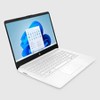
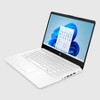
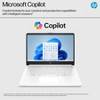
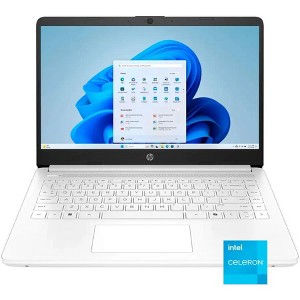
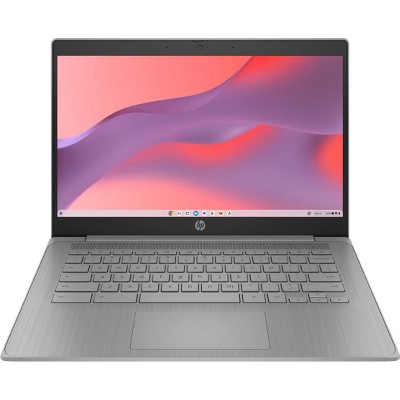
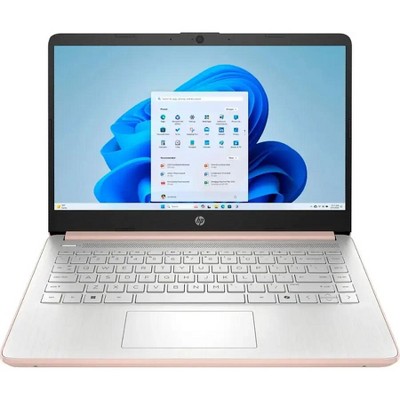
HP 14” HD Laptop, Intel Celeron N4500, 4GB RAM, 64GB eMMC, Windows 11 Home in S Mode, 1 Year Microsoft 365 included
In Stock
At a glance
Sponsored
About this item
Highlights
- Intel Celeron N4500, 2-Core, 1.10 GHz up to 2.80 GHz, 4 MB Cache
- 4GB DDR4-2933 MHz RAM, 64GB eMMC
- 14” HD (1366 x 768) 250 nits micro-edge Anti-glare Display
- Ports: 2x USB Type-A, 1x USB Type-C, 1x HDMI, 1x Headphone/Microphone combo jack, 1x SD card reader
- 720p camera
Description
Shipping details
Return details
Q: Is this device a touchscreen?
A: No, this Laptop does not have a touchscreen.
submitted byFiremall Team - 3 months agoBrand expertA: Hi, thank you for reaching out about HP 14” HD Laptop, Intel Celeron N4500, 4GB RAM, 64GB eMMC, Windows 11 Home in S Mode, 1 Year Microsoft 365 included. No, the HP 14-dq3000dx does not have a touchscreen; product specifications confirm it is a standard non-touch display. If you have any additional questions, we welcome you to contact MyTGTtech at 833-848-8324 every day, between 7am-11pm CST.
submitted byMatt - 3 months agoTarget expert support
Q: What is windows s mode?
A: Hi, thanks for reaching out about the HP 14” HD Laptop, Intel Celeron N4500, 4GB RAM, 64GB eMMC, Windows 11 Home in S Mode, 1 Year Microsoft 365 included S mode is ideal for users who primarily use their computer for basic tasks like web Browse, email, and streaming, and for those who want a simple, secure, and hassle-free experience. App Limitation: The most significant restriction is that you can only install apps from the Microsoft Store. You cannot download and install traditional desktop programs (.exe files) from the internet. Browser Restriction: Microsoft Edge is the only web browser you can use in S mode. If you have any additional questions, we welcome you to contact MyTGTtech at 833-848-8324 every day between 7 am and 11 pm CST.
submitted byRena - 5 months agoTarget expert supportA: Hi, Thank you for your question. S mode is a streamlined and more secure version of Windows, primarily designed for performance and security. In S mode, you can only install apps from the Microsoft Store, which are verified by Microsoft for safety. You can switch out of S mode. Switching out of S mode allows you to install apps from outside the Microsoft Store, switching out of S mode is a one way, once you switch out of S mode, you cannot go back to it.
submitted byFiremall Team - 5 months agoBrand expert
Q: Can I use this laptop to run Roblox on low graphics and will it run smoothly also can I run it run smooth for school work?
A: Hi, thanks for reaching out about HP 14” HD Laptop, Intel Celeron N4500, 4GB RAM, 64GB eMMC, Windows 11 Home in S Mode, 1 Year Microsoft 365 included This HP laptop does meet the minimum requirements for Roblox, so it should be able to run Roblox well, but you may need to lower the graphics settings, and you may experience lag or low frame rates, especially in more graphically demanding games on the platform. It's generally considered an entry-level machine for basic tasks. You also will likely need to disable S Mode, which is free. If you have any additional questions, we welcome you to contact MyTGTtech at 833-848-8324 every day, between 7am-11pm CST.
submitted byMike - 21 days agoTarget expert support
Q: Is this laptop good for gaming?
A: Hi, thanks for reaching out about HP 14” HD Laptop, Intel Celeron N4500, 4GB RAM, 64GB eMMC, Windows 11 Home in S Mode, 1 Year Microsoft 365 included. The short answer is No, this laptop is not suitable for modern gaming. This HP laptop is designed as an entry-level machine for basic tasks like web browsing, email, streaming, and light schoolwork—not for gaming. If you have any additional questions, we welcome you to contact MyTGTtech at 833-848-8324 every day, between 7am-11pm CST.
submitted byJoe - 1 month agoTarget staff support
Q: Is this laptop good for running google drive and google docs? Does it run a fast?
A: Hi, thanks for reaching out about the HP 14” HD Laptop, Intel Celeron N4500, 4GB RAM, 64GB eMMC, Windows 11 Home in S Mode, 1 Year Microsoft 365 included Yes, this laptop is perfectly fine for running Google Drive and Google Docs—but you must use them primarily in your web browser (like Microsoft Edge, which is mandatory in S Mode). If you have any additional questions, we welcome you to contact MyTGTtech at 833-848-8324 every day between 7 am and 11 pm CST.
submitted byRena - 1 month agoTarget expert support
Q: I puchased this laptop- How to I access the free year of Microsoft 365?
A: Hi, thanks for reaching out about the HP 14” HD Laptop, Intel Celeron N4500, 4GB RAM, 64GB eMMC, Windows 11 Home in S Mode, 1 Year Microsoft 365 included Accessing your free one-year subscription to Microsoft 365 on your new HP laptop is a standard process that is usually quite easy. The offer is typically linked to the device itself and your Microsoft account, rather than a physical product key. Here are the general steps to follow: Connect to the Internet: Make sure your new laptop is connected to a stable internet connection. Open an Office App: Go to the Start Menu and open any pre-installed Microsoft 365 application, such as Word, Excel, or PowerPoint. Follow the Activation Prompts: A setup or activation screen should appear. You will be prompted to sign in with your Microsoft account If you have any additional questions, we welcome you to contact MyTGTtech at 833-848-8324 every day between 7 am and 11 pm CST.
submitted byRena - 4 months agoTarget expert support
Q: Does the keyboard light up ?
A: Hi, Thank you for your question. No, this Laptop does not have a Backlit Keyboard.
submitted byFiremall Team - 5 months agoBrand expert
Q: what color is theb laptop
A: The color of this Laptop is Snowflake White.
submitted byFiremall Team - 6 months agoBrand expert
Q: Can I use external memory for this laptop??
A: Hi Alex, thanks for reaching out about HP 14” HD Laptop, Intel Celeron N4500, 4GB RAM, 64GB eMMC, Windows 11 Home in S Mode, 1 Year Microsoft 365 included. Yes, you absolutely can use external memory for the HP 14” HD Laptop, Intel Celeron N4500, 4GB RAM, 64GB eMMC, Windows 11 Home in S Mode. If you have any additional questions, we welcome you to contact MyTGTtech at 833-848-8324 every day, between 7am-11pm CST.
submitted byJoe - 7 months agoTarget staff support
Frequently bought together

Guests also viewed
Discover more options