Sponsored
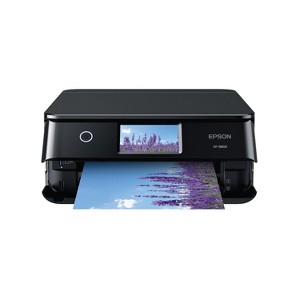
Epson Expression Photo XP-8800 Wireless Color All-in-One Printer
$329.99
In Stock
Eligible for registries and wish lists
Sponsored
About this item
Highlights
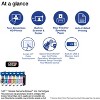
- Lab-quality photos and prints — 6-color Claria Photo HD ink and high print resolution for amazing borderless prints up to 8.5" x 11"
- Fast photo printing — delivers 4" x 6" borderless photos with astounding detail and accuracy in as fast as 10 seconds
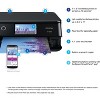
- Convenient, easy operation — features flush 4.3" color touchscreen, plus Easy Mode for enhanced visibility and ease of use
- Versatile paper handling — separate trays for plain and photo paper, plus a rear feed for specialty paper
- Easy wireless printing — print from your laptop, desktop, smartphone or tablet; use Wi-Fi Direct for router-free printing
- Built-in scanner and copier — high-resolution flatbed scanner for crisp, accurate scans and copies
- Epson Smart Panel app — control your printer from your smart device and enjoy timesaving, smart setup features
- Creative Print mobile app — easily print photos and create custom cards, stationery and more
- Easily adjust photos — includes tools for red-eye removal, photo restoration and more
- Epson Printing System Is Designed to Be Used Exclusively with Epson Genuine Cartridges — Use of non-genuine ink could cause damage not covered under the printer’s limited warranty
Description
Express your creativity to the fullest with the Expression Photo XP-8800. Perfect for printing family photos, greeting cards, art projects and more, this all-in-one solution uses innovative 6-color Claria® Photo HD ink to produce professional-quality borderless prints up to 8.5" x 11". And it’s fast—capable of printing incredibly crisp, detailed 4" x 6" photos in as fast as 10 seconds1. Compact and easy to use, the XP-8800 fits virtually anywhere and features a large, 4.3" color touchscreen for simple navigation. The printer offers Easy Mode, so you can customize your control panel and quickly access your preferred functions. Plus, with built-in wireless and compatibility with the Epson Smart Panel® app2, the XP-8800 supports fast, convenient printing from your laptop or smart device3.
Dimensions (Overall): 5.6 inches (H) x 13.7 inches (W) x 13.4 inches (D)
Weight: 14.6 pounds
B&W Print Speed: 9.5 pages per minute
Color Print Speed: 9.5 pages per minute
Electronics Condition: New
Connection Type: USB
Compatible With: Up to 8.5" x 14" Documents
Maximum Resolution: 5760 x 1440 (Color)
Wireless Technology: Wi-Fi, Apple AirPrint
Printer Ink Color: Multiple Colors
Model name: C11CL73201
Ink Series: Epson T340 series
Battery: No Battery Used
Warranty: 1 Year Limited Warranty. To obtain a copy of the manufacturer's or supplier's warranty for this item prior to purchasing the item, please call Target Guest Services at 1-800-591-3869
TCIN: 1007302925
UPC: 010343990548
Origin: imported
The above item details were provided by the Target Plus™ Partner. Target does not represent or warrant that this information is accurate or complete. On occasion, manufacturers may modify their items and update their labels.
We recommend that you do not rely solely on the information presented. If you have a specific question about this item, you may consult the item's label, contact the manufacturer directly or call Target Guest Services at 1-800-591-3869.
If the item details aren’t accurate or complete, we want to know about it.
Shipping details
Estimated ship dimensions: 16.5 inches length x 19.1 inches width x 8.3 inches height
Estimated ship weight: 17.95 pounds
item ships from third party seller: Epson
Return details
This item can be returned to any Target store or Target.com.
This item must be returned within 30 days of the date it was purchased in store, shipped, delivered by a Shipt shopper, or made ready for pickup.
See the return policy for complete information.
Q: doest it have blue tooth
submitted by geojanmos - 28 days ago
A: Hi, thanks for reaching out about Epson Expression Photo XP-8800 Wireless Color All-in-One Printer No, this printer does not have Bluetooth support. It uses your wireless network allowing you to print wirelessly from your computer or other compatible device If you have any additional questions, we welcome you to contact MyTGTtech at 833-848-8324 every day, between 7am-11pm CST.
submitted byMike - 27 days agoTarget expert support
Frequently bought together
Guests also viewed




Discover more options



Related Categories
4.7 out of 5 stars with 46 reviews
4 out of 5 stars
14 May, 2025
originally posted on epson.com

Great machine in complex wrapping
Excellent printer for home use, and seems good enough for true photographers (I am not one). Good definition, subtle colors, not very fast on “Best” setting, reasonable price. // But the interface is complex – it is all through the lcd screen: many menus, many layers of menus. At the print-from-computer level important things (like which paper tray to use) are buried. // The setup is also a mixed bag - hooking up to our home wireless network was easy; the printer connected itself to iPhones; but I wanted to use a wired USB connection and it took over 30 minutes to find the setting (see “interface” above) – why was this not the default? // Other concern is the way the ‘print drawer’ extends and stays out – seems likely to get sideswiped and broken. // Based on my previous Epson Stylus Photo experience I expect this one to last many years, and if I print something every week I hope the print nozzles will not get clogged.
1 out of 5 stars
14 April, 2025
originally posted on epson.com
DO NOT BUY THIS PRINTER
Have had this printer about one (1) month. Have done nothing but clean heads. Used almost all the ink that came with the printer. Do not ever buy this printer!!!
1 reply from The Epson Team team - 9 months ago
Hi 1JC123, we are sorry to hear you are having issues with your Epson printer. Your XP-8800 includes a 1-year limited warranty plus free technical support for the life of your product. Our Epson Support Team would be happy to hear from you and can be reached at (562) 276-4382; Hours: Monday – Friday, 7 a.m. to 4 p.m. (PT). Sincerely, Joseph – The Epson Team.
4 out of 5 stars
19 January, 2025
originally posted on epson.com
Performs as Advertised
Four-star rating vs five is only because it does not have the auto-2 sided scan capability, which I knew when I purchased it. Otherwise, I would give this printer a Five-star rating. Easy to setup and thus far functions as advertised and the print quality is absolutely excellent.
4 out of 5 stars
11 December, 2024
originally posted on epson.com
Beautiful quality
This is a review for the Epson Expression Photo XP-8800 Wireless Printer that I received free of charge for a Beta Test to review. It was really easy to setup, all I had to do was plug it in, download the app and follow the instructions that are in the app. I have had issues with loading paper in the top tray, but the bottom tray was an easy fix. The app makes printing simple to change quality, or paper size for whatever is being printed. The print quality is amazing, it looks like something that I would usually go to the store to print. It is definitely on the larger side and can be awkward when there's a paper jam, or loading more paper.
5 out of 5 stars
5 December, 2024
originally posted on epson.com
Great photo printer
“This is a review for the Epson Expression Photo XP-8800 Wireless Printer that I received free of charge to do a beta test and review." The Epson printer is the real deal if you want to turn your everyday snaps into stunning, professional-quality prints. With its 6-color Claria Photo HD ink system, you can get borderless prints up to 8.5" x 11" that really make your memories pop. The speed is crazy - this thing can pump out 4" x 6" borderless photos in just 10 seconds! The detail is so on-point, you might start thinking you're a photography pro (don't worry, I won't tell anyone). The 4.3" color touchscreen is a total game changer too - navigating the settings is as easy as scrolling on your phone, thanks to the Easy Mode. You also get separate trays for plain and photo paper, plus a rear feed for specialty stuff, so you can switch between homework and family pics without any hassle. And the wireless features are killer - print straight from your laptop, phone, or tablet using Wi-Fi Direct, no router required. The scanner is high-res and delivers awesome clarity when you need to scan or copy. Plus, the Epson apps let you control the printer from your smart device and even create custom cards and stationery. There's even red-eye removal and photo restoration tools to turn your "oops" moments into keepsakes. Long story short, this Epson printer is a total winner if you want to take your photo printing game to the next level. It's got the quality, speed, and creative tools to make your memories shine, all from the comfort of home. So what are you waiting for? Start printing!
4 out of 5 stars
4 December, 2024
originally posted on epson.com
Great printer!
This is a review for the Epson Expression Photo XP-8800 Wireless Printer that I received free of charge to do a beta test and review. The Epson Expression Photo XP-8800 is a compact and versatile printer, ideal for photo printing and standard office tasks. One of its standout features is its ability to produce vibrant, high-quality photo prints, perfect for anyone looking to preserve their memories. The printer's design makes it fit in a home office or studio without taking up too much space. However, setting up the wireless network connection proved to be a bit of a challenge. Despite following the instructions, I encountered difficulty pairing the printer with my phone, which delayed the setup process. It’s worth noting that this printer is Wi-Fi enabled only, as it lacks an Ethernet connection. This might be a drawback for users with limited Wi-Fi capabilities. Once connected, however, the printer performed smoothly and without any interruptions. Loading the cartridges was straightforward and hassle-free. The calibration process was quick and intuitive, allowing me to start printing in just a few minutes. Whether printing documents or photos, the output quality was impressive. The colors were vivid, and the details in the images were sharp, which exceeded my expectations for a printer in this price range. The quiet print feature is a must, as sometimes the prints can be loud and wake my dog. Overall, the printer offers excellent value for a wireless all-in-one printer. This would easily be a five-star product if the initial Wi-Fi setup were more seamless. I recommend this printer to anyone seeking an efficient and reliable device for their printing needs.
4 out of 5 stars
3 December, 2024
originally posted on epson.com
High Quality Photo Printing & Scanning
This is a review for the Epson Expression Photo XP-8800 Wireless Printer that I received free of charge to do a beta test and review. I have used this printer almost everyday since receiving and am impressed with its ability thus far. Instead of blabbering pointlessly, I am going to break my review into pros and cons. CONS: Device comes well packaged, with the many pieces of removable tape securely holding important pieces in place before setup. Print quality (photos, documents, mixed media, etc.), especially photos, is impressive and look amazing. I am sure the addition of a light cyan and light magenta cartridge noticeably improves print quality such as color transitions, nonexistent banding, and proper skin tone reproduction. Scan quality is beyond perfect, capturing details our standalone scanner could not. My wife absolutely loved being able to scan her artwork on the flatbed instead of the feed through previously used and right to her computer or mobile device. Honestly, she used it as much as, if not more than I did. The Epson Smart Panel & Creative Print apps are available to download for mobile devices, and I highly suggest downloading both, especially Creative Print. Available options from the Creative Print home screen include collage, photo calendar and coloring book just to name a few, with much more content found under Create+. There are plenty of print features available to keep a crafty wife and triplets busy for quite some time. CONS: Although I did receive this product free of charge, if I were buying an all-in-one at this price, the print speed and loud output tray extension would be my only concerns.
5 out of 5 stars
3 December, 2024
originally posted on epson.com
Great Home Printer
This is a review for the Epson Expression Photo XP-8800 Wireless Printer that I received free of charge to do a beta test and review. With that being said this is my honest review of the printer. I have owned many printers over the years and Epson printers have always been my favorite and this Expression Photo XP-8800 continues that feeling. Set-up was a breeze using the Epson Smart Panel app. The ink initialization took about 10 minutes but that's probably because of the six cartridge Claria ink system. I was able to connect my phone and computer without issue. From opening the box to connecting the app for set-up only took about 10 minutes. Once the set-up was complete it was time to actually print. I am very impressed with the speed and quality of the prints this machine creates. I was able to print full color photos in under 30 seconds. Black and white documents will print out in under 10 seconds. Two-sided printing isn't quite as quick but that's not a big deal to me. Just being able to print two-sided with such a compact machine is great. I would definitely recommend this printer to anyone who wants to print their own photos at home as well as just general printing needs.
5 out of 5 stars
3 December, 2024
originally posted on epson.com
Great for Artists and even Casual Users
This is a review for the Epson Expression Photo XP-8800 Wireless Printer that I received free of charge to do a beta test and review. This printer has been the easiest to set up I have used. I really love setting up through the app as it feels like a real person is guiding me through the process making it easy to go at my speed instead of reading paper instructions or just watching a video. The whole process was very easy and I didn’t run into any issues. Overall, this printer is perfect for people who don’t use a computer much or like me who don’t always have my laptop out and ready to use. All I need is a phone or tablet and I can do pretty much everything from there and the printer can do quite a bit as a stand alone as well. Feature wise I was a bit shocked when the tray that catches the paper popped out when it did the initial print on the printer. I’ve never seen a printer do that, but I think that’s a cool feature since I tend to forget to pull it out and end up with papers on the floor otherwise. I use this printer for both my side gig of designing and creating along with my main job which involves a lot of document printing and scanning. The copy/restore photos feature is probably my favorite built in feature. It does a beautiful job restoring old photos all on it’s own even though it does give you a preview on the screen so you can make a few adjustments if needed. I take this to family get togethers as there are always older members of the family wanting to get a picture copied and this fixes the coloring making them better than the original. We also use this scanner for copying recipes from books to take into the kitchen since we don’t want to get the physical book dirty (we collect them). The on screen scanning instructions with pictures makes it easy to copy what we need. For my full time job I use the scanning features to scan to the desktop computer I use and also have to print physical copies of some of the documents for the files like receipts and ID’s so the ID copy feature comes in handy. The printer itself has quite a few features I find handy detailed above along with some I didn’t touch on yet such as printing on discs, making coloring book pages, photo calendars, custom schedules and more. Pairing this printer with the app gives even more options. The probably biggest feature I haven’t touched on yet that makes a big difference for my side job/small business is being able to scan to cloud. I can pre-set a destination to my cloud storage and then choose scan to cloud on the printer to be able to send my file there as long as there is an internet connection. If I happen to take my printer on the go (it does happen since it is a nice size for travel), and there is no internet, I usually have a flash drive I can plug in to save my files to. The SD card slot is actually under the screen area to the left side of the printer and the usb spot for a flash drive is below that when you open the bottom tray where the paper goes.
5 out of 5 stars
3 December, 2024
originally posted on epson.com
Great feature and fast printing
This is a review for the Epson Expression Photo XP-8800 Wireless Printer that I received free of charge to do a beta test and post my personal experience.The Epson Expression Photo XP-8800 is a versatile all-in-one printer designed for home and small office use, with a strong emphasis on high-quality photo printing. The print quality is undeniably impressive, with the ability to produce borderless prints up to 8.5 x 11 inches. Additionally, the XP-8800 features a sleek and modern design with a 4.3-inch color touchscreen for easy navigation and an intuitive user experience, supporting wireless printing through Wi-Fi and Wi-Fi Direct. However, there are some notable drawbacks. Based on personal experience, the paper feeding mechanism can be somewhat cumbersome and may not always function smoothly. Additionally, the automatic roll-out output print tray can be a hindrance, especially if the printer is placed on a smaller desk, as it requires additional space for the tray to extend. Despite these minor inconveniences, the printer excels in its primary function: printing. Both color and black print outputs are of excellent quality, delivering sharp and vibrant images. The XP-8800 comes with six individual ink cartridges, which, while beneficial for high-quality prints, may be a deal-breaker for those concerned about running costs. Another significant aspect is the printer's performance in handling different paper types and sizes. The separate trays for plain and photo paper, along with a rear feed for specialty paper, add to its versatility. This model’s speed is also impressive, capable of printing a 4 x 6 photo in as little as 10 seconds. The high-resolution scanner ensures crisp and detailed scans, and the copier function is straightforward and user-friendly. Despite the high running costs and the absence of an Automatic Document Feeder (ADF), the XP-8800’s strengths in print quality, versatility, and overall user-friendliness make it a valuable addition to any home or small office setup. It remains an excellent investment for users who prioritize high-quality photo printing and require a reliable all-in-one solution.
5 out of 5 stars
3 December, 2024
originally posted on epson.com
All-in-One Champ!
This is a review for the Epson Expression Photo XP-8800 Wireless Printer that I received free of charge to do a beta test and review. This latest release from Epson both met and exceeded expectations. The XP 8800 handled everything I threw at it with ease. The printer arrived securely packaged and after a brief glance at the quick start documentation, I was up and running in no time. Installing the app to mobile phones and tablets was a breeze, and was fully ready to take advantage of all features. Sturdy, compact design, a space saving footprint while delivering full-featured printer results. The touch panel screen is large and the UI is concise and intuitive. Often times I find myself fighting with a printer to get what I want actually done. Using this unit felt headache-proof, as I moved from task to task. Printing, copying, scanning features worked exactly as I'd hoped and expected. Ink cartridges were color-coded and easy to install. It should be a snap replacing them when the time comes to do so. The printer was not overly loud, which is something I really do appreciate. Overall, I couldn't be more pleased with how this unit performed.
5 out of 5 stars
2 December, 2024
originally posted on epson.com
So easy to set up and use! Even my 60 year old mom can do it
This is a review for the Epson Expression Photo XP-8800 Wireless Printer that I received free of charge to do a beta test and review. Upon receiving the new Epson XP-8800 printer, I was immediately excited to see that this is a printer that can handle printing high quality photos, as well as your every day documents. The printer is a mix of attractive matte and shiny black and the size is small enough to sit on a small nightstand. Unpacking the printer and assembling it was a breeze. To test the printer and ease of set up, I had my 60 year old mother go through the process with me. We were able to set up the printer on her home network within 30 minutes and it was remarkably easy with the QR code and phone prompts. She was surprised at how easy it was to set up on the home wifi with the phone and the ease of following the prompts. She didn’t need my help at all to set up the printer! Once the printer was set up, we gave it a test run with a simple one page document. My mother was able to send the document for printing from her phone with ease. The printer, while printing, is not very loud at all and it was completed very quickly. I personally loved that the large and brightly lit touchscreen display has the option of “easy mode,” where you can simplify a few options for printing rather than the entire array. I also loved that the printer has the scanner option on the top. All in all, this printer is a win for not only your everyday printing and scanning needs, but it also provides you the luxury of being able to print out wonderfully colored photos in the convenience of your home. I loved that it was easy enough for my mother who is 60 years old to install via her phone and that it doesn’t take up too much space. Given that it’s from a trusted and reputable brand, I no longer have to worry about my mother having to travel to the local library to print off her documents or to the local pharmacy to print her photos, as she can do it all from the comfort of her home now. In closing, I would recommend this printer to anyone who is looking for a compact little workhorse of a printer that can handle the everyday demands and prints quality photos.
5 out of 5 stars
2 December, 2024
originally posted on epson.com
Best photo printer yet?
This is a review for the Epson Expression Photo XP-8800 Wireless Printer that I received free of charge to do a beta test and review.” This printer is probably the best photo printer I have ever used The set up was easy to do the instructions were very through. It only took about 5 mins. What I really enjoy about this wireless Bluetooth printer is that you find tell it to do certain printing or whatever you may need with just speaking to it thought your assistant. I would highly recommend this printer to any and everyone.
4 out of 5 stars
2 December, 2024
originally posted on epson.com
The Epson XP 8800 is a great Photo All-in-One Printer
This is a review for the Epson Expression Photo XP-8800 Wireless Printer that I received free of charge to do a beta test and review. I have purchased or tested several Epson printers ranging from entry level to advanced models with all the bells and whistles over the years. I am rarely disappointed. After two weeks of putting this model through its paces, I can again state the XP-8800 will not disappoint! For individuals looking for a mid-range All-in-One Photo Printer, the XP-8800 might just be the way to go. Unpacking: All components were tightly secured and protected. In fact, I took longer to unpack then it did to peel off the protective tape, plug in the unit and load the ink cartridges and paper. Initial Set-up and Synching to the Epson Smart Panel app (andriod). I turned in the printer on followed the instructions for WiFi connection ect. This included downloading the latest software updates. Now I ran into an issue. For background, I currently own an Epson XP-4200 All-in-One printer. It was a breeze to set up using the Epson Smart Panel app once I connected to WiFI. The unit was identified within 20 seconds. Unfortunately my experience with the XP8800 is different. As suggested in the Owners Manual, I took a picture of the UPC which brought me to the set-up module. The printer could not be located (yes, WiFi was connected). I tried again with similar results. My next three attempts were opening the Smart Panel app on my phone and trying to connect. The printer could still not be found. I followed all the help suggestions. At this point, I connected the printer using the WiFi Direct option which was successful. I tried to connect using the Smart Panel app and still the printer could not be found. Two days later, I tried again. This time there was a message on the printer screen to download the latest software. After downloading, I tried once more to connect using the app. Success! The printer was quickly located and connection was established. I am not sure why it took a second software update to allow the Smart Panel app to locate the printer. But after a couple of days of frustration, the world was right again. This is the reason why I rated the XP8800 with 4 stars. I would have given it 4 1/2 stars since the last software update seemed to correct the problem. But 1/2 stars is not an option. Installing the Ink cartridges was simple, as usual. They snap easily into place. I ran the ink alignment and cleaning several tims The paper trays are located in the front, which I like. No need to have to turn the unit or reach behind to access the trays. There are two trays for different size paper and for Photo paper. The paper catch tray is directly above the paper trays and slips in and out smoothly. Printing, Scanning: Over the last several days I have printed out a number of pages ranging from work products to photos. The quality is excellent. Black and white print is crisp and sharp. The colors in the photos I printed are vibrant and pretty true to the original. I am very impressed based on the fact this is a mid-range cost printer. I cannot make a determination at this time on how long the ink will last and how many pages I can print in black and white or color. I need more time to figure this out for me. While I haven't experienced a paper jam, from what I can see, removal should be easy. Just lift the cover by the tabs located on both sides. Any paper that is jammed should be clearly seen removed without going through different access doors. Printer Screen: The main menu set up nicely with touch screen access. No need to use side keys to navigate around. Compared to my Espon XP4200, there are more useful options like "various prints" providing a number of built-in photo option utilities and "smartphone connect". The like the maintenance tab options. In other models, there a only a few options and sometimes not easy to navigate. Not the XP8800. Bottom Line: If I were looking for a new Photo All-in-One printer that can do it all for a reasonable price, the XP8800 would be at the top of the list.
5 out of 5 stars
2 December, 2024
originally posted on epson.com
Perfect for Home office
This is a review for the Epson Expression Photo XP-8800 Wireless Printer that I received free of charge to do a beta test and review. This printer is designed for photography enthusiasts and those who need high-quality color printing. Talk about Features - The print quality is amazing with enhanced color accuracy and produces vibrant, detailed prints. It supports various wireless printing options, including Wi-Fi Direct, Apple AirPrint, Google Cloud Print, and Epson Connect which allows seamless printing from Smartphones, Tablets and Computers. It can print, scan and copy making it a versatile addition to any home or office setup. The design is very compact and sleek making it suitable for smaller spaces. The touch screen display is user-friendly and intuitive providing easy navigation through functions and settings. It supports variety of paper sizes which is great for larger prints or projects. Talk about performance- the print speeds are decent for an inkjet printer however photo printing can take longer, especially for high-resolution images. Talk about usability - setting up the printer is very straight forward with clear instructions provided. The wireless setup is particularly easy and allows for quick connection to home networks. One downside is that it can consume ink relatively quickly, especially if you print a lot of photos. Users may find themselves needing to replace cartridges more frequently than expected. While the initial price of the printer is reasonable for its capabilities, the ongoing cost of ink can add up. It's worth considering if you print frequently. Overall, this product is an excellent choice for anyone looking for a high-quality photo printer with all-in-one functionality. Its compact design, wireless capabilities, and exceptional print quality make it a standout option in its category. However, potential buyers should be mindful of ink costs and print speeds, especially if they plan to use it primarily for photo printing. If you're a photography enthusiast looking for a reliable and versatile printer, the XP-8800 is definitely worth considering.
5 out of 5 stars
2 December, 2024
originally posted on epson.com
New Epson Printer
This is a review for the Epson Expression Photo XP-8800 Wireless Printer that I received free of charge to do a product test and review. The Epson Expression Photo XP-8800 is a fantastic all-in-one printer that combines sleek design with excellent performance. Setup was very straightforward, and I appreciated the clear instructions provided in the box. Within minutes, the printer was connected to my Wi-Fi network, allowing seamless integration with my devices. The compact size makes it perfect for home offices, and the overall build quality feels premium and looks great on my desk. Print quality is outstanding, especially for photos. The colors are vibrant and true to life, with sharp details that rival professional photo printing services. I also tested regular document printing, and the results were equally impressive, with crisp text and quick output speeds. Additionally, the printer’s touchscreen interface is intuitive and makes navigation effortless. I very highly recommend this printer to anyone looking for a versatile, high-quality device for home or small business use. It delivers excellent results for both everyday tasks and specialized photo printing needs and is a great value for the price.
5 out of 5 stars
2 December, 2024
originally posted on epson.com
Great Quality Printer
This is a review for the Epson Expression Photo XP-8800 Wireless Printer that I received free of charge to do a beta test and review. I love the look of the printer, it's glossy black and fairly compact and has a great touch screen. The screen is about 5 inches wide. I've been using the XP-8800 for a while now and it's my go-to printer for photo-quality prints. The print quality is awesome, the colors are vibrant with crisp details The printer was easy to set up, and installing the 6 ink cartridges was a breeze, simple snap-in and go. Connecting to Wi-Fi took less than 3 minutes. Downloading the updated firmware took another 2-3 minutes, then it was time to install the software that downloads from Epson. You can use your computer or phone to scan and print. You can't go wrong with this printer, the XP-8800 is an excellent choice.
5 out of 5 stars
2 December, 2024
originally posted on epson.com
Boy are you in for a treat!
The Epson Expression Photo XP-8800 is a real gem when it comes to home printers. This little powerhouse is like having a mini print shop right at your fingertips! It’s got a knack for juggling different paper types without breaking a sweat, thanks to its separate trays for regular paper and photo paper, plus a special feed in the back for fancy media. No more paper-swapping headaches when you switch from printing boring documents to showing off your vacation pics! Speaking of pics, this printer is a total rockstar when it comes to photo quality. It pumps out prints with colors so vivid, you’d think they were glowing, and details so sharp, you could cut yourself on them (not literally, of course). Whether you’re printing snapshots of your dog or landscape masterpieces, this printer’s got your back. And let’s talk about convenience – it’s wireless, baby! You can print from your phone, tablet, or laptop without getting tangled up in a web of cables. It’s perfect for those “I need to print this right now” moments, no matter where you are in the house. Now, I know what you’re thinking – “But what about those pesky ink cartridges?” Well, the XP-8800 is a bit of a diva in that department. It only wants to work with Epson cartridges. But hey, think of it as the printer equivalent of a high-maintenance friend who always looks fabulous – sometimes you’ve got to play by their rules to get the best results. All in all, if you’re looking for a printer that can handle your everyday printing needs and still make your photos look like they belong in a gallery, the XP-8800 is your new best friend. It’s the Swiss Army knife of printers – versatile, reliable, and always ready to impress! This is a review for the Epson Expression Photo XP-8800 Wireless Printer that I received free of charge to do a beta test and review.
5 out of 5 stars
2 December, 2024
originally posted on epson.com
Amazing photo quality and super fast all-in-one.
“This is a review for the Epson Expression Photo XP-8800 Wireless Printer that I received free of charge to do a beta test and review.” I received this printer and was very excited to use it. I was interested to see how it worked having two separate trays inside the printer, one for photo paper and one for regular printer paper. I was also interested to see how the printer operated with the paper tray being able to close back into the printer. The six different ink colors were unique as well. I was anxiously awaiting it to arrive. The printer was boxed securely with easy to follow instructions. I am an Epson user and already had the apps installed on my iPhone and the programs on my MacBook Pro. Setup was a breeze with the Epson Smart Panel app on my iPhone. Setup only took a few minutes and after a brief firmware update I was ready to print. First I tried a photo to see how fast it would print and to see the overall quality. The photo printed in seconds. It was really impressive how the output tray moved out before printing. After installing the Smart Panel app on my families devices, everyone was off to printing their favorite photos. The quality was AMAZING. Super impressed. This will definitely be our go-to photo printer. Document printing from our phones and computer was a breeze as well. It automatically selected the printer paper tray and printed super-fast. Dinner time came around and I didn't want to get pasta sauce on my new Benny Blanco cookbook, so I copied the two recipe pages, one in black and white and one in color. The color copy looked as good as the page in the book! Overall, this is a great printer for documents and especially photos. Don't overlook the scanner and copier as well. Epson did a phenomenal job with this device. I highly recommend the XP-8800!
5 out of 5 stars
2 December, 2024
originally posted on epson.com
Really sleek printer
This is a review for the Epson Expression Photo XP-8800 Wireless Printer that I received free of charge to do a beta test and review. I am super impressed with this printer! It has an automatic push out of the printed paper holder and door, that just comes out when you are printing something. The printer is really fancy looking and sleek. And actually prints full page images with no borders which is amazing! The setup on the app was very quick and intuitive as well, no struggling needed.