

New ArrivalsHealth & WellnessValentine’s DayClothing, Shoes & AccessoriesHomeKitchen & DiningGroceryHousehold EssentialsFurnitureOutdoor Living & GardenBabyToysVideo GamesElectronicsMovies, Music & BooksBeautyPersonal CareGift IdeasParty SuppliesCharacter ShopSports & OutdoorsBackpacks & LuggageSchool & Office SuppliesPetsUlta Beauty at TargetTarget OpticalGift CardsBullseye’s PlaygroundDealsClearanceTarget New Arrivals Target Finds #TargetStyleHanukkahStore EventsAsian-Owned Brands at TargetBlack-Owned or Founded Brands at TargetLatino-Owned Brands at TargetWomen-Owned Brands at TargetLGBTQIA+ ShopTop DealsTarget Circle DealsWeekly AdShop Order PickupShop Same Day DeliveryRegistryRedCardTarget CircleFind Stores
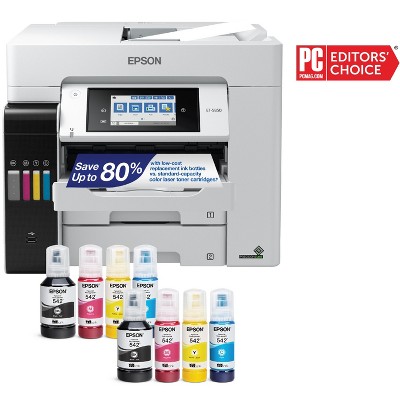
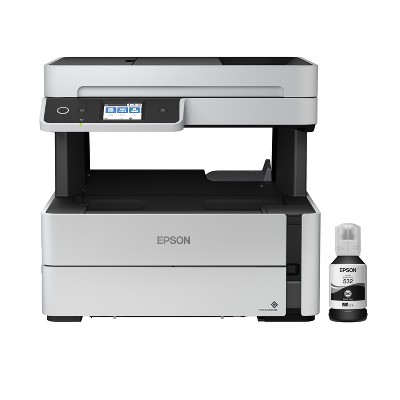
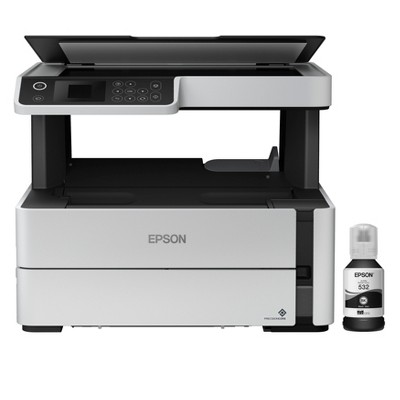
Epson EcoTank ET-3850 Wireless Color All-in-One Cartridge-Free Supertank Printer, Copier, Scanner - White: USB, Wi-Fi & Apple AirPrint - 2 of 4Epson EcoTank ET-3850 Wireless Color All-in-One Cartridge-Free Supertank Printer, Copier, Scanner - White: USB, Wi-Fi & Apple AirPrint - 3 of 4Epson EcoTank ET-3850 Wireless Color All-in-One Cartridge-Free Supertank Printer, Copier, Scanner - White: USB, Wi-Fi & Apple AirPrint - 4 of 4
Epson EcoTank ET-3850 Wireless Color All-in-One Cartridge-Free Supertank Printer, Copier, Scanner - White: USB, Wi-Fi & Apple AirPrint - 1 of 4

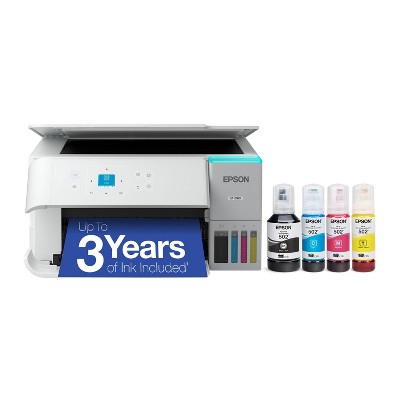
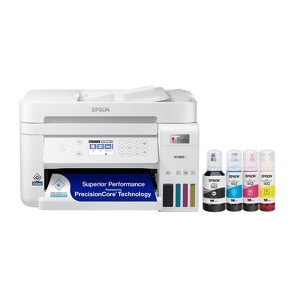
Epson EcoTank ET-3850 Wireless Color All-in-One Cartridge-Free Supertank Printer, Copier, Scanner - White: USB, Wi-Fi & Apple AirPrint

$399.99

Out of Stock

Eligible for registries and wish lists

Sponsored

About this item

Highlights

  • Innovative Cartridge-Free Printing ― No more tiny, expensive ink cartridges; each ink bottle set is equivalent to about 80 individual cartridges
  • Dramatic Savings on Replacement Ink ― Save up to 90% with replacement ink bottles vs. ink cartridges – that’s enough to print up to 7,500 pages black/6,000 color
  • Stress-Free Printing — Up to 2 years of ink in the box – and with every replacement ink set – for fewer out of ink frustrations
  • High-Capacity Ink Tanks – Epson’s exclusive EcoFit ink bottles make filling easy and worry-free
  • Zero Cartridge Waste – By using an EcoTank printer, you can help reduce the amount of cartridge waste ending up in landfills
  • Impressive Print Quality ― Unique PrecisionCore Heat-Free technology and pigment black ink produce extremely sharp text – plus impressive color photos and graphics – on virtually any paper type
  • Robust Paper Handling ― Auto Document Feeder, paper-saving auto 2-sided printing and a 250-sheet paper tray for high productivity
  • Built-In Scanner & Copier ― High-resolution flatbed scanner and a 2.4" color display for easy document copying and navigation
  • Modern Connectivity ― Features Ethernet and wireless, plus hands-free voice-activated printing. Easily print from your smart device with the intuitive Epson Smart Panel app
  • Use Genuine Epson Ink ― For optimal print quality and performance. Non-genuine ink could cause damage not covered by the printer’s limited warranty

Description

Your busy office needs a printer that’s fast, affordable, easy to use, and has great features. That’s why we developed the EcoTank ET-3850 – an innovative cartridge-free solution that uses high-capacity, easily refillable ink tanks. So you’ll worry less about running out of ink, and save a lot on replacement ink1. The ET-3850 features an auto document feeder, fast printing with outstanding print quality, productive paper handling, a high-resolution flatbed scanner, and a large color display – making it the perfect printer for your home office.
Dimensions (Overall): 10 Inches (H) x 16.4 Inches (W) x 19.8 Inches (D)
Weight: 14.8 Pounds
B&W Print Speed: 15.5 Pages per Minute
Color Print Speed: 8.5 Pages per Minute
Electronics Condition: New
Electronics Features: Scan to Mobile Device, Printer, Copier, Scanner, Controlled by Smartphone App, Automatic 2-Sided Printing
Connection Type: USB
Maximum capacity: 250 Sheets
Operating System Compatibility: Android, Apple iOS, macOS, Microsoft Windows
Maximum Resolution: 4800 x 1200 (Color)
Wireless Technology: Wi-Fi, Apple AirPrint
Printer Ink Color: Multiple Colors
Compatible With: Up to 8.5" x 47.2" Documents
Ink Series: Epson T502 series
Battery: No Battery Used
Warranty: 1 Year Limited Warranty. To obtain a copy of the manufacturer's or supplier's warranty for this item prior to purchasing the item, please call Target Guest Services at 1-800-591-3869
TCIN: 90762989
UPC: 010343957855
Item Number (DPCI): 056-03-0509
Origin: Imported
If the item details aren’t accurate or complete, we want to know about it.

Shipping details

Estimated ship dimensions: 16.2 inches length x 19.9 inches width x 12.3 inches height
Estimated ship weight: 16.1 pounds

Return details

This item can be returned to any Target store or Target.com.
This item must be returned within 30 days of the date it was purchased in store, shipped, delivered by a Shipt shopper, or made ready for pickup.
See the return policy for complete information.

Q: Does this printer have a rear feeding option?

submitted by Amy - 5 months ago
  • A: Hello Amy. You can only load paper through the lower paper cassette. Unfortunately, the ET-3850 does not have a rear paper feed. Regards, Kevin - The Epson Team.

    submitted byEpson - 5 months ago
    Brand expert
  • A: Hi Amy, thanks for reaching out about Epson EcoTank ET-3850 Wireless Color All-in-One Cartridge-Free Supertank Printer, Copier, Scanner - White: USB, Wi-Fi & Apple AirPrint No this printer uses a front load paper tray If you have any additional questions, we welcome you to contact MyTGTtech at 833-848-8324 every day, between 7am-11pm CST.

    submitted byJustin - 5 months ago
    Target expert support

Q: Does this printer fax ?

submitted by letty - 1 year ago
  • A: Hi letty, thanks for reaching out about Epson EcoTank ET-3850 Wireless Color All-in-One Cartridge-Free Supertank Printer, Copier, Scanner - White. The Epson EcoTank ET-3850 Wireless Color All-in-One Cartridge-Free Supertank Printer, Copier, Scanner, does not fax. If you have any additional questions, we welcome you to contact MyTGTtech at 833-848-8324 every day, between 7am-11pm CST.

    submitted byJoe - 1 year ago
    Target staff support
  • A: Hello letty. The ET-3850 does not include fax functionality. We recommend looking at the ET-4850 as it is a similar printer with print, copy, scan, and fax functionality included. Regards, Kevin - The Epson Team.

    submitted byEpson - 1 year ago
    Brand expert

Q: Can it print on sticky back paper?

submitted by Nanana - 1 year ago
  • A: Hello Nanana. The EcoTank ET-3850 can print on standard inkjet-compatible label sheets like Epson Photo Quality Self-adhesive Sheets. Please note that we have not tested other third party sticky back paper, so your results will vary. We recommend contacting the manufacturer directly to see if it will work with our printers. Regards, Kevin - The Epson Team.

    submitted byEpson - 1 year ago
    Brand expert
  • A: Hi Nanana, thanks for reaching out about Epson EcoTank ET-3850 Wireless Color All-in-One Cartridge-Free Supertank Printer, Copier, Scanner - White. The EcoTank Photo can print fully borderless on a wide range of papers from thin vellums, to fine art and photographic papers, to even posterboards up to 1.3mm thick. If you have any additional questions, we welcome you to contact MyTGTtech at 833-848-8324 every day, between 7am-11pm CST.

    submitted byJoe - 1 year ago
    Target staff support

Q: Will this printer print on cardstock that is 100lb (270 gsm) or 110lb (300 gsm)? Can it also print paper that is 25lb (40 gsm)?

submitted by tnguye7 - 2 years ago
  • A: Hi tnguye7, thanks for reaching out about Epson EcoTank ET-3850 Wireless Color All-in-One Cartridge-Free Supertank Printer, Copier, Scanner - White. The heaviest paper the Epson ET-3850 supports is Epson Premium Photo Glossy paper weighing 79 lb. Unfortunately, using 110lb paper in the machine is not recommended and can lead to paper feed issues. If you have any additional questions, we welcome you to contact MyTGTtech at 833-848-8324 every day, between 7am-11pm CST.

    submitted byJoe - 2 years ago
    Target staff support
  • A: Hello tnguye7. The ET-3850 can print on card stock. However, the thickest paper we have tested on the machine is Epson Premium Photo Paper Glossy, which weighs 79 lb. For cardstock, we have tested similar Epson paper that weighs around 44 lb. Please be aware that these recommendations are for Epson paper only. You can try a cardstock that falls in that range, but your results can vary when using other brands and heavier paper. Regards, Kevin - The Epson Team

    submitted byEpson - 2 years ago
    Brand expert

Q: Does this printer support 2-sided scanning?

submitted by F G - 1 year ago
  • A: Hello F G. The ET-3850 includes automatic 2-sided printing and copying. Unfortunately, it does not have 2-sided scanning available. You would have to manually flip your original document to scan both sides. Regards, Kevin - The Epson Team.

    submitted byEpson - 1 year ago
    Brand expert

Related Categories

3.4 out of 5 stars with 217 reviews
quality: 2.43 out of 5
value: 2.71 out of 5
42% would recommend
7 recommendations
5 out of 5 stars
12 December, 2025
originally posted on epson.com
Image

Break the strangle hold that you H_ printer has on you.

I bought this printer a year ago. It has been one of the best purchases that I've made in years. I’ve used it almost everyday for a year and still have plenty of ink left in the tanks. My former H_ printer was locked out on me because I used aftermarket ink. It would stop working whenever H_ decided to coerce me into buying their ink. I stopped fighting them and gave in. Signed up for automatic H_ ink replacements. After accumulating several cartridges that weren't being used, I stop the auto replacement. Then when I finally needed to use the ink cartridge I purchase under H_ ink replacement program, they didn't work, because I was no longer enrolled in their ink replacement program. Ink that I bought under this program was locked out because I quit the program. If that’s not extortion what is. I haven't used one four letter word in regards to this Epson printer. I can't say the same for my last printer.
Charlesalpine
Did you find this review helpful?
2 out of 5 stars
Thumbs down graphic, would not recommend
9 December, 2025

I wish I bought the HP Ink tank printer

FRUSTRATING!!! I had high hopes for this printer & I was SO EXCITED to use it! Unfortunately I was QUICKLY disappointed. We paid alot of $ for this printer last year after I researched dozens of ink tank printers; it initially had really suprisingly solid reviews compared to other "ink tank" printer brands. It worked fairly well for the first month or so. After that & ever since it either will not connect to the "network"/wifi at all , or would occasionally connect, then disconnect after I print a page or 2. ALSO for some reason since the first time I tried to make a copy or scan a document, there is a 2" wide long white line all the way horizontally across any page I tried to print. Also, anytime I attempt multiple ways to reconnect to the wifi/network, I get a "printer busy" error msg on the screen. INSANELY FRUSTRATING! The ONLY positive things I can say about this printer are: *ink bottles are simple to fill ink tank *Ink lasts ALOT longer than ANY of the ink cartridges from ALL of the 7 or 8 printers I've owned in my lifetime. Unfortunately, the money saved in ink is NOT WORTH IT!! I'd much rather pay for ink cartridges for a printer/copier/scanner that ACTUALLY WORKS w/o having to mess w/ it for hours trying to get it to function correctly or connect to the wifi. It kills me that I wasted $300+ for this & after one year it's useless.
1 reply from Epson team - 22 days ago
Hi Melissa, we are sorry to hear you are having issues with your Epson printer. Your ET-3850 includes free technical telephone support for the life of your product. Our Epson Support Team would be happy to help you and can be reached at (562) 276-4382; Hours: Monday – Friday, 7 a.m. to 4 p.m. (PT). Sincerely, Joseph – The Epson Team.
Melissa
quality: 1 out of 5
value: 1 out of 5
Did you find this review helpful?
1 out of 5 stars
7 December, 2025
originally posted on epson.com
Image

Terrible all around. You’ve been warned.

Junk - jams when trying to make copies or scan items. Also double side copying works one minute and not the next. Shame on epson…all this thing can actually do decently is print. What a joke. Will never buy another epson product.
1 reply from The Epson Team team - 25 days ago
Hi Blah blah blah 123, please visit www.epson.com/support/et3850 for useful product information on optimizing print settings and avoiding paper jams. Your Epson includes free technical support for the life of your product. Our Epson Support Team would be happy to help you and can be reached at (562) 276-4382; Hours: Monday – Friday, 7 a.m. to 4 p.m. (PT). We appreciate your purchase, and we value your feedback. Sincerely, Joseph – The Epson Team.
Blah blah blah 123
Did you find this review helpful?
1 out of 5 stars
26 November, 2025
originally posted on epson.com
Image

ET3850 experience is not good!

Epson ET3850 will not stay connected to our network, constant disconnect errors requiring multiple reboots of printer and network each day. This is not a user error as it has been well documented by many Epson ET3850 users.
1 reply from The Epson Team team - 1 month ago
Hi Lee G2, we apologize about the disappointing experience you are having with your Epson printer's Wi-Fi connection. Your ET-3850 includes free technical support for the life of your product. Please call and let our Epson Support Team assist. Our support number is (562) 276-4382. Our support hours of operation are Monday – Friday, 7 a.m. to 4 p.m. (PT). We’re here to help. Sincerely, Joseph
Lee G2
1 guest found this review helpful. Did you?
2 out of 5 stars
14 November, 2025
originally posted on epson.com
Image

Not a good printer

I have had so many issues with this printer. Sometimes it works, sometimes it does not. I turn it off and unplug it, then turn it back on and sometimes it works, but not always. I don't use it much but when I need to, it's not dependable.
1 reply from The Epson Team team - 2 months ago
Hi Verona, we are sorry to hear that you are experiencing issues with your printer. Your ET-3850 includes free technical support for the life of your product. Our Epson Support Team would be happy to help and can be reached at (562) 276-4382; Hours: Monday – Friday, 7 a.m. – 4 p.m. PT. Sincerely, Joseph
Verona
2 guests found this review helpful. Did you?
1 out of 5 stars
21 September, 2025
originally posted on epson.com
Image

There are no good printers any more.

When I purchased this printer because I had trouble with cartridges drying up on me and I was told that this ink system would work better. After not pri ti g for a few weeks the ink levels showed full but it would not print even after cleanings.
1 reply from The Epson Team team - 3 months ago
Hi Dana38, we are sorry to hear you are having issues with your Epson printer. Your ET-3850 includes a 1-year limited warranty plus free technical support for the life of your product. Our Epson Support Team would be happy to hear from you and can be reached at (562) 276-4382; Hours: Monday – Friday, 7 a.m. to 4 p.m. (PT). Sincerely, Joseph
Dana38
1 guest found this review helpful. Did you?
1 out of 5 stars
13 September, 2025
originally posted on epson.com
Image

Don't waste your money

I hate this printer. It will not stay connected and I keep having to reconnect or make a cable connection to make it work. The lack of touch screen is very inconvenient. Do not buy!!!!!!!
1 reply from The Epson Team team - 4 months ago
Hi Firenoid5, we apologize about the disappointing experience you are having with your Epson printer's Wi-Fi connection. Your ET-3850 includes free technical support for the life of your product. Please call and let our Epson Support Team assist. Our support number is (562) 276-4382. Our support hours of operation are Monday – Friday, 7 a.m. to 4 p.m. (PT). We’re here to help. Sincerely, Joseph
Firenoid5
1 guest found this review helpful. Did you?
1 out of 5 stars
8 September, 2025
originally posted on epson.com
Image

Worst printer ever

Do NOT buy this printer. The paper jams nearly every time I want to print, rendering it essentially useless. I have tried various types of printer paper, it jams with all of them. My printer isn't even a year old and soon I will be throwing it out (not even donating it, I wouldn't inflict this printer on anyone else) and purchasing a new printer. It will not be an Epson, I will NEVER buy another Epson printer.
1 reply from The Epson Team team - 4 months ago
Hi Verydissatisfied, we're sorry for the disappointing experience you had with your Epson printer. Your ET-3850 includes free technical support for the life of your product. Please give us the opportunity to assist you by calling our Epson Advanced Support Team. We can be reached at 1-800-241-5794; Hours: Monday – Friday, 7 a.m. – 4.p.m. PT. We're here to help. Sincerely, Joseph
Verydissatisfied
1 guest found this review helpful. Did you?
3 out of 5 stars
27 August, 2025
originally posted on epson.com
Image

Good hardware, bad software

product works fine except for 2 aspects: set up is poorly designed. At one point asks for a password, which i never set up and doesnt offer the ability at that point to create a password. Connectivity to wifi is horrible. sometimes it works, sometimes not. Usually it says Printer is offline, default.
1 reply from The Epson Team team - 4 months ago
Hi noneyet, we are sorry to hear that you are experiencing issues with your printer. Your ET-3850 includes free technical support for the life of your product. Our Epson Support Team would be happy to help and can be reached at (562) 276-4382; Hours: Monday – Friday, 7 a.m. – 4 p.m. PT. Sincerely, Joseph
noneyet
Did you find this review helpful?
1 out of 5 stars
18 August, 2025
originally posted on epson.com
Image

Would Not Recommend

Would NOT recommend this printer/scanner at all. It's AWFUL. I can't get anything scanned to my computer, no matter what or how I try to scan.... the printing feature is so slow you will think it isn't working only to find an hour later something has printed. Take your money elsewhere.... this thing is a piece of junk.
1 reply from The Epson Team team - 4 months ago
Hello K9Sling, we apologize for the disappointing experience you’ve encountered with your Epson printer. Your ET-3850 includes free technical support for the life of your product. Please reach out to our Epson Support Team for assistance at (562) 276-4382; Hours: Monday – Friday, 7 a.m. to 4 p.m. (PT). We’re here to help. Sincerely, Joseph
K9Sling
1 guest found this review helpful. Did you?
5 out of 5 stars
Thumbs up graphic, would recommend
8 August, 2025Verified purchase

Epson 3850

Easy set up Eco tank for savings on ink Fast copies
Kathy
quality: 5 out of 5
value: 5 out of 5
Did you find this review helpful?
1 out of 5 stars
6 August, 2025
originally posted on epson.com
Image

Hard to use

Hard to change the settings, not touch screen, takes long to use.
1 reply from The Epson Team team - 5 months ago
Dear Gladder, we appreciate your business and are sorry to hear you are not completely satisfied with your purchase. Your Epson ET-3850 includes free technical support for the life of your product. Please reach out to our Epson Support Team for assistance at (562) 276-4382; Hours: Monday – Friday, 7 a.m. to 4 p.m. (PT). We’re here to help. Sincerely, Joseph
Gladder
1 guest found this review helpful. Did you?
1 out of 5 stars
Thumbs down graphic, would not recommend
19 July, 2025Verified purchase

Epson eco tank 3850

Printer did not work, it printed poorly, I did an alignment and print head cleaning then it stopped feeding paper altogether.
1 reply from Epson team - 5 months ago
Hi M, we are sorry to hear you are having issues with your Epson printer. Your ET-3850 includes a 1-year limited warranty plus free technical support for the life of your product. Our Epson Support Team would be happy to hear from you and can be reached at (562) 276-4382; Hours: Monday – Friday, 7 a.m. to 4 p.m. (PT). Sincerely, Joseph – The Epson Team.
M
quality: 1 out of 5
value: 1 out of 5
1 guest found this review helpful. Did you?
1 out of 5 stars
27 May, 2025
originally posted on epson.com
Image

Not working

It didn’t work after I did all the steps for the set up
1 reply from The Epson Team team - 7 months ago
Hi Andrea M, we are sorry to hear you are having issues with your Epson printer. Your ET-3850 includes a 1-year limited warranty plus free technical support for the life of your product. Our Epson Support Team would be happy to hear from you and can be reached at (562) 276-4382; Hours: Monday – Friday, 7 a.m. to 4 p.m. (PT). Sincerely, Joseph – The Epson Team.
Andrea M
2 guests found this review helpful. Did you?
4 out of 5 stars
30 April, 2025
originally posted on epson.com
Image

Surprise

I bought two of these printers for the house in the past last month. The install whet very smoothly and have had no problems in normal computer to printer operations. One of the printers is setup for WIFI communications and the other via USB. Today my wife opined about printing from her phone and iPad, so looked into it and it seemed to be straight forward. I down loaded the app and low and behold I discovered I had to pay weekly or monthly to utilize this function of my PC. Isn't it a bit callous on Epson's part to charge extra for built in functionality?
TwoLab John
2 guests found this review helpful. Did you?
5 out of 5 stars
3 April, 2025
originally posted on epson.com
Image

New Jet

I love it so far
Cathy Price
Did you find this review helpful?
4 out of 5 stars
2 April, 2025
originally posted on epson.com
Image

Great printer/scanner

Very nice, compact printer scanner with solid build.
Jim Sprecher
Did you find this review helpful?
3 out of 5 stars
2 April, 2025
originally posted on epson.com
Image

Not happy

Less than 2 months old and since day one it doesn’t print the colors on the screen, no matter how many cleaning cycles and alignments I do. So sad. Something has changed. I had an epson for 5+ years and was great. This new one-horrible and it’s same model. So drivers have changed I assume. I tried the downloading and installing. Even swapped for more expensive epson and nope same problem.
1 reply from The Epson Team team - 9 months ago
Hi NotYourMom, we're sorry for the disappointing experience you had with your Epson printer. Your ET-3850 includes free technical support for the life of your product. Please give us the opportunity to assist you by calling our Epson Advanced Support Team. We can be reached at 1-800-241-5794; Hours: Monday – Friday, 7 a.m. – 4.p.m. PT. We're here to help. Sincerely, Joseph – The Epson Team.
NotYourMom
2 guests found this review helpful. Did you?
2 out of 5 stars
31 March, 2025
originally posted on epson.com
Image

Great printer at first, 4 months later it 's a headache

Worked so well for about 4 months. Then, stopped recognizing each computer randomly. Now, the printer will not print unless I plug directly into the printer, only then will it acknowledge my computer. No other computers can print. The scanner is no longer recognized either. Get error messages that the ET3850 is "busy" or "offline" or communication error. Tried many things to correct it. Avoid this printer. Unreliable and unpredictable.
non93
2 guests found this review helpful. Did you?
2 out of 5 stars
26 March, 2025
originally posted on epson.com
Image

Get a different printer

Hard to set up. Stopped connecting to my computer. I cannot figure it out.
1 reply from The Epson Team team - 9 months ago
Hi Finns Mom, we are sorry to hear that you are experiencing issues with your printer setup. Your ET-3850 includes free technical support for the life of your product. Our Epson Support Team would be happy to help and can be reached at (562) 276-4382; Hours: Monday – Friday, 7 a.m. – 4 p.m. PT. Sincerely, Joseph – The Epson Team.
Finns Mom
1 guest found this review helpful. Did you?

Get top deals, latest trends, and more.

Privacy policy

Footer

About Us

About TargetCareersNews & BlogTarget BrandsBullseye ShopSustainability & GovernancePress CenterAdvertise with UsInvestorsAffiliates & PartnersSuppliersTargetPlus

Help

Target HelpReturnsTrack OrdersRecallsContact UsFeedbackAccessibilitySecurity & FraudTeam Member ServicesLegal & Privacy

Stores

Find a StoreClinicPharmacyTarget OpticalMore In-Store Services

Services

Target Circle™Target Circle™ CardTarget Circle 360™Target AppRegistrySame Day DeliveryOrder PickupDrive UpFree 2-Day ShippingShipping & DeliveryMore Services
PinterestFacebookInstagramXYoutubeTiktokTermsCA Supply ChainPrivacy PolicyCA Privacy RightsYour Privacy ChoicesInterest Based AdsHealth Privacy Policy