Sponsored
HP LaserJet M110w Wireless Black and White Laser Printer (7MD66F
In Stock
Sponsored
About this item
Highlights
- High-quality black & white printing
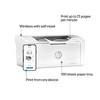
- Print, scan and copy on the go with HP Smart app
- Built-in wireless
- Easy mobile setup
- Print up to 21 pages per minute
- High-speed USB 2.0
Description
BEST FOR TIGHT WORK SPACES: Print high-quality black & white documents and forms
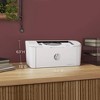
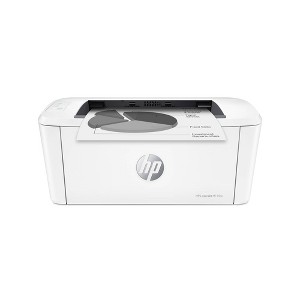
WORLD'S SMALLEST LASER IN ITS CLASS: Efficient black & white precision laser printing that fits anywhere
FAST PRINT SPEEDS: Print up to 21 pages per minute
STAY CONNECTED: Wireless with self-reset to help you stay connected
HP SMART APP: Print, scan and copy from your phone
Shipping details
Return details
Q: It mentions that it’s wireless a few times, but I’m not seeing if it is Bluetooth or Wi-Fi?
A: Thanks for your question. The printer will support WiFi and not Bluetooth. You can use wireless with the printer even if you do not have a WiFi network setup.
submitted byHP Team - 10 months agoBrand expert
Q: Can you print on photo glossy paper?
A: Hello Ana and thanks for asking. The HP LaserJet M110w is a black-and-white printer with no color printing capability and should not be used with any ink jet photo paper, glossy or matte.
submitted byHP Team - 2 years agoBrand expert
Q: Does this printer have duplex printing?
A: Hello. Thanks for your question. This HP Laserjet m110w printer does not do duplex printing. You would need to manually turn the paper over.
submitted byHP Team - 2 years agoBrand expert
Q: This printer M110 says you can print scan and copy. However when I google what is the difference between M110 and M140 it says M110 you can print only. So can you copy and scan from this printer M110?
A: Hi, thanks for reaching out about HP LaserJet M110w Wireless Black and White Laser Printer (7MD66F To better understand your individual needs, we welcome you to contact MyTGTtech at 833-848-8324 every day, between 7am-11pm CST.
submitted byMike - 1 month agoTarget expert support
Q: what ink cartrage does it use?
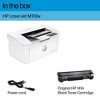
A: Hi, thanks for reaching out about HP LaserJet M110w Wireless Black and White Laser Printer (7MD66F The HP LaserJet M110w uses HP 141A Black LaserJet Toner Cartridges (W1410A), not traditional liquid ink. It is a laser printer, which uses toner powder to create prints. You can also use a high-yield version, the HP 141X (W1410X), for a lower cost per page, or compatible third-party cartridges. If you have any additional questions, we welcome you to contact MyTGTtech at 833-848-8324 every day, between 7am-11pm CST.
submitted byJustin - 1 month agoTarget expert support
Q: Can I print address labels ?
A: Hi, thanks for reaching out about HP LaserJet M110w Wireless Black and White Laser Printer (7MD66F This printer is compatible with and can print address labels. The specifications dp officially list "label" as one of the supported media types. If you have any additional questions, we welcome you to contact MyTGTtech at 833-848-8324 every day, between 7am-11pm CST.
submitted byMike - 1 month agoTarget expert support
Q: Can I print from my phone?
A: Hi, thanks for reaching out about HP LaserJet M110w Wireless Black and White Laser Printer (7MD66F Yes, this printer is fully compatible with both Android and iOS phones and other devices. If you have any additional questions, we welcome you to contact MyTGTtech at 833-848-8324 every day, between 7am-11pm CST.
submitted byMike - 1 month agoTarget expert support
Q: Does anybody know if this works with Windows 11 packing the Snapdragon chip?
A: Hi, thanks for reaching out about HP LaserJet M110w Wireless Black and White Laser Printer (7MD66F To better understand your individual needs, we welcome you to contact MyTGTtech at 833-848-8324 every day, between 7am-11pm CST.
submitted byMike - 2 months agoTarget expert support
Q: I don't have wifi. Will the printer print from my iPhone?
A: Hi, thanks for reaching out about HP LaserJet M110w Wireless Black and White Laser Printer While you cannot print directly from an iPhone to the HP LaserJet M110w without a network connection, because the printer requires either a Wi-Fi network or a Wi-Fi Direct connection, and both are types of wireless networking. However, you can print without a home internet connection using the Wi-Fi Direct feature, which creates a direct wireless connection between your iPhone and the printer. If you have any additional questions, we welcome you to contact MyTGTtech at 833-848-8324 every day, between 7am-11pm CST.
submitted byJustin - 2 months agoTarget expert support
Q: Can you use it as a wired printer to connect to your computer?
A: Yes, you can use a USB 2.0 cable to connect the HP LaserJet M110w to your computer. Thank you for your question!
submitted byHP Team - 8 months agoBrand expert
Frequently bought together

Guests also viewed




Discover more options
Related Categories
Guests are saying

serves the purpose
Piece of junk

Happy customer
Good value
Simple and easy yo use

HP Printer
The price is right for a neat compact printer.
easy to set up and use
Great printer!
Great Printer, Incredible Value
HP LaserJet M110w Black & White Wireless Printer
Best budget laser printer
Very nice basic laser printer
Perfect printer for the spouse!
Excellent printer!
Installing the M110 on a wireless network
A great investment

HP M110w for my office
Small but efficient