
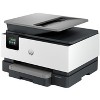
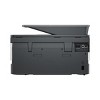
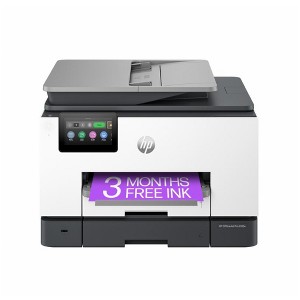
HP OfficeJet Pro 9125e All-in-One Printer with 3 Months of Instant Ink for free with HP+, AI-enabled
$209.99 reg $309.99
Sale save $100.00 (32% off)
In Stock
Eligible for registries and wish lists
About this item
Additional product information and recommendations
Discover more options
Frequently bought together

Related Categories
Guests also viewed


Guests are saying
The HP OfficeJet Pro 9125e is a versatile all-in-one printer that excels in printing, scanning, and copying, making it ideal for home offices and personal use. Guests appreciate its fast printing speed, excellent print quality, and user-friendly setup process. While some have experienced connectivity issues and setup challenges, many find the wireless capabilities and HP Smart app features to be game-changers. Overall, it offers great value for its multifunctional capabilities.
Summary created by AI from text of reviews reflecting recent feedback provided across different star ratings (includes incentivized reviews)
4.1 out of 5 stars with 538 reviews
quality: 4.25 out of 5
value: 4.5 out of 5
75% would recommend
4 recommendations
4 out of 5 stars
11 January, 2026
originally posted on store.hp.com

Useful but unwieldy
It gets the printing done, with a lag to start, and then, parts of the printing are cut off at the side, or top, when the paper comes out of the printer. There must be something wrong with the way the paper is aligned.
5 out of 5 stars
4 January, 2026
originally posted on hp.com

printer
works great, east setup
1 out of 5 stars
3 January, 2026
originally posted on hp.com

HP Dis-connected
I'm giving HP/Instant Ink, 10 days to respond to my emails.
4 out of 5 stars
1 January, 2026
originally posted on hp.com
HP OJ Pro 9125e AIO 3 Mo In Ink
I have bought HP products for over 30 years starting with the HP 12C calculator, then PCs and printers. This new HP OJ Pro 9125e is OK but does not match the quality of our previous 8600 ink jet which failed after a reasonable number of years. After my Spectre PC's battery failed I bought a new Spectre PC which shows defects when I type emails and is inferior to the previous Spectre. I regret to write that HP products are decreasing in quality and reliability. This will be ok until it no longer is and long time clients like me migrate to other brands. HP used to be the gold standard.
4 out of 5 stars
28 December, 2025
originally posted on hp.com
9125e some good, some bad
I've had mostly good experience with HP printers however the earlier models (10 years back) were more solidly built and didn't use as much plastic. My previous HP 8025 and this current 9125e, the paper trays are very flimsy in my opinion... if not careful when pulling them to load paper, you could break the end of the tray which I did on my previous 8025 model. I also don't like the fact that there isn't a paper adjusting slider inside the tray in the front of both these models, only for the sides of the paper (not a plus). The biggest complaint about this 9125e model is how LOUD it is each time it's sits idle and when you're ready to print something... it goes thru it's automatic cartridge adjustment internally and is makes a very loud banging sound like there's something ready to go inside! Would be nice to have a "quiet" printer... this model by far is the loudest I've had but everything runs as it should, color quality is reasonable, digital display is a nice, visible size. I did refer to YouTube for help setting up this printer to my WiFi... found a good tutorial that was much easier to follow than the info from HP's website.
5 out of 5 stars
15 December, 2025
originally posted on hp.com
HP O/Jet Pro 9125e
Excellent and Easy Setup.
3 out of 5 stars
4 December, 2025
originally posted on hp.com
Good, but not great!
What I like about it is it will print double-sided documents without my having to get up and turn the paper. What I don't like is that it is slow to react, whether scanning or printing. Why I wouldn't give it more than 3 stars is that it was really hard to install because it came with outdated software and I needed HP help to make it work. That should not be! If HP is still selling an electronic product, it should come with a notice that it will require updating before it will work.
4 out of 5 stars
29 November, 2025
originally posted on hp.com
Setup
We rely on a printer to be available 24/7 which I doubt is an unusual requirement for home or home office.. Setting up the 9125e to meet this requirement was a task and required several trips to the internet. HP wake up! This should be your basic setup instructions- power on 24/7, WIFI connect 24/7, Infact these should be defaults. Also scans to USB should be PDF not JPEG or at least allow a way to reset the power on defaults (firmware?). Another question Why do we have to periodically turn the printer off and then on to get it to reconnect to the WIFI even even though the WIFI light is on?
5 out of 5 stars
28 November, 2025
originally posted on store.hp.com
Happy Customer
I broke my old HP printer and found out not repairable. Contacted help desk to inquire how to handle my instant ink account if I buy a new printer and what inks would be compatible. Help desk was extremely helpful. Helped me with what to buy, sent a link to order, followed up letting me know I would receive my new printer in a couple of days. Said he would follow me up in a couple of days when I had received the new printer. This he did and helped me insall it and I definitly needed the help to install it. All in all it was a great experience -Thanks HP.
5 out of 5 stars
27 November, 2025
originally posted on hp.com
First class product
Firts class product replaces m previos HP Printer
1 out of 5 stars
26 November, 2025
originally posted on hp.com
Junk - HP want fix the problems
Poor product
5 out of 5 stars
25 November, 2025
originally posted on hp.com
Easy to use.
Great printer. Easy to use . The learning curve is very quick.
1 out of 5 stars
9 November, 2025
originally posted on hp.com
Beware of different model numbers
Not the same printer that they claim
1 out of 5 stars
5 November, 2025
originally posted on hp.com
Disappointed
works sometimes and sometimes it doesn't - no manual - so how does this printer work? When I print an email sometimes it prints all the folders on the side of the email - what gives I don't want that on my printed email. It will not print a marked passage-it will print the whole document out-gee what a pain. Where is the 24/7 phone number I was promised???
5 out of 5 stars
3 November, 2025
originally posted on hp.com
Does what it says on the tin.
I have had it a few weeks and setting up was easy. I haven't used all the features but pleased with what I have done so far. Slightly more clunky than my 15 year old Office Jet Pro but hope it lasts as long.
4 out of 5 stars
19 October, 2025
originally posted on hp.com

Review
This product is good for my home needs
4 out of 5 stars
18 October, 2025
originally posted on hp.com
Nice print quality, but...
This printer prints well but is very noisy. I am often printing newsletters while on the phone and it sits on the end of my desk and makes it difficult to hear. It prints much quicker than my last printer, which I like. I do a lot of enlarging and reducing of patterns in my work and you have to go through numerous screens to get to that option, which is frustrating when in a hurry.
5 out of 5 stars
17 October, 2025
originally posted on store.hp.com
My review of Instant ink
Pleasant and prompt responses
5 out of 5 stars
14 October, 2025
originally posted on hp.com
Best Printer Yet
Printer is fast and now that it is setup and runs instantly with my new computer printing is easier.
5 out of 5 stars
14 October, 2025
originally posted on hp.com
New printer
So far this printer has exceeded my expectation