Sponsored
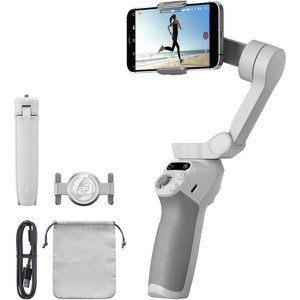
DJI Osmo Mobile SE Smartphone Stabilizer: Camera Mount Tripod, Black
In Stock
Sponsored
About this item
Highlights
- Smartphone Gimbal Stabilizer
- Magnetic Phone Clamp
- Up to 10.2 oz Load Capacity
- Dynamic Zoom, SpinShot, Story Mode
- ActiveTrack 6.0, Follow, and Sport Modes
- Supports Smartphones up to 3.3" Wide
- Time-Lapse, Hyperlapse, Panorama Modes
- Control Gimbal/Phone with DJI Mimo App
Description
Updated ActiveTrack 6.0 improves stability over longer distances and supports front camera tracking from both side orientations and while spinning. Built-in 3-axis gimbal motors render smooth footage even while running with lossless delivery.
• Set your gimbal down on a flat surface using the grip tripod and create a timelapse of your view of choice.
• Preset a gimbal path during your timelapse for subtle, dynamic movement using Motionlapse.
• Condense motion into a fast-paced, stabilized shot using Hyperlapse
• Templates embedded in the DJI Mimo app allow you to create compilation videos out of highlighted clips
Fold the Mobile SE down to a compact form factor capable of fitting in your pocket. Its magnetic phone clamp easily detaches when not in use and is capable of fitting around your phone while in its case.
• Follow: Camera view follows the gimbal's pan and tilt movements and remains stable during rolls
• Tilt Locked: Camera view only follows the gimbal's pan movement and stays stable during tilts and rolls
• FPV: All three axes of the gimbal follow the movement of the main body
• SpinShot: Push the joystick left or right to control rotation
Shipping details
Return details
Q: Does handle take photos/video without touching phone?
A: Hi, thanks for reaching out about DJI Osmo Mobile SE Smartphone Stabilizer: Camera Mount Tripod, Black Yes, you can absolutely take photos and record video using the handle of the DJI Osmo Mobile SE without having to touch your phone screen. There are actually three different ways to control your camera remotely using this device 1. The handle has a dedicated Shutter/Record Button (the one with the red circle). When your phone is connected via Bluetooth and the DJI Mimo app is open you can use these commands: -Single Press: Takes a photo or starts/stops video recording. -Press and Hold: Triggers Burst Shooting (on compatible phones). -Double Press (while recording): Takes a photo without stopping the video. 2. Since the Osmo Mobile SE comes with a tripod, you can set it down and control it from a distance using hand signals. If you show your palm or a peace sign to the camera, the gimbal will recognize the gesture, start a short countdown, and then take a photo or start recording. You can set it to not only start recording but also begin tracking your movement (ActiveTrack 6.0) the moment it sees your gesture. 3. The "M" Button on the handle allows you to switch between photo and video modes with a single press, so you never have to reach for the screen to change your settings. If you have any additional questions, we welcome you to contact MyTGTtech at 833-848-8324 every day, between 7am-11pm CST.
submitted byMike - 11 days agoTarget expert support
Q: Can this track a single person in a group of people? For example, in a soccer game?
A: Hi, thank you for reaching out about DJI Osmo Mobile SE Smartphone Stabilizer: Camera Mount Tripod, Black. Yes, the DJI Osmo Mobile SE can track a single person in a group using its ActiveTrack technology. By drawing a box around the desired person on the screen via the DJI Mimo app, you can select them to be tracked, even if other people are also in the frame. The system will then follow that specific person reliably, with the latest versions even offering improved subject recognition. If you have any additional questions, we welcome you to contact MyTGTtech at 833-848-8324 every day, between 7am-11pm CST.
submitted byMatt - 2 months agoTarget expert support
Q: How long is the run time or battery life?
A: Hi, thank you for reaching out about DJI Osmo Mobile SE Smartphone Stabilizer: Camera Mount Tripod, Black. The DJI Osmo Mobile SE has a battery life of approximately 8 hours and takes about 2 to 2.2 hours to fully charge. This runtime can vary based on usage and how well the phone is balanced on the gimbal. If you have any additional questions, we welcome you to contact MyTGTtech at 833-848-8324 every day, between 7am-11pm CST.
submitted byMatt - 2 months agoTarget expert support
Q: Will this work with both iOS and Android phones?
A: Hi, thank you for reaching out about DJI Osmo Mobile SE Smartphone Stabilizer: Camera Mount Tripod, Black. Yes, the DJI Osmo Mobile SE Smartphone Stabilizer is compatible with both iOS and Android phones. It connects via Bluetooth and uses the DJI Mimo app, which is available for both operating systems. If you have any additional questions, we welcome you to contact MyTGTtech at 833-848-8324 every day, between 7am-11pm CST.
submitted byMatt - 3 months agoTarget expert support