Target New ArrivalsGift Ideas for MomClothing, Shoes & AccessoriesHome & DecorKitchen & DiningOutdoor Living & GardenGroceryHousehold EssentialsBabyBeautyPersonal CareHealthWellnessLuggageSports & OutdoorsToysElectronicsVideo GamesMovies, Music & BooksSchool & Office SuppliesParty SuppliesGift IdeasGift CardsPetsUlta Beauty at TargetShop by CommunityTarget OpticalDealsClearanceTarget New ArrivalsSpring OutfitsGift Ideas for MomWomen’s Festival OutfitsTop DealsTarget Circle DealsWeekly AdShop Order PickupShop Same Day DeliveryRegistryRedCardTarget CircleFind Stores
Tweak Your Mac Terminal - by  Daniel Platt (Paperback) - 1 of 1

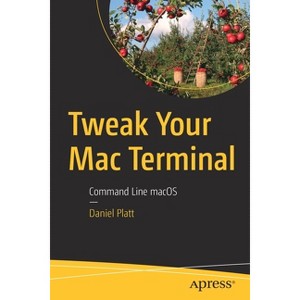
Tweak Your Mac Terminal - by Daniel Platt (Paperback)

$46.49Save $8.50 (15% off)

In Stock

Free & easy returns

Free & easy returns

Return this item by mail or in store within 90 days for a full refund.
Eligible for registries and wish lists

About this item

Highlights

  • Look beyond the basics of Mac programming and development to become a Mac power user.
  • About the Author: ​Daniel Platt is a software developer and system admin.
  • 535 Pages
  • Computers + Internet, Programming

Description


Book Synopsis


Look beyond the basics of Mac programming and development to become a Mac power user. When most people think about the Mac, they think about the amazing graphical user interface macOS is known for. However, there is a whole world to explore beneath the hood. This book approaches working directly in the terminal with fun projects and ideas to help turn you into an advanced Mac user.
You'll work with Brew (HomeBrew), which gives you the ability to install applications from Linux (and Unix) that can make the terminal more useful. This is important, because a lot of applications have been stripped out of macOS or deprecated. For example, Apple's built-in PHP is usually a major release behind. You'll also customize your terminal to change everything about it, making it your own. The whole world is about personalizing. Why put up with the Apple defaults?
Once you have your terminal set up and ready to rock, you'll review the basics of programming on the Mac terminal. This will allow you to get a taste of power scripting. You'll discover the power of bash, PHP, and Python. And then you'll apply those tools to web development.

Tweak Your Mac Terminal takes you on a journey into a world of the terminal and its hidden applications.


What You'll Learn
  • Customize the terminal to make it perfect for your needs
  • Develop web applications using basic coding skills in the terminal
  • Install HomeBrew and by extension Linux and Unix applications

Who This Book Is ForMac users who are already very familiar with the GUI and want to go further. This book will especially help starting IT professionals and beginning programmers.


From the Back Cover


Look beyond the basics of Mac programming and development to become a Mac power user. When most people think about the Mac, they think about the amazing graphical user interface macOS is known for. However, there is a whole world to explore beneath the hood. This book approaches working directly in the terminal with fun projects and ideas to help turn you into an advanced Mac user.
You'll work with Brew (HomeBrew), which gives you the ability to install applications from Linux (and Unix) that can make the terminal more useful. This is important, because a lot of applications have been stripped out of macOS or deprecated. For example, Apple's built-in PHP is usually a major release behind. You'll also customize your terminal to change everything about it, making it your own. The whole world is about personalizing. Why put up with the Apple defaults?
Once you have your terminal set up and ready to rock, you'll review the basics of programming on the Mac terminal. This will allow you to get a taste of power scripting. You'll discover the power of bash, PHP, and Python. And then you'll apply those tools to web development.

Tweak Your Mac Terminal takes you on a journey into a world of the terminal and its hidden applications.

You will:

  • Customize the terminal to make it perfect for your needs
  • Develop web applications using basic coding skills in the terminal
  • Install HomeBrew and by extension Linux and Unix applications


About the Author


Daniel Platt is a software developer and system admin. Much of his time is spent writing code and setting up computers. He is a Senior Software Engineer at Comparison Technologies Ltd. and has spent a lifetime working with computers keeping on the bleeding edge of technology.
Dimensions (Overall): 9.21 Inches (H) x 6.14 Inches (W) x 1.14 Inches (D)
Weight: 1.71 Pounds
Suggested Age: 22 Years and Up
Number of Pages: 535
Genre: Computers + Internet
Sub-Genre: Programming
Publisher: Apress
Theme: Macintosh
Format: Paperback
Author: Daniel Platt
Language: English
Street Date: November 21, 2020
TCIN: 1008783695
UPC: 9781484261705
Item Number (DPCI): 247-26-2544
Origin: Made in the USA or Imported
If the item details aren’t accurate or complete, we want to know about it.

Shipping details

Estimated ship dimensions: 1.14 inches length x 6.14 inches width x 9.21 inches height
Estimated ship weight: 1.71 pounds
We regret that this item cannot be shipped to PO Boxes.
This item cannot be shipped to the following locations: American Samoa (see also separate entry under AS), Guam (see also separate entry under GU), Northern Mariana Islands, Puerto Rico (see also separate entry under PR), United States Minor Outlying Islands, Virgin Islands, U.S., APO/FPO, Alaska, Hawaii

Return details

This item can be returned to any Target store or Target.com.
This item must be returned within 90 days of the date it was purchased in store, delivered to the guest, delivered by a Shipt shopper, or picked up by the guest.
See the return policy for complete information.

Q: What is HomeBrew used for in this context?

submitted by AI Shopping Assistant - 1 month ago
  • A: HomeBrew is used to install additional Linux and Unix applications to enhance the terminal experience.

    submitted byAI Shopping Assistant - 1 month ago
    Ai generated

Q: What type of projects can I expect from this book?

submitted by AI Shopping Assistant - 1 month ago
  • A: The book includes fun projects designed to help you become an advanced Mac user through practical terminal use.

    submitted byAI Shopping Assistant - 1 month ago
    Ai generated

Q: How does the book help customize the Mac terminal?

submitted by AI Shopping Assistant - 1 month ago
  • A: It provides guidance on personalizing the terminal setup to fit individual needs and preferences.

    submitted byAI Shopping Assistant - 1 month ago
    Ai generated

Q: Who is the intended audience for this book?

submitted by AI Shopping Assistant - 1 month ago
  • A: This book is aimed at Mac users familiar with the GUI, especially starting IT professionals and beginning programmers.

    submitted byAI Shopping Assistant - 1 month ago
    Ai generated

Q: What programming languages will I learn about in this book?

submitted by AI Shopping Assistant - 1 month ago
  • A: You will learn about bash, PHP, and Python, along with their applications.

    submitted byAI Shopping Assistant - 1 month ago
    Ai generated

Additional product information and recommendations

Discover more options

Trending Computers & Technology Books

Get top deals, latest trends, and more.

Privacy policy