Sponsored
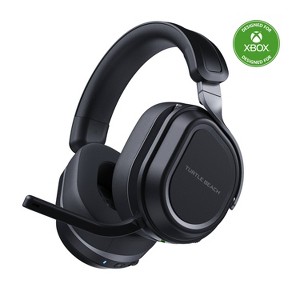
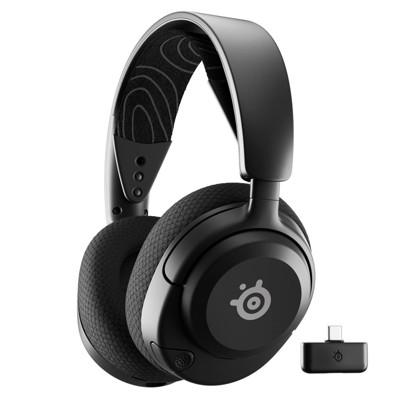
Turtle Beach Stealth 700 Gen 3 Gaming Headphones for Xbox - Black: Wireless Leatherette Ear Cushions, 20-Hr Battery, Multi-Platform Compatibility
In Stock
At a glance
Sponsored
About this item
Highlights
- CrossPlay Dual Transmitter Multiplatform Wireless Audio System
- Simultaneous Low-latency 2.4GHz wireless + Bluetooth® 5.2
- 60mm Eclipse™ Dual Drivers for Immersive Spatial Audio
- Flip-to-Mute Mic with A.I.-Based Noise Reduction
- Long-Lasting Battery Life of up to 80-Hours plus Quick-Charge
- Memory Foam Cushions with Glasses-Friendly Technology
- Lay-Flat, Steel-Reinforced Design
- Swarm™ II Desktop & Mobile App with Advanced 10-Band EQ
- Mappable Wheel & Mode Button for Customizable Functions
- Built-in EQ modes plus Advanced Superhuman Hearing®
Description
Shipping details
Return details
Q: I’ve had this plugged in for a total of 3 times overnight and the next morning it’s still not charged. Is there a trick to charging this?
A: Hello Amber! We are sorry to hear about the experience you've had with your Turtle Beach Product. Our products are each sold with a manufacturer's warranty, and we have a dedicated Support Team available to assist as needed. Please reach out directly to our dedicated Support Team so they can lend a hand. They’re always happy to help and can be reached right from the support section of the Turtle Beach website. Best Regards!
submitted byTurtle Beach Support - 8 days agoBrand expertA: Hi, thanks for reaching out about Turtle Beach Stealth 700 Gen 3 Gaming Headphones for Xbox - Black: Wireless Leatherette Ear Cushions, 20-Hr Battery, Multi-Platform Compatibility. It sounds like your Stealth 700 Gen 3 might be stuck in a "locked" state, which is a known issue where the headset becomes unresponsive to charging inputs. There isn't necessarily a "trick" to the charging itself, but there is a specific reset procedure to get the battery management system to "wake up" again. 1. Perform a Hard Reset If the headset isn't charging after being plugged in overnight, it’s likely unresponsive. Try this "Triple Button" reset: The Steps: Simultaneously press and hold the Bluetooth button, the Mode button, and the Power button for about 20 seconds. What to expect: You might hear a beep or see a light flash. This forces the internal hardware to reboot. After doing this, try plugging it back into a standard wall outlet (not the Xbox) to see if the charging light illuminates. 2. Check the "Power Nap" Issue (USB Port Power) If you are charging the headset by plugging it into your Xbox console, the console might be cutting off power to the USB ports once it goes into "Energy Saving" mode. The Fix: Go to your Xbox Settings > General > Power options. Make sure it is set to Sleep (Standby) and that "When Xbox is off, turn off storage" is unchecked. Better Alternative: Plug the headset into a standard USB wall brick (like an iPhone or Samsung charger) overnight instead. This ensures a constant flow of power that doesn't rely on the console's power state. 3. Firmware Update (The "Permanent" Fix) Turtle Beach released a firmware update specifically to address battery reporting and charging bugs in the Gen 3 models. How to update: Download the Turtle Beach Swarm II app on your PC or mobile device. Important: The app will guide you through updating both the headset and both transmitters (the USB dongles). If the firmware is out of sync, the headset can sometimes refuse to charge because it "thinks" it is already full or has encountered a system error. 4. The "Ear Cup" Trick Interestingly, some users have reported that the charging port can be finicky if the ear cups are folded flat or rotated in a certain way. The Fix: Ensure the ear cups are in their natural wearing position (not rotated flat) before plugging in the cable. This ensures there is no internal tension on the charging port assembly. If you have any additional questions, we welcome you to contact MyTGTtech at 833-848-8324 every day, between 7am-11pm CST.
submitted byJoe - 9 days agoTarget staff support
Q: My Husband has a wireless remote for his Xbox series X and I wonder if I buy a wireless headset can they both be connected to the Xbox at the same time?
A: Hello Mia! The Stealth 700 Gen 3 connects to the Xbox using an included USB Transmitter. As long as there is an available USB port on the Xbox you will be able to use the headset at the same time as the wireless controller. Best Regards.
submitted byTurtle Beach Support - 20 days agoBrand expert
Q: Can this headset be used with a PlayStation 5?
A: The Stealth 700 Gen 3 for Xbox is compatible with PlayStation 5. Best Regards.
submitted byTurtle Beach Support - 2 months agoBrand expertA: Hi, thanks for reaching out about Turtle Beach Stealth 700 Gen 3 Gaming Headphones for Xbox - Black: Wireless Leatherette Ear Cushions, 20-Hr Battery, Multi-Platform Compatibility This headset is compatible with PlayStation 5, Nintendo Switch, Xbox Series S, Xbox Series X, Apple iPhone Cell Phones, Android Phones, Nintendo Switch Lite, Personal Computer. If you have any additional questions, we welcome you to contact MyTGTtech at 833-848-8324 every day, between 7am-11pm CST.
submitted byMike - 2 months agoTarget expert support
Q: Will these headphones work on Xbox one X?
A: The Stealth 700 Gen 3 for Xbox is compatible with the Xbox One X. Best Regards.
submitted byTurtle Beach Support - 2 months agoBrand expertA: Hi, thanks for reaching out about Turtle Beach Stealth 700 Gen 3 Gaming Headphones for Xbox - Black: Wireless Leatherette Ear Cushions, 20-Hr Battery, Multi-Platform Compatibility. Yes, the Turtle Beach Stealth 700 Gen 3 Gaming Headphones for Xbox are fully compatible with the Xbox One X. If you have any additional questions, we welcome you to contact MyTGTtech at 833-848-8324 every day, between 7am-11pm CST.
submitted byJoe - 2 months agoTarget staff support
Q: Are you able to hear audio from both a pc and xbox at the same time if connected to both?
A: Hi Loi, thanks for reaching out about Turtle Beach Stealth 700 Gen 3 Gaming Headphones for Xbox - Black Audio can only stream from one input device at a time. If you have any additional questions, we welcome you to contact MyTGTtech at 833-848-8324 every day, between 7am-11pm CST.
submitted byJustin - 10 months agoTarget expert supportA: While the Stealth 700 Gen 3 for Xbox includes 2 USB transmitters allowing you to connect to both Xbox and PC, the headset is only capable of playing audio from one transmitter at a time. With that being said, the headset is capable of simultaneous audio playback from one transmitter and the Bluetooth audio connection. Best Regards!
submitted byTurtle Beach Support - 10 months agoBrand expert
Q: Can these headphones also be used with an iPad or Samsung phone?
A: Hi Riley P, thanks for reaching out about Turtle Beach Stealth 700 Gen 3 Gaming Headphones for Xbox - Black These headphones are wireless but have a USB receiver that plugs in to the computer or console you are using. For headphones that you can use across multiple types of devices like your phone and iPad you may want to look for Bluetooth wireless headphones or earbuds instead, but make sure to verify compatibility with your gaming console and Bluetooth headphones. If you have any additional questions, we welcome you to contact MyTGTtech at 833-848-8324 every day, between 7am-11pm CST.
submitted byMike - 1 year agoTarget expert supportA: Thanks for your inquiry, Riley! The Stealth 700 Gen 3 for Xbox features Bluetooth 5.2, enabling it to pair with Bluetooth equipped mobile devices such as an iPad or Samsung Smartphone. Best Regards!
submitted byTurtle Beach Support - 1 year agoBrand expert
Q: Is this headset compatible with a PC used for gaming?
A: All of the available Stealth 700 Gen 3 models are compatible with PC (Windows 10 & up, USB 2.0 or higher). Best Regards.
submitted byTurtle Beach Support - 1 month agoBrand expert
Q: Do you have to use the USB transmitter plug in if only using for xbox? Previous generations did not require
A: Thanks for your inquiry! The Stealth 700 Gen 3 for Xbox requires use of the included USB transmitter in order for the headset to be used on any Xbox console. Best Regards!
submitted byTurtle Beach Support - 1 year agoBrand expert
Frequently bought together
Guests also viewed
Discover more options
Related Categories
Guests are saying
Excellent!
Doesn't turn on

Just GREAT
Stealth 700 gen 3 review
Amazing headset
very good headset
Almost perfect
Awesome
Sound and movement from warzone
My son loves the headset,
It doesn’t work good
Arrived crazy fast
(no review title)
1 reply from Turtle Beach Support team - 2 months ago
Birthday gift
100% recommend the Gen3 for
Bluetooth Connection
Disappointed
Excellent quality, Perfect for audio
When the headphones work, they