


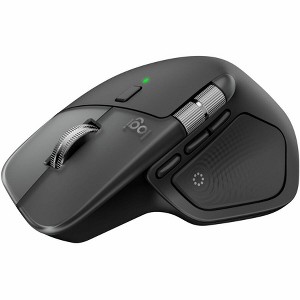
Logitech MX Master 4 for Mac Ergonomic Bluetooth Mouse, Advanced Haptic Feedback
$126.99
In Stock

Free & easy returns
Return this item in store within 30 days for a full refund.
Sold & shipped by Spacebound
Eligible for registries and wish lists
At a glance
About this item
Additional product information and recommendations
Discover more options
- $49.99reg $59.99 Sale
- $39.99reg $49.99 Sale
- $17.99 - $21.99reg $29.99 Sale5 out of 5 stars with 1 ratings
- $44.99reg $54.99 Sale3.6 out of 5 stars with 5 ratings







Frequently bought together
- $65.00 - $89.99Lower price on select items4.6 out of 5 stars with 22 ratings
- $330.99reg $375.00 Sale

Guests also viewed
- $49.99reg $59.99 Sale
- $149.99Get the Apple Magic Trackpad starting at $14/mo.
- $39.99reg $49.99 Sale
- $63.99 - $99.99Select items on saleGet the Apple Magic Mouse starting at $18/mo. on select items4 out of 5 stars with 30 ratings

Related Categories
Guests are saying
The MX Master 4 mouse offers a blend of advanced features and ergonomic design, making it a popular choice among guests. Many appreciate its comfortable fit, customizable buttons, and smooth operation. However, some guests have noted concerns about its grip and weight compared to previous models. Overall, it is seen as a solid upgrade for productivity, especially for those who work long hours on their devices.
Summary created by AI from text of reviews reflecting recent feedback provided across different star ratings (includes incentivized reviews)
4.4 out of 5 stars with 79 reviews
5 out of 5 stars
6 May, 2026
originally posted on Logitech

MX Master is a game changer!!
MX Master is a game changer even if you are upgrading from MX 2. Delibated a lot before taking the plunge and it is so much worth it. The soft clicks, the smooth scrolling and the very "usable" action button really enhances prdocutivity. Many customization options tailored for different appclaitions make it even more useful. Really recommend.
5 out of 5 stars
25 April, 2026
originally posted on Logitech
Excellent product
Best mouse I’ve purchased thus far for MacBook Pro
3 out of 5 stars
21 April, 2026
originally posted on Logitech
Not as ergonomic
The original MX mouse fit my hand much better. Features are fine, just not as ergonomic.
5 out of 5 stars
8 April, 2026
originally posted on Logitech
Great, with reservations
The new MX Master works wonderfully. I'm a little upset that I had to buy a new mouse for my new MacBook Pro, because I already owned two MX Masters. Now I own three, and one is a paperweight.
5 out of 5 stars
6 April, 2026
originally posted on Logitech
The "mouse" that ROARED
What a wonderful tool to ease the frustration of trying to interface with my Mac. I enjoy the features of this "mouse" that continually make my like easier. Every MAC user absolutely should have one.
5 out of 5 stars
24 March, 2026
originally posted on Logitech
Fixed my non-Apple Logitech MX Master 3 mouse issue with my MAC
Perfect for Apple devices and should fix any issues you maybe experiencing
5 out of 5 stars
1 March, 2026
originally posted on Logitech
Excellent product
Really nice. should have purchased the Windows version. That is only because it would have come with a “dongle” all for the same price. It would make the Mac version of this a little more versatile! The product itself is very nice versatile app that allows for more customization.
5 out of 5 stars
27 February, 2026
originally posted on Logitech
Top Quality Product
Great product design and functionality. This is a top quality product
4 out of 5 stars
23 February, 2026
originally posted on Logitech
Great function, ergonomics, so so
I have the old M720 and it's still my favorite. Had it for years now. I got the MX Master 4 because I thought it would be helpful to have the side scroll for Sketchup. It doesn't work with Sketchup without significant customization that I found too onerous compared to my tried and true workarounds. I like the heft of the MX Master, but the placement of the buttons are not as convenient as the M720, and I don't see any significant functional advantage either. Good mouse and if it fits your hand and habits.
5 out of 5 stars
31 January, 2026
originally posted on Logitech
Amazing!
Love this mouse! I was having hand cramping with a cheap mouse and this one has taken that away!
5 out of 5 stars
25 January, 2026
originally posted on Logitech
Useful keeper
Comfortable fit. Long lasting charge. Highly configurable.
5 out of 5 stars
19 January, 2026
originally posted on Logitech
MX 4 Master
MX 4 Master - Best Everyday mouse period. Don't even bother trying to find an alternative .
1 reply from Logitech Team team - 4 months ago
We're thrilled to hear that you're enjoying your MX 4 Master mouse! Thank you for the positive feedback, we always strive to provide the best products for our customers
2 out of 5 stars
5 January, 2026
originally posted on Logitech
A step down
The MX 3 was a perfect mouse and it's successor had a lot to live up to. I've been using these for maybe a decade now and this is the only one that's really been difficult to use. The programmed in widget wheel isn't as useful as the button it moved (see all windows) and frequently clutters up the screen, often opening finder or settings when unneeded. The button is sensitive, and the far button to navigate windows is unnatural to the point where it feels like an oversight to move it. The USB C charging is nice.
1 reply from Customer Care team - 3 months ago
Sad to know that the device did not live up to your expectation We hear you about the Actions Ring. We'll make sure to pass this along to our developers for their future consideration.
2 out of 5 stars
29 December, 2025
originally posted on Logitech
Apple Mail Issue
In Apple mail it frequently loses connection so I’m unable to operate in the Apple mail environment. It’s interesting to note that it ONLY happens in Apple mail, no other application.
1 reply from Customer Care team - 3 months ago
Thanks for calling this out. Losing functionality in a specific app like Apple Mail is understandably frustrating and shouldn't happen. If this issue is still ongoing, please contact us at socialcare@logitech.com so our team can investigate and assist you directly.
5 out of 5 stars
24 December, 2025
originally posted on Logitech
BD gift
Bought as a gift for my techy son. He was excited to receive it as this was an upgrade from your previous model.
1 reply from Customer Care team - 3 months ago
Glad to know that! The MX Master 4 is definitely a worthy upgrade over previous models. The mouse has a haptic sense panel that offers immersive control and precision you can feel with customizable haptic feedback.
4 out of 5 stars
8 December, 2025
originally posted on Logitech
Not as comfortable as MX3
Functionally - it's good. However, the MX3 was more comfortable to hold thanks to the curvier shape on the top. The MX3 was filling more naturally - this one doesn't. Not sure why Logitech decided to drop the tried and tested design.
4 out of 5 stars
25 November, 2025
originally posted on Logitech
Trying to get a grip on this mouse.
In the past, I owned a Logitec MX Master 2S. This one works just great, and admittedly, I haven't tried to use any of the new, latest tech features; just pointing and clicking. I liked the grip on the old one better. With this unit, it almost feels like my thumb is going to slip off the edge of the mouse. Maybe that was intentional in the design, but, just saying, it is consequently, a less comfortable feeling holding it when lifting it up off the desktop. Otherwise it is a great mouse! Maybe only half a star off of 5 would be more accurate.
5 out of 5 stars
23 November, 2025
originally posted on Logitech
Great Mouse
Upgraded to the 4 and still learning the features but it has helped me greatly and fits my hand wonderfully. I have always been a Logitech fan for years.
5 out of 5 stars
18 November, 2025
originally posted on Logitech
GOATed
The best productivity mouse. I always get the newest generation as soon as it comes out, and it always delivers. Comfortable, connects to multiple devices, good tracking. 10/10
5 out of 5 stars
18 November, 2025
originally posted on Logitech
A welcome upgrade
I upgraded from my MX 3 to the 4. Same quality as before along with outstanding performance.