Sponsored


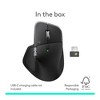
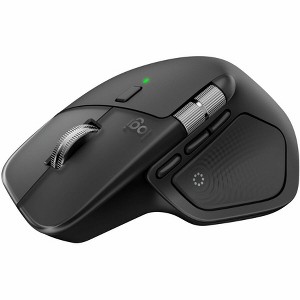
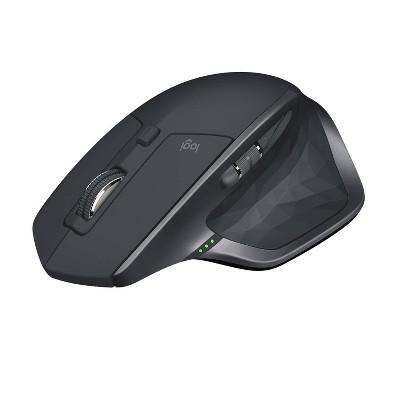
Logitech MX Master 4 Ergonomic Wireless Mouse Black 910007560
New at target
$132.99
In Stock
Eligible for registries and wish lists
Sponsored
About this item
Description
Logitech MX Master 4 Mouse (Bl
Dimensions (Overall): 5.6 inches (H) x 2.3 inches (W) x 6.6 inches (D)
Weight: .6 pounds
Electronics Condition: New
Connection Type: USB-C
Wireless Technology: Radio Frequency
Primary use: Home
Number of buttons or keys: 8
Battery: Required, Non-Removable
TCIN: 1008322207
UPC: 097855207524
Origin: imported
The above item details were provided by the Target Plus™ Partner. Target does not represent or warrant that this information is accurate or complete. On occasion, manufacturers may modify their items and update their labels.
We recommend that you do not rely solely on the information presented. If you have a specific question about this item, you may consult the item's label, contact the manufacturer directly or call Target Guest Services at 1-800-591-3869.
If the item details aren’t accurate or complete, we want to know about it.
Shipping details
Estimated ship dimensions: 6.6 inches length x 2.3 inches width x 5.6 inches height
Estimated ship weight: 0.6 pounds
We regret that this item cannot be shipped to PO Boxes.
This item cannot be shipped to the following locations: American Samoa (see also separate entry under AS), Guam (see also separate entry under GU), Northern Mariana Islands, Puerto Rico (see also separate entry under PR), United States Minor Outlying Islands, Virgin Islands, U.S., APO/FPO, Alaska, Hawaii, American Samoa (see also separate entry under AS), Guam (see also separate entry under GU), Northern Mariana Islands, Puerto Rico (see also separate entry under PR), United States Minor Outlying Islands, Virgin Islands, U.S., APO/FPO
item ships from third party seller: Spacebound
Return details
This item must be returned to any Target store.
This item must be returned within 30 days of the date it was purchased in store, shipped, delivered by a Shipt shopper, or made ready for pickup.
See the return policy for complete information.
WARNING: This product can expose you to chemicals which are known to the State of California to cause cancer and birth defects or other reproductive harm. For more information, go to www.P65Warnings.ca.gov For more information, go to https://www.p65warnings.ca.gov/
Guests also viewed
$79.99
reg $99.99 Sale
$179.99
$55 Target GiftCard with 1 select Logitech gaming mice
4.6 out of 5 stars with 178 ratings
Highly rated
$170.99
reg $179.99 Sale
$55 Target GiftCard with 1 select Logitech gaming mice
4.6 out of 5 stars with 175 ratings
Discover more options
$84.99
reg $99.99 Sale
Related Categories
4.5 out of 5 stars with 216 reviews
4 out of 5 stars
30 December, 2025
originally posted on Logitech

Still one of the best productivity mice available.
MX Master continues to be top notch. Hyper-scroll is a game changer when working with long lists and multi page documents. Comparing to previous MX Masters: I find the haptics to be pointless but I like that the thumb button was changed from press-down to press-in. The new forward & back buttons are less prominent, which I don't care for - with the MX Master 3 they protrude slightly more and offer some traction in lift-and-reposition operations when you're moving the cursor across multiple screens and need to "take another bite" without repositioning your wrist.
5 out of 5 stars
27 December, 2025
originally posted on Logitech
Super Comfortable Mouse
Love this mouse, super comfortable. Only wish I had bought it sooner.
5 out of 5 stars
27 December, 2025
originally posted on Logitech
Amazing.
I stat using Logi MX since the second version. And this version is amazing
3 out of 5 stars
24 December, 2025
originally posted on Logitech
Changed things that didn't need changing
The removal of the grip style and material from what the 3 and 3S have was a huge mistake, it's borderline impossible to move smoothly now, I think we underestimate how much we subtly PICK UP the mouse while moving it. And while I was really excited about the move of the thumb button from the surface to being a button, because we all know that the pushing with the side of the thumb isn't easy, I wish MORE so that it hadn't moved the front/back buttons so much, because it was hard to use any of them with how they are placed, and I use those buttons so much I forget other mice don't have them. IF anything, I wonder if making that "thumb" button rather be a button below the track-wheel scroll button, so wheel -> button -> button, and shrinking the size of those buttons by a third, would be more ergonomic and much easier to use while not being in the way if the second button ENDS at the same place as the current button.
5 out of 5 stars
24 December, 2025
originally posted on Logitech
The perfect mouse for me
This is the perfect mouse for me. It is very well constructed, has the right number of features/buttons, is the right weight (of all things), and so on including presets for various apps that I use frequently, and allows customizing for my specialty app SketchUp. It fits my hand. I guess as a further plus - I upgraded to the MX4 from a MX3 that I then setup for my wife.
5 out of 5 stars
24 December, 2025
originally posted on Logitech
Logitech people had when they said HAPTIC
I really enjoy using my MX MASTER 4. The quick access with the buttons and the wheel are two of the main perks of this mouse not to mention it had Haptic Features.
4 out of 5 stars
22 December, 2025
originally posted on Logitech
Nice product with one flaw that vexes me
I like this mouse and the rotary menus are great. I've been using MX Master mouses for years and they are always great. Everything about this is nice except that I continuously hit the thumb button when I pick up the mouse to move it (which I do often). I liked it better when it took more of a downward pressure instead of a lateral pressure to actuate it. I keep thinking I'll get used to it but after a month I'm still accidentally triggering the rotary menu when I lift the mouse.
5 out of 5 stars
22 December, 2025
originally posted on Logitech
MX Master 4
MX Master 4 is a nice addition to my home office. Very quiet and multi-functional.
3 out of 5 stars
21 December, 2025
originally posted on Logitech
Linux Drivers when?
Linux Drivers when? There is no official Linux support. Why?
4 out of 5 stars
19 December, 2025
originally posted on Logitech
It is a great comfortable mouse. Do recommend
Has great connectivity with Mac. It is ergonomic. It works great even without a mousepad. I would say that the new ring functionalities are still in development and I don't have that much of a use for them, nonetheless, it is great to see attempts of innovation without disrupting existing applications. Certainly a great product.
2 out of 5 stars
19 December, 2025
originally posted on Logitech
Good but broken..
Not bad but quality is questionable. Side button hardly works unless pressed super hard. Hand position is awkward for reaching side buttons.
5 out of 5 stars
19 December, 2025
originally posted on Logitech
Logitech MX Master 4 Review: The Best Gets Better (Small Caveat)
After three months of daily use across work, freelance web design/scripting/video editing, and general productivity, I can confidently say the MX Master 4 is the best mouse on the market. Coming from the MX Master 3, Microsoft mice, and the occasional stint with Apple's Magic Mouse, the MX Master 4 immediately impressed me with its build quality and refined performance. The tracking is superb—precise and consistent across every surface I've thrown at it. The scroll wheel remains a standout feature with excellent feel and the new haptic feedback adds a satisfying tactile response that enhances the experience without being gimmicky. Comfort is where this mouse truly excels. It fits the hand naturally and supports long work sessions without fatigue. Battery life has been excellent, and Bluetooth connectivity was seamless once initially paired. The multi-device switching is a genuine productivity booster for anyone juggling multiple computers. My only critiques are minor. The thumb button, while well-executed, simply isn't part of my workflow—and I occasionally trigger it when repositioning the mouse or pushing it rightward, which gets slightly annoying. Additionally, the top profile of the mouse rises to a sharper angle than previous versions. It's not uncomfortable, but it's right at the threshold of being uncomfortable. Any further and it would start pressing into the wrist in a way that detracts from the ergonomics. These are small observations on an otherwise outstanding product. If you're in the market for a premium productivity mouse, the MX Master 4 sets the standard.
5 out of 5 stars
18 December, 2025
originally posted on Logitech
Amazing Experience!
The Logitech MX Master 4 is hands down the best mouse I’ve ever used. The sleek black design feels premium, and the ergonomics are perfect for long hours of work or gaming. The scroll wheel is incredibly smooth and precise, while the customizable buttons make multitasking effortless. Battery life is outstanding—I barely have to think about charging it. The wireless connection is rock‑solid with zero lag, and switching between multiple devices is seamless. This mouse has truly elevated my productivity and comfort. Logitech nailed it again—worth every penny!
5 out of 5 stars
18 December, 2025
originally posted on Logitech
Premium feel
Premium build feel. Has extra gadgets I don't use, but they do not feel like a burden to have. I do not accidentally press the extra buttons really.
5 out of 5 stars
17 December, 2025
originally posted on Logitech
An improvement on the already fantastic MX series
I didn't look for improvement on my previous MX mice, but Logitech did it. The clicks are so quiet, which I didn't really like at first. But I quickly got used to it, because my other MX mice now sound cheap and clicky in comparison. The thumb rest has a button that I don't use, and it's easy to click when moving the mouse to the right. It brings up a nice context menu. I am sure you can disable it with the Options software, but I have left it on because it isn't in the way and I may learn to use it. I will give it a chance. The mouse overall is very smooth and comfortable.
1 out of 5 stars
15 December, 2025
originally posted on Logitech
Very expensive mouse that I cannot use.
DO NOT BUY THIS MOUSE. The software does not work on Mac. I tried a few different computers. Updates, evrything. Their software does not work on the most current version of macOS. a lot of people are talking about that, and no official solution
5 out of 5 stars
14 December, 2025
originally posted on Logitech
Worthwhile purchase for a frequent computer user
Smooth feel, great on the wrist. A great investment if you’re on the computer for a few hours a day!
4 out of 5 stars
14 December, 2025
originally posted on Logitech
Excellent Mouse
I purchased this mouse alongside a new laptop, and I'm pretty pleased with the functionality of the mouse. It is very customizable, and you can assign different functions to the buttons. The horizontal scroll is very cool as well. The only issue I have is that the haptic feedback button is a little laggy. It usually takes about 2-3 seconds for the menu to pop up after clicking the haptic button. For this reason, I don't really use this feature. If it were to be instant I would use it. The other great thing about this mouse is that I have large hands, and this is the only mouse I've ever had where my fingers didn't hang off the front, so that's very nice. Great mouse overall!
5 out of 5 stars
13 December, 2025
originally posted on Logitech
MX Master 4
This would be the first mouse I've bought honestly. i wanted something to match my keyboard but also no make my wrist tired or pain. I've been using this for about 2 months now and its been amazing i love how fast it scrolls and stops, the click are so quite. i also work as a salesmen so i use this everyday with no problem
4 out of 5 stars
13 December, 2025
originally posted on Logitech
Love the product want more prebuilt profiles.
I love the feel and functionality of the mouse. My only complaint is the action ring functions so far have limited profiles already built and can be slow to appear. It would be nice if users could share their profile builds to make expanding the functionality quicker. Other wise the mouse is great!