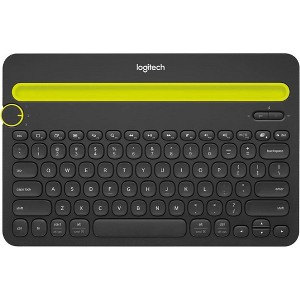
Logitech - K480 Wireless Multi-Device Keyboard
$29.99 reg $49.99
Sale save $20.00 (40% off)
In Stock

Free & easy returns
Return this item by mail or in store within 30 days for a full refund.
Sold & shipped by KIDS VOICE TOYS
Eligible for registries and wish lists
At a glance
About this item
Additional product information and recommendations
Discover more options
- $168.99reg $239.99 Sale
- $229.99

Frequently bought together


Guests also viewed
- $89.99reg $99.99 Sale
- $36.79 - $45.99Lower price on select items4.4 out of 5 stars with 23 ratings
Related Categories
Guests are saying
The K480 keyboard is a versatile and compact device that enhances typing on various devices, including phones and tablets. Guests appreciate its sturdy build, ease of setup, and comfortable typing experience. However, some have noted issues with key responsiveness and a sticky instruction strip that detracts from its overall appeal. Despite these concerns, many guests find it to be a reliable and valuable addition to their tech setup.
Summary created by AI from text of reviews reflecting recent feedback provided across different star ratings (includes incentivized reviews)
4.0 out of 5 stars with 25 reviews
quality: 4 out of 5
value: 5 out of 5
50% would recommend
2 recommendations
4 out of 5 stars
13 October, 2025
originally posted on Logitech

Perfect keyboard for my phone
I bought this to type on my phone and its perfect! Its easy to set up and small enough to fit in my purse but big enough to comfortably type on. The ridge holds my phone so I don't have to lean it on anything which is really convenient. The keys are pretty loud but i kinda like the clicking so I don't mind, but it is a bit much for typing in public. It's a really great keyboard though, it's exactly what i needed
2 out of 5 stars
Thumbs down graphic, would not recommend
12 May, 2025Verified purchase
Doesn't turn off
There's a switch in the back where it's supposed to turn off the keyboard but my keybpard still stays on and drains the battery. It is a hefty keyboard but not very convenient to carry around.
4 out of 5 stars
13 April, 2024
originally posted on Logitech
Bluetooth Multi-Device Keyboard K480 -RK
[This review was collected as part of a promotion.] I love the features of the K480 keyboard, the keyboard takes a little getting used to but works well. My only complaint - and I consider it horrible, is the strip with the instructions that are glued to the keyboard above the keys. I tried to remove it after I read it once and removing it was a terrible experience. A horrible glue was used and I tried soap, ammonia, detergent, vinegar to no avail the keyboard remained sticky and a mess. I was so annoyed I was tempted to return it. I finally went out an bought Goo Gone and it worked to remove the sticky residue. That section of the keyboard does not look like the rest. It is not sticky but the outline of the strip remains - probably forever. I told my sister, who was very interested in buying one, and she changed her mind. I love the functionality of switching but I highly recommend you no longer but the sticky strip of instructions. a slip of paper will do just fine. Your users are not stupid enough that we need the simple instructions there forever. Sorry for the harsh review but I was really upset with a great product R Kennedy PS I will give the pebble mouse 5 stars
4 out of 5 stars
Thumbs up graphic, would recommend
29 December, 2023Verified purchase
A great device!!
The product is sturdy and well-built. It works great and will meet my needs exactly. The reason I didn't give it a five star is it seems like sometimes all the key stikes don't work. It's as if I'm typing to fast and the keyboard can't keep up. I've only had the product for a few days so I'm working on seeing if resets help, etc.
5 out of 5 stars
14 July, 2023
originally posted on Logitech
Best overall!
My favorite in terms of ease of use and design. I had one for too many years but suddenly two keys stopped working. Purchased it again and I’m happy with it!
2 out of 5 stars
2 June, 2023
originally posted on Logitech
Had it for About a year
I would love this, but the keys are and always have been so hard to push. I feel like I have to slam each key, some are worse than others. Because of this it makes typing harder, louder, and takes longer.. with more mistakes. It’s disappointing and I’m looking for a new keyboard and afraid to use Logitech for this reason. Reading other reviews, I wonder if I just got a dud?
1 reply from logitech-inc team - 3 years ago
Hi Rachel, Thank you for your review - we're sorry our K480 Bluetooth Multi-Device keyboard did not meet your expectations. We will pass your feedback along to our team. We always want to ensure we are providing our customers with the best products and experience. If you need additional assistance, we will be happy to help at https://support.logi.com/
2 out of 5 stars
18 May, 2023
originally posted on Logitech
K480 Keyboard won't turn off.
Since new, the on/off button doesn't work. It's just always on. I have to flip one of the batteries backwards before I put it in my backpack or else the batteries will go dead. I contacted support, but they refused to talk to me unless I sent them a video of my keyboard not turning off. Stupid. Now, the two buttons to the left of the space bar are swapped. Super annoying. I came here to see if a driver update was available, but it doesn't look like it.
1 reply from logitech-inc team - 3 years ago
Hi Tony, Thank you for your review - we're sorry to hear you're having issues with our Bluetooth Multi-Device Keyboard K480. This is not the experience we expect. To continue with our service, be on the lookout for contact from our team. Our team will reach out to you shortly via a support ticket. We would like to thank you again for your feedback.
3 out of 5 stars
10 May, 2023
originally posted on Logitech
Works as advertised. Not as
Works as advertised. Not as well-made as I would expect from logiitech.
1 reply from logitech-inc team - 3 years ago
Hi David, Thank you for your review - we're sorry our Bluetooth Multi-Device Keyboard K480 did not meet your expectations. We will pass your feedback along to our team. We always want to ensure we are providing our customers with the best products and experience. If you need additional assistance, we will be happy to help at https://support.logi.com/
5 out of 5 stars
9 May, 2023
originally posted on Logitech
Great leyboard
This was a birthday gift for someone and I’ve heard nothing but great feedback. Setup was easy. Keyboard is nice looking and comfortable to use.
5 out of 5 stars
17 February, 2023
originally posted on Logitech
A workhorse, a gem, a great deal
I found this little thing at a warehouse store at half price on a closeout deal about 7 years ago. Had never heard of such a thing but had heard of Logitech and used their products, so it was a no-brainer purchase. Am I ever glad I did. Greatly added ease of use on my tablet. I originally liked the idea that I could use it on my phone as well, but have found that it pretty much stays with the tablet. I use it and the tablet now more than I use the desktop. The poor desktop feels abandoned. This little keyboard is my laptop, my main device, my remote control for the TV (Streaming videos via Chromecast) and a lot more. I'm very surprised for the amount of daily use it gets that it has lasted this long. Battery life seems to be very long as well. I think I may have changed batteries only 2 or 3 times so far.
5 out of 5 stars
18 January, 2023
originally posted on Logitech
keyboard mi amor
I was only looking for a cheap replacement when I first noticed the K480. It stood out, laying next to dozens of fancier models, all with inflated prices and most of them included a wireless mouse. My low expectations were not let down when I opened the box. I must say that I am impressed. Especially with the peel off band-aid instructions grabbing my attention and the ease of set up has kept it going strong. Thank you for your product!!!
5 out of 5 stars
29 December, 2022
originally posted on Logitech
Best Deal in Keyboards
I have all sorts of expensive keyboards, but I keep this one handy at all times. It is amazingly sturdy and works flawlessly. I often use it to type on my iPhone. And, you cannot beat the price. Just an incredible value.
1 out of 5 stars
21 December, 2022
originally posted on Logitech
Reşat problem
I cannot ad a net tablet instead of an old öne. I sold mu old android tablet and my old Windows comp. I bought new Öner but I did not sürçesin to şair them with my k480. I tried many saysan to resetit according to prosedürse…. I failde :pensive:
5 out of 5 stars
24 November, 2022
originally posted on Logitech
Rock solid, long battery life, works as advertised.
I’ve had this for years. I love it and never go on a trip without it. I mainly use it with my iPad, though I’ve typed an entire college research essay on a Galaxy Tab using this. The keys feel nice, the special iPad-specific functions work brilliantly - I can’t think of a bad thing to say about. I suppose, after having it so long, the plastic case kinda bends and creaks a little if I have my iPad loaded in and then I try to pick up or carry the whole setup by the corner (but this is to be expected). Nevertheless, it still feels perfectly solid. I have zero fear that this will ever break physically or stop working electronically. Kinda makes me mad, actually, as I love new gadgets but I’ll probably never have a reason to buy another portable Bluetooth keyboard. Also, the battery lasts forever. I’m not sure I’ve ever changed the batteries. I’m pretty conscientious about turning it off when I’m not using it, though. As such, it would be nice if the next model has an easier to access power switch; but I can only imagine this has an automatic power-off function when not used for a few minutes and wakes up when you press a key. Bottom line: Love it.
5 out of 5 stars
9 May, 2022
originally posted on Logitech
options software
I see options software for assigning the 1-12 f keys ?"unifying"?
4 out of 5 stars
1 January, 2022
originally posted on Logitech
Love this keyboard...
I've had the K480 for over two years and love it. Small footprint fits my desk and typing style perfectly. Only problem I have (and it's very bothersome) is I don't know what the top keys are for, example F1-F12. Also, I don't know how to find windows key (keys). Other than being in the dark about some of the features, I really like it.