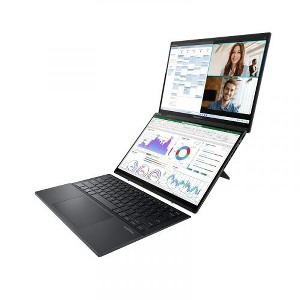
ASUS Zenbook Duo Dual 14" OLED WQXGA+ 120Hz Notebook Intel Core Ultra 9 185H 32GB RAM 1TB SSD Intel Arc Graphics Inkwell Gray
$1,744.99
Out of Stock
Eligible for registries and wish lists
At a glance
About this item
Additional product information and recommendations
Related Categories
Discover more options
Frequently bought together

Trending 2-in-1 Laptops
4.5 out of 5 stars with 121 reviews
quality: 5 out of 5
value: 5 out of 5
100% would recommend
1 recommendations
5 out of 5 stars
26 September, 2025
originally posted on https://www.asus.com

A master piece.
Whoever designed this laptop needs a raise. This is truly a master piece, the laptop it’s really a laptop, with the option to have 2 screens and a wireless keyboard????, take my money. I purchased the laptop a year ago and I am still happy with my purchase, if it breaks I will buy another one. By the way, did I mention that when I bought it came with a backpack and a pen for a laptop, which is a 2 touchscreen.
5 out of 5 stars
14 May, 2025
originally posted on https://www.asus.com
90 days extended warranty review
Loving it so far. futuristic design. 90 days extended warranty review.
1 out of 5 stars
7 May, 2025
originally posted on https://www.asus.com
After just 4 months, major battery/charging issues
This machine was fine for the first four months, but having just entered the fifth month of use, I'm now having major battery and charging issues. First, the dual screens are great (great resolution) and it operates fine, typically booting up quickly. It runs very hot (a concern), and the battery life has always been far less than promised (whatever). The worst issue, though, is that about a week ago, I started having major issues with battery life/charging. When the laptop is plugged in/charging (the battery indicator says "charging to full in XX time") and I'm using it, it DRAINS the battery instead of charging it. It will only charge when it is plugged in and not in use. This is ridiculous. In addition, the battery now drains from 100% to nearly 0% in less than 2 hours. This is inexcusable for a machine this expensive.
1 reply from CLM team - 9 months ago
Dear AKCBR, Thank you for your comment. We certainly understand your disappointment and the inconvenience this may have caused if you started having battery/charging issues after four months of usage. ASUS is an ISO certified company, as a result, all products go into a strict quality manufacturing standard. All ASUS products undergo intensive quality control testing and inspections that ensure each one is trouble-free, and are built to last. ASUS provides warranty coverage for the product. To improve or prolong the battery charged time, please try to do battery calibration manually. To start with, please drain it completely then charge it fully without using the system. Once fully charged, please use the system, without the AC adapter connected, and drain it completely again. Please repeat the charging process thereafter. Also, please check if this laptop is running with the most Windows, drivers and BIOS update. Updates for this laptop are available at: https://www.asus.com/us/laptops/for-home/zenbook/asus-zenbook-duo-2024-ux8406/helpdesk_bios?model2Name=UX8406MA. Keeping this laptop updated will maintain optimum power management, including battery usage. Additionally, no third-party battery draining applications are running in the background if not in use. If problem persist after following the troubleshooting tips, we recommend you send the product in for service to determine if this is a hardware issue so this may be resolved immediately. An RMA number is required to send it in for service. For RMA details, please go to: https://www.asus.com/us/support/article/818/. If you need further assistance with this product, please email me at cl-rodel@asus.com and I would be more than happy to help. Or, you are most welcome to call Product Support Hotline at: 1(888) 678-3688. Also, you can chat with an ASUS live support agent from the link: https://www.asus.com/us/support/article/1135/. Thank you for choosing an ASUS product. Regards, Rodel ASUS Customer Loyalty
5 out of 5 stars
3 May, 2025
originally posted on https://www.asus.com
Imagination.
Amazing craftsmanship, Ingenuity , and Science. Thank You.
5 out of 5 stars
1 May, 2025
originally posted on https://www.asus.com
Asus duo 2024
I haven't using it the most but in did interact the deal screen mode and desktop mode. And i really i like both modes. Its smooth when porting from one screen to another rather than dragging it between the cut off in the middle. Like the built in keyboard and touch pen makes it more convenient when the physical keyboard disconnected or misplaced. Very worth of looking into it for students, graphic designers, and programming.
3 out of 5 stars
2 April, 2025
originally posted on https://www.asus.com
Slow in performance
It starts getting slow now. Alot of 3rd party program installed.
1 reply from CLM team - 9 months ago
Dear Kenny P, Thank you for your comment. We do understand your disappointment with the laptop and the inconvenience this may have caused if you started experiencing slow system speed or performance. To resolve the speed issue, ensure Windows, drivers, BIOS and applications are always up to date. Keeping the laptop updated will maintain optimum system stability and performance. Updates for this laptop are available at: https://www.asus.com/us/laptops/for-home/zenbook/asus-zenbook-duo-2024-ux8406/helpdesk_download?model2Name=UX8406MA . Additionally, while accessing web applications, please ensure the unit has access to an established router and internet service is working properly since poor and unstable internet connection will definitely affect system speed and performance. Also, clearing internet cache or browsing history will improve system performance. If these steps were performed to no avail, please try to run a diagnostics or optimization test using the "My ASUS" utility software or application. If this is not pre-installed on the laptop, please download the application at the Microsoft Store. For details on how to use "My ASUS", please go to: https://www.asus.com/support/FAQ/1041686/. If you need further assistance with this laptop, please email me at cl-rodel@asus.com and I would be more than happy to help. Or, you are most welcome to call Product Support Hotline at: 1(888) 678-3688. Also, you can chat with an ASUS live support agent from the link: https://www.asus.com/us/support/article/1135/. Thank you for choosing an ASUS product. Regards, Rodel ASUS Customer Loyalty
5 out of 5 stars
22 February, 2025
originally posted on https://www.asus.com
ASUS Zenbook DUO (2024) UX8406
Outstanding laptop; Small form factor with lots of display
5 out of 5 stars
21 February, 2025
originally posted on https://www.asus.com
You get what you pay for! Awesome!
Beautiful, fast, very high quality. Really amazing!
1 out of 5 stars
15 February, 2025
originally posted on https://www.asus.com
Still fixing it.
I was very mjch motivated with this computer. Just started using it yesterday, but second display doesn't activate at all. Still trying to fix it. Also, keyboard doesn't seem to be connecting fine with Bluetooth. Will try to fix it as soon as possible. Hope can be solved quickly. So I can't still rate this computer. Hope not to be disappointed by the product.
1 reply from CLM team - 10 months ago
Dear ArtBC, Thank you for your comment. We do understand your disappointment with the product and the inconvenience this may have caused if are having issues with the laptop. To resolve the issue with the send display, check if the "Switch on the second screen" function is enabled in the ScreenXpert application or within Windows Settings > System > Display > Multiple displays, then select "Detect". To resolve the keyboard connection problem, install the Bluetooth driver posted at: https://www.asus.com/us/laptops/for-home/zenbook/asus-zenbook-duo-2024-ux8406/helpdesk_download?model2Name=UX8406MA , and ensure Windows is up to date. Should you need further assistance with the product, please email me at cl-rodel@asus.com and I would be more than happy to help. Or, you are most welcome to call Product Support Hotline at: 1(888) 678-3688. Also, you can chat with an ASUS live support agent from the link: https://www.asus.com/us/support/article/1135/. Thank you for choosing an ASUS product. Regards, Rodel ASUS Customer Loyalty
5 out of 5 stars
10 February, 2025
originally posted on https://www.asus.com
ASUS duo 🤯🤯 wow!!!
The ASUS duo Was the Best Upgrade I could’ve possibly made. The dual screen is perfect for my new cyber security career if you’re looking for a fun slick and cool laptop this is the one to go to. I’d give it 10 stars if I could.
5 out of 5 stars
6 February, 2025
originally posted on https://www.asus.com
Powerful dual screen laptop
I love my new ASUS Zenbook DUO (2024) UX8406, can do all my tasks easily and fast!
5 out of 5 stars
4 February, 2025
originally posted on https://www.asus.com
Game Changer
Absolutely a game changer! Crisp video, fast, responsive and well built.
5 out of 5 stars
27 January, 2025
originally posted on https://www.asus.com
Love it
Love this computer. It makes multi-tasking so much easier
5 out of 5 stars
18 January, 2025
originally posted on https://www.asus.com
The best computer ever
This computer makes stuff easy for me I don't need a lot installation to setup my work station. I have everything I need I hope to give an another review in the next 6 month for now it all good.
5 out of 5 stars
17 January, 2025
originally posted on https://www.asus.com
Sleek design with light weight and high performanc
The design is good, performance is amazing and all the features are great. Great power house for students and no heating or any issues for such a powerful laptop
2 out of 5 stars
13 January, 2025
originally posted on https://www.asus.com
A bit of a disappointment
A bit of a disappointment. Frist the positive, I love the double screen and the OLED. Now the negative. When connected to a docking station with 3 HDMI ports it will not keep them as set. It takes restarting the laptop and removing the docking station a couple of time for it to detect the additional monitors. Also, it seems to be limited to only showing 4 total monitors A 5th will be detected but unusable This will last for about 24 hours then you have to do it again. Biggest issue I work with spreadsheet all day long and the computer is very sluggish and freezes constantly. You have to wait for it to catch up. The external mouse does the same thing. The keyboard mouse does work well. I have 32 GB of ram 64-bit system it doesn't seem to have the horsepower.
1 reply from CLM team - 1 year ago
Dear Hotel Guy, Thank you for your feedback. We do understand your disappointment and the inconvenience this may have caused if you are having issues with this laptop. To resolve these issue, check if Windows, drivers and BIOS updated. Updates for this laptop are available for download at: https://www.asus.com/us/laptops/for-home/zenbook/asus-zenbook-duo-2024-ux8406/helpdesk_bios?model2Name=UX8406MA . Keeping the laptop updated will maintain optimum system stability and performance. Additionally, while accessing web applications, please ensure the laptop has access to an established router and internet service is working properly since poor and unstable internet connection will definitely affect system speed and performance. Also, clearing internet cache or browsing history will improve system performance. If these steps were performed to no avail, please try to run a diagnostics or optimization test using the "My ASUS" utility software or application. If this is not pre-installed on the laptop, please download the application at the Microsoft Store. For details on how to use "My ASUS", please go to: https://www.asus.com/support/FAQ/1041686/. If you need more information or further assistance with the warranty for the product, please email me at cl-rodel@asus.com and I would be more than happy to help. Or, you are most welcome to call Product Support Hotline at: 1(888) 678-3688. Also, you can chat with an ASUS live support agent from the link: https://www.asus.com/us/support/article/1135/. Thank you for choosing an ASUS product. Regards, Rodel ASUS Customer Loyalty
4 out of 5 stars
8 January, 2025
originally posted on https://www.asus.com
What it needs
Cons: 1. The top screen should have folded all the way back, to use as a tablet mode. 2. Also if the keyboard could fold in half to just have it as keyboard for use with external mouse could have helped to save desk space when detached from the laptop. 3. Additional usb-c and/or usb-a ports on the right side would have been a plus.
5 out of 5 stars
1 January, 2025
originally posted on https://www.asus.com
Recommended and dont think twice
Everything is good ….I dont believe dell or lenovo can offer anything that asus offers in todays time… very unique laptops … good sound and sturdy laptops… but i believe if it is possi to provide i9 14h gen processor with this model … Also i would like to say that i have another 14x oled model of asus … in this 1.5 years i guess i hardly restart for updates and never shutdown… still the battery life is extremely good …one of the main reason to love asus
5 out of 5 stars
31 December, 2024
originally posted on https://www.asus.com
VERY VERY pleased with Laptop.
So far VERY VERY pleased with this sleek, well designed, innovative and sort of magical dual screen with magnetic keyboard laptop. Excellent job ASUS Teams. Kudos to all of you at ASUS.
5 out of 5 stars
Thumbs up graphic, would recommend
31 December, 2024
Ryan
Such a great greatest great great great laptop