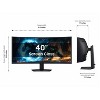
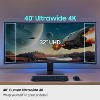
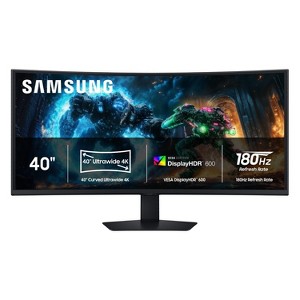
Samsung Odyssey G7 G75F 40" 4K HDR 180 Hz Curved Ultrawide Gaming Monitor
$1,199.99
In Stock
Eligible for registries and wish lists
About this item
Additional product information and recommendations
Discover more options
Guests also viewed
4.8 out of 5 stars with 21 reviews
5 out of 5 stars
28 December, 2025
originally posted on Samsung US

Looks amazing from different angles and a distance
I am genuinely impressed by this display. Great viewing angles and has replaced my 50 inch tv as well that was behind my monitor on the wall. Don't need it anymore this looks better from many feet away with no distortion at all. Would not believe this was a va panel if I didn't already know it was for s fact. Hdmi can't output 5k2k so im at 1440p 21:9 and it looks amazing for 4k hdr content. Productivity is great, text is sharp, just play with the color settings and reduce brightness for better blacks. Love the curve, thought I wanted 1800 or flat, now I definitely know 1000 is the move, kinda want even more of a curve, it's definitely not that prominent, like it's noticable but somehow distorts in your vision less than a flat screen. Hard to explain or photograph, has to be seen in person. Only getting 60 fps til my usb c to display port adapter comes in over hdmi, could lower resolution for 120 over hdmi, but 60 is fine for now. Just a limitation of hdmi 2.0.
1 out of 5 stars
22 December, 2025
originally posted on Samsung US
Text are TINY on Mac, No HiDPI support at 5k2k
It is a great display and very lightweight. However, if you work with a Mac, you probably want to get something else instead. Mac's can't display in HiDPI mode at the max resolution, so you end up with very tiny texts that is harder to read. It sort of defeat the whole purpose of getting a big screen.
1 reply from -Samsung team - 27 days ago
Thank you for your review. Samsung is committed to providing the best possible product experience, quality, and value. Samsung greatly values our customers’ feedback and we utilize your concerns and opinions in our relentless efforts towards delivering world-class products. We are very sorry to hear this product didn't meet your expectations and hope to have you back as a customer again. If there is anything we can do to assist you and improve your product experience, please don't hesitate to contact Samsung Customer Support via: 1-800-SAMSUNG, available 8AM - 12AM EST (Mon-Fri) / 9AM - 11PM EST (Sat-Sun)
5 out of 5 stars
25 October, 2025
originally posted on The Insiders

Rocking Gaming Monitor
[This review was collected as part of a promotion.] This is a sick monitor for gaming. Ultrawide in 40 inches is rare and above 1440p is even rarer. This is basically a stretched 4k monitor which makes for amazing graphics and colors. The HDR works good enough for videos and gaming, and the low latency means gaming without blur. The Stand is sturdy enough to not need a mount on my desk too. Overall a fantastic monitor at 180hz
5 out of 5 stars
22 October, 2025
originally posted on The Insiders
Excellent quality
[This review was collected as part of a promotion.] This is a big curved gaming monitor that looks amazing and feels super smooth to use. The picture is sharp, colors are bright, and the curve really pulls you into games. The 180Hz refresh rate makes everything fast and fluid. Great for gamers who want an immersive, high-quality display.
5 out of 5 stars
18 October, 2025
originally posted on The Insiders
Best purchase thus far this year
[This review was collected as part of a promotion.] Honestly I was a little worried with how large the screen was at first but WOW has it been a blessing. It looks incredible on my gaming / work desk! I initially got this for gaming - set it up and used it for work use the first day - productivity skyrocketed ! No more swapping from tab to tab or window to window - i had all information needed for my entire work day at my finger tips. Our point of sales, schedule, client file, calculator, documents . It was a complete dream! That night I set it up for gaming and got to see maybe 5 minutes of the graphics and refresh rate before having to go out of town on short notice - however it was impressive. Graphica were so crisp and everything is much more detailed than my usual platform of gameplay. 10/10
5 out of 5 stars
18 October, 2025
originally posted on The Insiders
Amazing Monitor
[This review was collected as part of a promotion.] This monitor was very easy to setup and start using. The size of this monitor is enough to accommodate gaming and work/school needs. The curve of the monitor offers easiness to the eyes and functionality for viewing. Samsung delivers great products and this is another example of one. Great monitor overall!
5 out of 5 stars
17 October, 2025
originally posted on The Insiders
one of the best monitor purchases I’ve made
[This review was collected as part of a promotion.] I recently upgraded to the Samsung 40″ Odyssey and I am impressed by the quality and size. The curve wraps around your field of view, making everything feel more immersive. The sleek design with ambient lighting with the RGB ring on the backlight adds flair. I also like the multiple ports to plug in different cables needed without and extension plug. Quick movements on the game are thanks to the high refresh rate and 1 ms response time.
5 out of 5 stars
17 October, 2025
originally posted on The Insiders
Best of both worlds
[This review was collected as part of a promotion.] this monitor is a beast! It can handle anything you throw at it. This monitor has clear clarity, vibrant colors, and can handle even everyday tasks. It makes reading multiple documents at a time super easy and really enhances the gaming experience to make it immersive. The DID/PIP feature also makes using 2 computers/2 inputs simple.
5 out of 5 stars
17 October, 2025
originally posted on The Insiders
Samsung Odyssey G7 40'
[This review was collected as part of a promotion.] What a fantastic monitory to pull you into the game! This new G7 40 in not only has amazing resolution that will help you multitask on your desktop, the curved display pulls you into the action when your ready to game. Some standout features I really appreciate are the built in USB hub for connecting webcams and dongles for laptops. My stand for the monitor is flat and the base which make it easy to tuck under my desk pad for a seamless look. Great picture quality and HDR is really good. good job Samsung.
5 out of 5 stars
16 October, 2025
originally posted on The Insiders
Best of both worlds
[This review was collected as part of a promotion.] The G75F is the newest addition to Samsung's lineup of gaming monitors but if you're like me and need something for work as well, then look no further. The main benefit of this screen is the fact that larger than 34inch ultrawides can be rare at times but this monitor at 40inches gives you heaps of workable space, especially since its 4k. That makes simple tasks like web browsing or video watching a treat but when it comes time to work, you're able to take care of that too with no problem. Once you move to gaming, that's where the fun begins. You can turn on HDR which is bright enough for a monitor so close to your face, and then the curve is gentle enough to stop neck craning. Then take the picture clarity at 4k and a very high quality VA panel and you have a beast of a monitor. Battlefield 6 is so much fun thanks to the large enhanced field of view and the va panel helps the darks and colors popout really well. A great purchase that will last me for years.
5 out of 5 stars
15 October, 2025
originally posted on The Insiders
Game changer
[This review was collected as part of a promotion.] Absolutely gorgeous, emersive game play. This monitor takes RPG ( roll playing game) to another level. The way it curves brings your peripheral vision into the world that lays before you You can hear and see things sneaking up on you like never before with a flat screen. The colors are crisp and saturated with black being so much more than on my previous monitor. It refreshes the frame rate so quickly you have seemless game play. No flickering or lagging. Unlike my issues with a 3 monitor set up. My power bar and movement keys are centered and easily accessible to hunting for my power bar, that takes you out of the experience. My only issue is that I only purchased one and now everyone in my house wants to play on my gaming computer with my 40 inch curved monitor. I had my sister over and now she is looking at buying this exact monitor. It only takes sitting in front of this beautiful masterpiece to know what leaps technology has made. My husband uses it for work as well , and it has made working IT from home much better. He loves the way he can efficiently solve their computer issues with no lag on his end . For work or play this monitor is what you need. I watched a movie on it and it was such a great experience, with color richness and spectacular frame refresh rates. I can't stop showing it off to friends and family. Just pop it out of the box, plug in at the back and go! No messy cords everywhere. User friendly even for the most computer novice.
5 out of 5 stars
14 October, 2025
originally posted on The Insiders
Fantastic Monitor for Gaming and Productivity
[This review was collected as part of a promotion.] I have been extremely impressed with the 40 inch G75F. I've been using it for about a month now and have been very with the performance when playing games and for productivity matters. Setup and install: the G75F was a lot bigger than my previous 34in curved monitor, but thankfully it fit on my VESA monitor arm with no issues. The stand that it came with seemed to be very sturdy, but I prefer my monitors mounted. What I did like about the stand was that it was flat plate vs. a V or some other shape so even though it would take up desk space, it's still usable space. The box also included both HDMI and DP cables which I appreciated as you didn't have to worry about compatibility or having the right version of the cables. Usage: I do two primary things with this monitor - game and edit photos/videos. Starting with gaming, I've really enjoyed gaming on it. I'm running a 9800X3D and 5080 and the monitor keeps up well. The image is always smooth with no noticeable lag. The only thing to be aware of is that some games don't support the native resolution (WUHD (5120 x 2160)) so you may have black bars or stretching. I opt for the bars, but it doesn't detract from the game at all. It has also performed well for editing photos and videos. I did a quick color calibration and was happy with the results. My pics/vids come out as I want and being able to have multiple windows open has been a great productivity boost. Overall, I really enjoy this monitor and appreciate all of the extra space it provides.
5 out of 5 stars
9 October, 2025
originally posted on The Insiders
Productivity Powerhouse
[This review was collected as part of a promotion.] This monitor has changed my work from home experience for the better. I previously had a dual monitor setup and the G75F has replaced both of them and then some. The resolution (5120 x 2160) is good for 4 windows at once and I use all 4 every day.I was a little worried about the curve, but when I'm sitting in front of it, I don't even notice. I briefly used a big 43in OLED TV as a monitor and it was okay, but the size made me have to sit a lot further back which I didn't like. The curve and shorter screen on the G75F makes for a much better overall experience. The only thing that I don't like about the monitor is with cable management. The cables plug straight into the monitor and that affects how close to the wall you can put it. My previous monitor had cables that went up into the plugs which reduced the required wall clearance. All in all, I love this thing and I'm definitely enjoying the extra desk space that comes from only needing 1 monitor.
5 out of 5 stars
2 October, 2025
originally posted on The Insiders
Curved to Perfection
[This review was collected as part of a promotion.] I have never had or owned a curved screen before. Although I'm not a gamer, I use my computer for content creation, research, and watching shows and movies. You can use headphones to plug in or what I do is connect my Bluetooth speaker to the laptop then use the speaker as my sound system. The screen is smooth with amazing colors and deep blacks. I'm truly so happy with this product and would recommend it to anyone!
5 out of 5 stars
27 September, 2025
originally posted on The Insiders
Great monitor
[This review was collected as part of a promotion.] The setup of the monitor was very simple. I especially like the design, which allows you to attach the stand first and then to the monitor, which makes it so much easier to lift out of the box. Once it was set up, I plugged the monitor into my PC with an RTX 4060 with the included HDMI cable, and it had no issues running at 5120×2160 at 180Hz. I plugged it into my MacBook Air M1 using a USB-C to DisplayPort 1.4 Cable I purchased, and it ran at 5120×2160 and 60Hz. The wider 5K2K resolution is beneficial for day-to-day tasks like browsing the internet, reading documents, or coding. Compared to a standard 16:9 monitor, it allows you to fit more content on the screen side by side and on the same page, making it better for multitasking. It is very nice for programming and when working with large spreadsheets. Gaming looks very good in that resolution. My RTX 4060 can't handle the newest AAA games at 5K2K, but it runs old titles, 2D games, and less demanding online games with no problems. With HDR on the colors and lighting look so much better. If you have a high-end GPU, this monitor would be amazing. If you watch movies or shows that are widescreen and HDR-supported, the experience is far superior. Even though it’s marketed as a gaming monitor, I would say it works really well as an all-purpose display. It’s great for productivity, gaming, and entertainment. Overall, I’m very happy with it and don’t have any complaints so far.
5 out of 5 stars
19 September, 2025
originally posted on The Insiders
Great Curved 5K2K Gaming Monitor
[This review was collected as part of a promotion.] My first reaction to this monitor was simple: this monitor is massive. Coming from a 35-inch 3440×1440 ultrawide, I didn’t think an extra five inches would feel like such a leap, but in practice, the difference is very noticeable. Once powered on, the jump to a 40-inch 5120×2160 panel immediately stood out. Build and Setup: Samsung includes all the essentials in the box: HDMI and DisplayPort cables, a USB upstream cable, and the 140W external power brick. Setup is very straightforward. The screen's display size is 36.5 x 15.4 inches, and the screen depth (with stand) is 11.9 inches, so it requires a spacious desk to sit comfortably. Everyday use: The 5K2K resolution accommodates three word pages side by side, like the picture I attached, and PIP/PBP modes let you run content from multiple devices simultaneously. Text is very sharp, and scaling adjustments are easy. Gaming: Gaming is where this display really comes alive. The high resolution, combined with the 180Hz refresh rate, creates a smooth and immersive experience. With an RTX 4060, I’m limited to less demanding games at full resolution—things like older AAA titles, 2D games, or online multiplayer. Games look fantastic, even though you have to reduce the resolution. Entertainment & Media: Movies and TV shows look excellent as well, especially when the content supports widescreen (21:9) and HDR. Final Verdict: The Samsung 40" Odyssey G7 G75F exceeded my expectations. While it’s marketed as a gaming monitor, it’s much more versatile than that. It works equally well for productivity, gaming, and media.
5 out of 5 stars
19 September, 2025
originally posted on The Insiders
I love this monitor!
[This review was collected as part of a promotion.] The monitor comes packed securely in foam on all sides. Assembly of the stand and attachment to the monitor were straightforward. Within minutes, I had connected the monitor to my existing setup, switched inputs, and had a picture. If you notice ghosting or artifacts when the system is first powered up, install any video driver updates and reboot the system. Since I rebooted this monitor, it has performed flawlessly. In both office applications, browsing the internet, or of course, gaming. You will need a powerful video card to fully appreciate this display. I am generally an FPS shooter first and foremost. I happened to receive it prior to the BF6 beta test, and I can tell you it looked amazing on this monitor. When playing FPS games, I feel much more in the game, probably due to the monitor's curvature. I increased my field of view to compensate for the curve, and it has been great ever since. The only flaw I saw was a slight bit of light bleed at the bottom edge of the screen when loading programs, etc., but once the program is open, I no longer notice light leaking through. If I had to guess it's while the programs are adjusting to the 5K resolution since that is not a normal launching resolution. While this isn’t an OLED display, and it’s only rated for 350nits, it sure seems brighter than that. The resolution is 5K or 5120x2160 Most major titles will support this resolution natively. When using office applications, the increased screen size makes it very easy to manage multiple machines on one display. You can easily grab resized windows and slide them along the curve to resize and place them. The included power supply and cords with a stand-up desk setup are long enough to use. The 180Hz is a nice benefit, but again, this monitor requires a powerful video card to run at high frame rates. I am powering it with an Nvidia 4090, and I easily get over 100 frames per second, and all games look amazing. It does support a 100x100mm VESA mount, but I find the stand that comes with this monitor to be a nice, compact stand size for the monitor's size. I actually increased my monitor size by 8 inches, but I gained desk space back because I can now place this monitor far back on my desk, and the stand is not very deep at the center. For those who are on the fence about curved monitors, like I was, take the leap; gaming is fine!
5 out of 5 stars
19 September, 2025
originally posted on The Insiders
Good Picture Quality
[This review was collected as part of a promotion.] The 40" Odyssey G7 G75F delivers outstanding picture quality and an impressively large size that makes gaming and content viewing feel truly immersive. The smooth 180Hz performance ensures there’s no latency or lag, which is perfect for fast-paced gaming. The curved screen pulls you in, while the QLED display keeps colors sharp and vibrant. 4K graphics shine in supported titles, and the overall visual experience is stunning, this monitor is clearly built to excel where it matters most for gamers and professionals. While it doesn’t include built-in speakers, I now understand this is a design choice to keep the focus on uncompromising visual performance, since most serious setups use dedicated audio systems anyway. The stand is sturdy and takes up some desk space, but it supports the screen well. Overall, the Odyssey G7 G75F fully delivers on its promise of speed, clarity, and immersion.
5 out of 5 stars
19 September, 2025
originally posted on The Insiders
Most stylish curve monitor
[This review was collected as part of a promotion.] I recently got this amazing Samsung 40” Curved Ultrawide 4K monitor , and it has completely transformed my whole office setup . The size alone is soo impressive the 40” curved monitor design wraps around your vision soo perfectly , making both work and entertainment feel on another level . The 4k resolution is crystal clear , as colors are so vibrant which makes movies and games pop with more contrast and absolute amazing view. Overall this is the one of the best product from Samsung I ever had . If you want a true all- in -one display for daily life and work routine, then this is the best investment for sure!
5 out of 5 stars
15 September, 2025
originally posted on The Insiders
Impressive and immersive
[This review was collected as part of a promotion.] I primarily use this monitor for work. I'm a software developer and I had an older 32" Samsung curved monitor. However, it was only 1080p. I wanted a 4k monitor and the added size is also a benefit. First let me start with the setup process, Samsung has made this extremely simple to assemble. No tools, just snap in; I think it took me 5 mins to put together, very impressive. It has all the ports one needs and speaking of which; it is worth noting that to enjoy the benefits of the display you should use a DisplayPort cable. Most likely it will require a docking station which is what I needed. Thankfully my work provided me one and I am able to take advantage of all of the benefits of the display (HDMI won't cut it). I don't use it for gaming, mainly for work and because of it's large size I am able to have two applications side by side and they're large enough to feel that I'm not compromising. It helps with my productivity. Also everything is very clear, beautiful to read and takes up almost my entire field of view. Productivity aside, watching YouTube Videos at 4k is bright, clear and a joy. Unfortunately it does not take up the entire width of the screen, but that is to be expected.