Sponsored

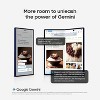
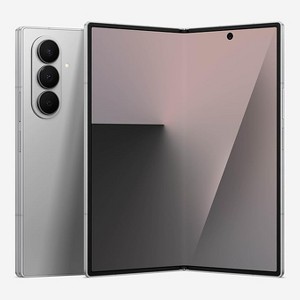
Open Box Samsung Galaxy Z Fold 7 Cell Phone, 512GB AI Smartphone, Unlocked Android, AI Photo Edits, Large Screen, Long Battery Life, Silver Shadow
$2,119.97
Out of Stock
Eligible for registries and wish lists
Sponsored
About this item
Description
About this item
- BIGGER, YET SLIMMER THAN EVER: Who would’ve guessed that wider could also be lighter? The design of Galaxy Z Fold7 is refined to feel like a traditional smartphone with its expanded cover display.
- BEST CAMERA ON A FOLD YET: You asked for more – now you can have the most. Galaxy Z Fold7 now boasts an ultra-premium 200MP camera with Pro-Visual Engine so you can effortlessly take incredibly detailed pics.
- SCREENSHARE FOR STREAMLINED ASSISTANCE: Intrigued by something you see? Go Live with Google Gemini, then screenshare or point your camera at it for additional info or assistance on the fly.¹
- DO AND VIEW MORE, ALL AT ONCE: With an 8” screen that allows you to view up to three windows at once, Galaxy Z Fold7 is the ultimate device for seeing and doing more.²
- ALL THE POWER AND SPEED YOU NEED Smoothly run your day with the power and speed of Galaxy Z Fold7. With its customized Snapdragon 8 Elite processor for Galaxy, you can stream your favorite shows, edit photos, scroll social feeds and more with ease.³
- TIME-TESTED TOUGHNESS: With a new, advanced Armor Aluminum frame and a Corning Gorilla Glass Ceramic 2 display, Galaxy Z Fold7 is built to handle whatever your on-the-go lifestyle throws at it.⁴
- STAY LOCKED IN WITHOUT BEING PLUGGED IN: Create, work and game to the max – the battery life of Galaxy Z Fold7 is able to keep up with your busiest days.⁵
- BETTER TOGETHER TO BETTER YOUR HEALTH: Conveniently track your health on the go with Galaxy Watch8 Classic, and then get deeper insights on the expansive screen of Z Fold7.⁶
- EXPAND THE WAYS YOU STAY AHEAD: With Galaxy Z Fold7, you get to decide how to stay ahead. See your daily briefings at a glance on the cover screen, or unfold your phone for an expansive view.
Dimensions (Overall): 6.4 inches (H) x 5.64 inches (W) x .17 inches (D)
Weight: 1 pounds
Product Model: Samsung Galaxy Z Fold7
Electronics Condition: Preowned
Connection Type: USB-C
Operating System: Android
Data Storage Capacity: 512GB
Screen Resolution: 2556 x 1179
Wireless Frequency/Band: 5G
Video Recording Resolution: 8K
Wireless Technology: 5G
IP rating: IP48
Camera Megapixels (Rear Facing): 200 MP
Camera Megapixels (Front Facing): 10 MP
Screen Size: 6.8 inches
Processor Speed: 4.7 ghz
System RAM: 12 gb
Processor model: Snapdragon
Contract Type: Unlocked
Compatible Service Providers: Unlocked
Battery: Required, Installed
TCIN: 1007187540
UPC: 195174054093
Origin: made in the USA
Non Contract Cell Phone Coverage Or Contract Disclaimer:
All carrier/phone availability varies by location. Upon activation of device, subject to carrier agreement terms and conditions. Excludes taxes & surcharges. Restrictions apply. Airtime sold separately. Price match not valid on mobile phones.
The above item details were provided by the Target Plus™ Partner. Target does not represent or warrant that this information is accurate or complete. On occasion, manufacturers may modify their items and update their labels.
We recommend that you do not rely solely on the information presented. If you have a specific question about this item, you may consult the item's label, contact the manufacturer directly or call Target Guest Services at 1-800-591-3869.
If the item details aren’t accurate or complete, we want to know about it.
Shipping details
Estimated ship dimensions: 4 inches length x 4 inches width x 9 inches height
Estimated ship weight: 1 pounds
item ships from third party seller: Reliant Cellular Inc
Return details
This item can be returned to any Target store or Target.com.
This item must be returned within 14 days of the date it was purchased in store, shipped, delivered by a Shipt shopper, or made ready for pickup.
See the return policy for complete information.
Frequently bought together
Guests also viewed
Discover more options
Related Categories
4.5 out of 5 stars with 181 reviews
1 out of 5 stars
15 April, 2025
originally posted on lg.com

Constant updates
Constantly requires updates. I can’t even watch Netflix or prime TV because it needs updates and half the time that doesn’t even work I can update it and it turns around and wants another update I spend more time updating than I get to watch the TV.
1 reply from LG Digital Care Team team - 9 months ago
Hey there! Thanks for letting us know about constantly updating your LG TV. We'd be happy to help deal with this so you can enjoy your favorite movies and shows. You can turn off updates for your TV by navigating to "Settings" > "General" > "System" > "Software Update" and then setting "Allow Automatic Updates" to "Off." We'd also be happy to provide you with this link (https://tinyurl.com/2xv3nzso) so you can manually update your TV in case you have automatic updates turned off. Send us a private message on social media at @LGUSSupport with your contact details, model number, and details about what you've tried already, and we'd be happy to help you further should you ever need us! *Josh
2 out of 5 stars
21 January, 2025
originally posted on lg.com
Abysmal support
Had my LG for 9 months. Operating instruckions depend on trial and error. Very little intuitive menues. Remote response on tv failed after 7 months. 4 tedious support chats, 3 more remotes and 2 months later I found a facorry reset which fixed the issue. No thanks to LG support
1 reply from LG team - 1 year ago
Hi, Peter. Thank you for sharing your detailed experience with your LG 65UR9000PUA. Your feedback regarding the operating instructions, remote response issues, and support experience is incredibly valuable. We appreciate your patience in troubleshooting and finding a solution. Your insights help us understand where we can improve to better serve our customers. Thanks again for taking the time to provide your review. -Shae
5 out of 5 stars
14 January, 2025
originally posted on lg.com
Easy to navigate
[This review was collected as part of a promotion.] I received this tv as a Christmas gift and I just love it. It has so much more than my old LG 32 inch tv features
1 reply from LG Digital Team team - 11 months ago
We’re so thrilled to hear that you’re loving your new 65UR9000PUA TV Lise! It’s awesome that it’s bringing so many new features to enhance your experience. For those epic movie and video game nights, we’ve got the perfect match for your new TV—our LG Soundbar S70TY! 🎶 It’ll take your sound to the next level and create an even more immersive experience. Plus, you can get $50 off its original price! Don’t forget, when you sign up for an LG account, you’ll earn 450 points! For more information on the S70TY soundbar, check out this link: https://www.lg.com/us/soundbars/lg-s70ty-soundbar. And while you're there, click on the "Live Agent" icon for exclusive savings and promotions! 😊 Enjoy the upgrade! ^Anthony
5 out of 5 stars
13 January, 2025
originally posted on lg.com
Great TV
I had my last LG TV for 10 years and loved it so I purchased another LG. It has great color and easy to use/set up. Great TV at a great price
1 reply from LG Digital Care Team team - 11 months ago
Wow, Jules, 10 years with your last LG TV—that’s awesome! We’re glad you decided to stick with LG for your new TV. It’s great to hear you’re enjoying the vibrant color and easy setup. A great TV at a great price is always a win! Want to elevate your audio experience, too? Check out the S60T LG Soundbar for immersive sound that pairs perfectly with your new TV. Check it out here: https://shorturl.at/APfxK. You can even connect with one of our live agents for an exclusive deal! For more questions, private message us on social media @LGUSSupport. Thanks for your continued trust in LG! 🙂 ^David
1 out of 5 stars
9 January, 2025
originally posted on lg.com
Bad LGTV
Bought the tv 3 months ago and it already has issue: auto restarts as it wishes
1 reply from LG team - 1 year ago
Hi, Van! Thank you for sharing your experience with us regarding your LG TV model 55UR9000PUA. We understand how frustrating it must be to deal with auto restarts, especially so soon after purchase. We’d like to assist you in resolving this issue. As a troubleshooting step, please try the following: ensure that the TV’s software is up to date by checking for updates in the settings menu, unplug the TV for about 60 seconds and then plug it back in to reset the power, and check if any external devices connected to the TV might be causing the issue by disconnecting them temporarily. If the issue persists, please send us a private message on Social Media @LGUSSupport. Our team will be happy to assist you further and explore possible solutions. We appreciate your patience and are here to help! ^James
5 out of 5 stars
26 December, 2024
originally posted on lg.com
Great featured
[This review was collected as part of a promotion.] I bought this product a month ago for my grandchildren and they love it
1 reply from LG Digital Care Team team - 3 months ago
Hello Dulce! That’s awesome to hear! 🎉 It’s always a win when you find something that brings the little ones so much joy. Hope they get to watch their favorite cartoons or movies on this awesome LG TV. Let us know if you have any questions or concerns in social media @LGUSSupport. ~Kimmy
2 out of 5 stars
23 December, 2024
originally posted on lg.com
Unreliable
I bought this in June 2024, it wont turn on now....I think it is a "lemon"
1 reply from LG Social team - 1 year ago
Hey Mary! Thank you for bringing this to our attention. We want you to be able to enjoy your LG TV without any hassle because it’s the best partner for tuning into all your favorite shows! We recommend checking the standby light and testing your power outlet. You can check out more information here: http://tiny.cc/lsn2001. If these steps do not work, please private message us on social media @LGUSSupport with your contact information and model number. We'll be happy to look into this together with you! ^Joslyn
2 out of 5 stars
15 December, 2024
originally posted on lg.com
Hate the remote
The TV is OK. The remote is horrible. LG packed so much into the remote and offer a no real manual to figure it all out. You know it is bad when there are multiple YT videos with a million views each on how to use a remote.
1 reply from LG Social team - 1 year ago
Thanks for sharing your thoughts with us Arkie! Scrolling through channels on your TV should be as fun as flipping through a good playlist, and we’d love to help you make the most of your remote. Check out some handy tips and tricks through this link: https://tinyurl.com/29j29nug. As always, feel free to drop us a private message on social media @LGUSSupport with your contact details if you’d like more info or need further assistance. We’re here to help! 😊 ^Anthony
4 out of 5 stars
27 November, 2024
originally posted on lg.com
Beautiful Image Quality!
[This review was collected as part of a promotion.] I bought this TV over a year ago and it works fine however, sometimes it's a bit slow when it comes to the lag time of content and apps to load. Overall, the image quality is incredible and very lightweight
4 out of 5 stars
16 November, 2024
originally posted on lg.com
I need more LG love
[This review was collected as part of a promotion.] Remote difficult. Voice setting repeated, not work
5 out of 5 stars
15 November, 2024
originally posted on lg.com
(no review title)
[This review was collected as part of a promotion.] Easy to figure out how to program it..Bluetooth works good...
5 out of 5 stars
2 November, 2024
originally posted on lg.com
Great TV for the price!
[This review was collected as part of a promotion.] I Love the picture/FPS, it’s not too heavy or bulky, looks amazing on a wall mount. I overall love the product!
3 out of 5 stars
19 October, 2024
originally posted on lg.com
Terrible New Features
[This review was collected as part of a promotion.] This is my fourth LG television. Because I loved them so much!….however the format has changed considerably making it harder to find my channels. Also the channel changer is very cumbersome…the Netflix, Prime Video, Disney, LG,sling, Alexa buttons should be at the top…because they are not used as much! The regular antenna navigator buttons should be in the area that get used all the time! The BIGGEST PROBLEM!!!…the white paint used to identify the buttons is almost completely rubbed off!…and I have only used the tv channel changer for two months!….i will not purchase another tv from you again unless I can see and use it before purchase.
1 reply from LG Digital Care Team team - 1 year ago
Hi there, and thank you so much for your feedback! We are so happy to see that you've loved your LG TVs, and want to ensure you have the best home entertainment experience possible. We love hearing suggestions from our LG family, so feel free to connect with us on social media @LGUSSupport to chat with our experts. We'd love to hear more from you! *Chey
5 out of 5 stars
16 October, 2024
originally posted on lg.com
Great picture and sound
[This review was collected as part of a promotion.] Purchased 1 month ago and its a great TV. Replaced a 10 YO LG (which we gave to our daughter).
3 out of 5 stars
6 October, 2024
originally posted on lg.com
Good picture bad sounds
[This review was collected as part of a promotion.] Good picture and cool remote, but the audio is not good at all. You need to have a sound bar. It sounds like you’re listening to it in a paper towel roll
1 reply from LG Digital Care Team team - 1 year ago
Hey there Bobby! We're happy to hear that you've been enjoying the picture quality of your LG TV and appreciate you letting us know about the audio it's been having. We'd be happy to provide you with this link (https://www.lg.com/us/support/help-library/lg-tv-troubleshooting-low-audio--20153209065985), which can help you improve your audio quality. If the quality is still low, please send us a private message on social media at @LGUSSupport with your contact details and model number, and we'll be ready to look into this further with you! *Josh
4 out of 5 stars
3 October, 2024
originally posted on lg.com
Magic remote?? The trick is learning how it works
[This review was collected as part of a promotion.] I bought this unit 2 weeks ago and am still learning how to use it. No directions given you must seek everthing on the internet
5 out of 5 stars
2 October, 2024
originally posted on lg.com/ca

Excellent Buy
Great quality. Excellent picture and sound. Easy to set up and customize to my needs.
1 reply from LG CareQ team - 9 months ago
Hello, we appreciate you getting in touch with us. Thank you for being a valued customer. Your trust in LG brand has been a huge factor in the brand success and we are deeply appreciative of it. Your patronage has been invaluable, and we are forever grateful for it. Thank you for your continued support. If you need additional help, don't hesitate to give us a call, we would be pleased to help. You can reach us at 1-888-542-2623 from Monday-Sunday, 8a.m. to 9 p.m. Eastern Time.
5 out of 5 stars
9 August, 2024
originally posted on lg.com
Sleek looking
[This review was collected as part of a promotion.] Love the apps on the tv. Really like how smooth and easy it is
5 out of 5 stars
3 August, 2024
originally posted on lg.com
Amazing picture
[This review was collected as part of a promotion.] Luv luv this LG tv set up so easy the picture is amazing even watching old black and whit r movies is epic. So happy with my purchase
3 out of 5 stars
30 July, 2024
originally posted on lg.com
It looked great on the Internet
I got this two weeks ago. I still cannot get the voice control command on the remote to work.
1 reply from LG team - 1 year ago
Thank you for reaching out about your 43UR9000PUA. We understand how important it is for the voice control feature to work seamlessly. To help resolve this issue, please ensure that the remote's microphone is not obstructed and that the TV's software is up-to-date. You might also want to try resetting the remote by removing the batteries and pressing any button for a few seconds before reinserting the batteries. LG TV - Using Voice Commands - https://www.lg.com/us/support/help-library/lg-tv-using-voice-commands--20153219134177 Please send us a private message on Social Media @LGUSSupport, and our team will be more than happy to assist you further. We appreciate your patience and look forward to getting this resolved for you. —Renzo