Sponsored

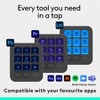
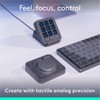
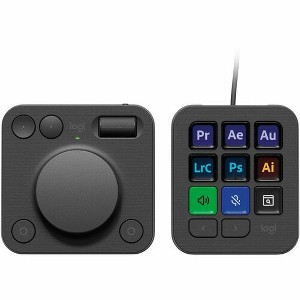
Logitech MX Creative Console, Programmable Keypad With 9 Customizable LCD Keys and Control Dial for Graphic Design, Video Editing, Photography, use...
$199.99
Out of Stock
Eligible for registries and wish lists
Sponsored
About this item
Highlights
- Keyboard Connectivity: Cable
Description
Introducing MX Creative Console, streamline your creative workflow with intuitive and customizable backlit LCD keys and tactile controls for precise adjustments on the dialpad.MX Creative Console lets you quickly access shortcuts and actions on your favorite apps with recommended profile configurations and adjusts automatically depending on the app you are currently using.Or customize it to your own workflow in Logi Options+. Set up to 15 keypad pages per app, create shortcuts, and personalize with custom icons.Feel control and precision with a tactile analog experience that lets you make precise adjustments with an analog aluminum low friction dial and smooth roller.
Dimensions (Overall): 3.62 inches (H) x 3.06 inches (W) x 1 inches (D)
Weight: .21 pounds
Electronics Condition: New
Connection Type: USB-C
Wireless Technology: No Wireless Technology
Backlit Keyboard: No Backlit Keyboard
Primary use: Home
Switch Type: Dome
Model name: 920-012660
Number of buttons or keys: 17
Battery: 2 AAA Alkaline, No Battery Used
Warranty: 1 Year Limited Warranty. To obtain a copy of the manufacturer's or supplier's warranty for this item prior to purchasing the item, please call Target Guest Services at 1-800-591-3869
TCIN: 1001357029
UPC: 097855197085
Origin: made in the USA or imported
The above item details were provided by the Target Plus™ Partner. Target does not represent or warrant that this information is accurate or complete. On occasion, manufacturers may modify their items and update their labels.
We recommend that you do not rely solely on the information presented. If you have a specific question about this item, you may consult the item's label, contact the manufacturer directly or call Target Guest Services at 1-800-591-3869.
If the item details aren’t accurate or complete, we want to know about it.
Shipping details
Estimated ship dimensions: 5.28 inches length x 2.72 inches width x 10.63 inches height
Estimated ship weight: 1.27 pounds
This item cannot be shipped to the following locations: American Samoa (see also separate entry under AS), Guam (see also separate entry under GU), Northern Mariana Islands, Puerto Rico (see also separate entry under PR), United States Minor Outlying Islands, Virgin Islands, U.S., APO/FPO, Alaska, Hawaii
item ships from third party seller: antonline
Return details
This item can be returned to any Target store or Target.com.
This item must be returned within 30 days of the date it was purchased in store, shipped, delivered by a Shipt shopper, or made ready for pickup.
See the return policy for complete information.
Frequently bought together

Guests also viewed
Discover more options
$84.99
reg $96.99 Sale
Related Categories
Guests are saying
The MX Creative Console is a versatile tool designed to enhance productivity for creative professionals. With customizable controls, a tactile dial, and seamless integration with popular software like Adobe, it streamlines workflows and makes editing tasks more efficient. While some guests have experienced issues with software compatibility and responsiveness, many appreciate its build quality and the time-saving benefits it offers. Overall, it is a valuable addition for those in creative fields.
Summary created by AI from text of reviews reflecting recent feedback provided across different star ratings (includes incentivized reviews)
4.0 out of 5 stars with 64 reviews
3 out of 5 stars
22 December, 2025
originally posted on Logitech

Nice hardware, but clearly aimed only at Adobe app
The hardware itself is nice, but if you're not using it with Adobe products then it's a slog to set it all up correctly. It feels like Logitech has gone out of their way to make it difficult to use with non-Adobe products, requiring lots of tedious set-up and no support for community-created setups. I'm disappointed.
4 out of 5 stars
29 November, 2025
originally posted on Logitech
Over all, very nice!!
Over all it work really well but I have noticed it picks your apps and compiles them in a list. My Adobe recently updated the Creative Cloud app and the icon populated to pick from doesn’t work now. I have had to use a work around by using the “open file” command instead. It would be nice to be able to just pick your app if it is not in the list or maybe a new short cut after an update.
5 out of 5 stars
18 November, 2025
originally posted on Logitech
Great productivity booster
The more I use the MX Creative Console, the more I like it. I mainly use it in Final Cut Pro where I can quickly skim the timeline and size it to what I'm doing way faster than using a mouse and keyboard. But the real power is how customizable it is. If there is no profile for the app you're using, its super easy to create one and add all kinds of shortcuts to boost productivity. I'm getting very addicted to it!
5 out of 5 stars
11 November, 2025
originally posted on Logitech
INCREDIBLE for design students
The creative console has been incredible for my graphic design classes, especially considering I injured my mouse hand and have been struggling a bit. I got it with a student discount and it came with 3 months of Adobe CC which I already needed for class. It take some time and consideration setting up the hotkeys and icons just how you like, but it's definitely worth it in the end
3 out of 5 stars
10 November, 2025
originally posted on Logitech
Useful but it has issues
Overall the console has improved workflow in LrC. Two significant problems are: the “actions ring” doesn’t work despite following all guidance from Logitech. The other issue is the loss of connectivity. This occasionally requires the removal/reinsertion to get the unit to “wake up.”
2 out of 5 stars
19 August, 2025
originally posted on Logitech
Interesting product for the MX series
The MX Creative Console is well made and is a usefull accessory. My reason for only giving the product 2 stars, I develop applications for the PC and was wanting to use the creative console as an input to some of my applications. I could not find an API that would allow me to use the creative console in my applications. So the MX Creative Console has limited use for me. I suspect that users of applications for which the MX Creative Console was intended, will find it very useful.
4 out of 5 stars
28 April, 2025
originally posted on Logitech
Mostly good, with a few considerations
So far, the overall polish and out-of-the-box integrations have been great. My two biggest issues are related to the main dial (for volume) and the default focus settings for the keypad's programmable buttons. 1. There's a delay of well over one second when turning the volume dial. This makes it useless for small volume adjustments. You basically end up needing to "jiggle" the dial (turning it up and down) for one or two seconds for it to "wake up" the Bluetooth connection and start transmitting dial position to Windows. I know this is to save battery (the dialpad isn't hardwired), but it's a step back compared to my Elgato Stream Deck. 2. The keypad buttons change "context" (switching between modes) based on which application has "focus" in Windows. For example, when I launch a Zoom meeting, the keypad (quite noticeably) switches to blue preset buttons for Zoom. Awesome! The problem is when I'm sharing my screen in Zoom and doing something in a shared window. Since I'm technically "focused" on the shared window (my web browser, etc.) and not Zoom, all my keypad buttons jump to whatever the other app's keypad buttons are. This makes it very difficult to seamlessly mute, unmute, or execute other hotkey tasks in Zoom because I lose them every time I click into my screenshared app. Ideally, the MX keypad is smart enough to know when I've hit "share" on the keypad and won't switch my keypad buttons until I stop sharing.
1 out of 5 stars
18 February, 2025
originally posted on Logitech
Good idea but bad execution.
[This review was collected as part of a promotion.] I bought it to use Capture One shortcuts but the keys never work. For example, rating with stars or adding color tags just to begin with. I keep waiting and waiting for a software update but still no solution and the device is basically useless on Capture One.
5 out of 5 stars
14 February, 2025
originally posted on logitech-ch

MX Creative Console – A Must-Have for Creators
I’ve been using the MX Creative Console for a few weeks now, and it’s made a huge difference in my workflow. The dials, buttons, and sliders make editing so much faster and smoother, whether I’m working in Photoshop, Premiere Pro, or a music production app. Customization is a big plus—you can set up different controls for each program, which saves a ton of time. The build feels premium and solid, and it fits nicely on my desk without taking up too much space. It does take a little getting used to, but once you do, it’s hard to go back. If you do a lot of creative work, this is definitely worth checking out!
3 out of 5 stars
13 January, 2025
originally posted on Logitech
I like but Sometimes But
[This review was collected as part of a promotion.] I love the concept but having issues. Sometimes the button gets stuck and you have to reset the device. Also, sometime in photoshop if you load an Action script it will only perform some of the action. It would be helpful if they would have a trouble shooting support page that was more detailed. If I can get it to work properly it would be a nice addition, but as of right now I am reverting to pressing keys on my keyboard, and not speeding up my work flow.
2 out of 5 stars
6 January, 2025
originally posted on Logitech
Overhyped marketing, fooled me
[This review was collected as part of a promotion.] I bought it because the marketing convinced me. I liked the ability to display what I want on the keys. Software doesn't work very well and the keys have a strange soft double click when depressed. Not in a good way, feels like an overlooked design flaw. Maybe I'll try using it again when they fix the overly aggresive scroll wheel, changing the speed didn't do anything, or when they have more programs that are compatible with the device.
5 out of 5 stars
3 January, 2025
originally posted on Logitech
Incredible and Versatile Tool
[This review was collected as part of a promotion.] The MX Creative Console is an incredibly useful tool making workflow between creative applications I use (i. e. , Adobe Premiere Pro, Adobe Audition, Adobe Lightroom Classic, Adobe Photoshop). With 15 pages per profile, I am able to put multiple instances of functions on multiple pages (e. g. , having cut, copy, and paste alongside functions I use frequently). With the option of the profiles changing automatically between using applications, it makes workflow seamless. I look forward to firmware updates that improve/add more functionality. The only thing I would have changed is to make the MX Dial Pad have its own integrated USB-rechargeable battery (similar to the MX Keyboard and Mouse).
3 out of 5 stars
24 December, 2024
originally posted on Logitech
Needs more features
[This review was collected as part of a promotion.] Adobe illustrator features are lacking with customization hopefully this gets fixed with updates
1 out of 5 stars
11 December, 2024
originally posted on Logitech
Dial is frequently offline, rarely works
[This review was collected as part of a promotion.] I really like the keypad. It works well, always on, and saves time hunting for actions that are otherwise hard to find. The dialpad on the other hand is terrible. It never works right away. I have to push its buttons and/or open the Logi Options app and it will start working a minute later. Then, it sometimes get “stuck” on the wrong app. Yesterday it got stuck on Zoom and the dial pad would only change the volume until I quit Zoom completely. The other day, I updated Illustrator and had to reprogram all the settings for Illustrator to get it to work again. I hate this thing so much. It doesn’t save time, it takes up my time trying to get it to work.
4 out of 5 stars
10 December, 2024
originally posted on Logitech
Good 9/10
[This review was collected as part of a promotion.] The product works as described! I did have a little trouble setting it up at first, i had to re-download and install the photoshop option withen the logi Option app. After that it worked great. Pros - Nice addition to the mx serries, Quality product that does work. Cons - took a little trouble shooting to get everything working properly. Not every app is supported yet, but it's still early for developers. Overall great product If I could add anything it would be to have added aluminum wheel with haptic feedback and clicks when turning, maybe the option to press down the wheel as a button as well
5 out of 5 stars
9 December, 2024
originally posted on Logitech
MX Creative Console
[This review was collected as part of a promotion.] Definitely a must have for editors! I use it for Lightroom and Premier Pro and it definitely speeds up my workflow!
5 out of 5 stars
30 November, 2024
originally posted on Logitech
Mx console
[This review was collected as part of a promotion.] Absolutely loved it makes having shortcuts so much easier it’s more customized than I believe when I Ordered it it’s a must have on your desktop easy to use And program
4 out of 5 stars
27 November, 2024
originally posted on Logitech
Lots of potential
[This review was collected as part of a promotion.] The buttons are easy to configure on the keypad, I'm looking forward to the marketplace expanding with more profiles and plug-ins to help this live up to the full potential The reason I chose this over a more established product was the larger wheel for jog/shuttle purposes when doing video editing. As someone who started editing back in the prehistoric era of tape-to-tape, using a wheel to refine in and out points is something I miss. This does the trick, but I wish the wheel had a little more resistance/tactile feeling when it is moved rather than the smooth movement it has. That's a personal preference and it is still very effective at whatever you decide to use it for.
5 out of 5 stars
25 November, 2024
originally posted on Logitech
Adobe game changer
[This review was collected as part of a promotion.] It leveled up my work in Adobe Premiere. Especially with color correction and color grading. With the wheel, you can achieve precise color adjustment. No more annoying color grading with mice. I like it from the first view, it is stylish, ergonomic, and somehow soft to the touch. It works not only with Adobe, but it is easy to program for other apps like Open Office or even Evernote. On the main screen, you can set your fav apps and websites. Creative Console is one love 💕
2 out of 5 stars
22 November, 2024
originally posted on Logitech
Unfinished Product with Potential
[This review was collected as part of a promotion.] The MX Creative Console is multiple products in one. It has a Streamdeck style button controller as well as a separate dial pad. The button pad is wired and the dial is wireless. Pros: - The console works with Logi Options+. If you already have a compatible Logitech product you don't have to install new software. - The software is stable and installed and continues to run with no major issues. - The button pad is useable and I'm finding it useful for some applications I can never remember the shortcuts. Cons - The software is incomplete and confusing. - The marketplace is woefully bare. There are not enough plugins and more than that there are not enough (if any) shared profiles for common apps. - The icon library is entirely missing from my installation. Support was unable to help. It's also not possible to import your own icons - The wireless dial pad sleeps frequently and it takes too long to wake up and reconnect. I find I don't use it because it doesn't actually work the first time I touch it. - There is basically no support and profiles outside of Adobe applications. - The button pad is too light. It will slide of the desk without additional adhesive. - Without proper profiles the set-up and customization time to make this useful is unacceptable. I've made it useful in some applications but only have hours of tinkering with the software. - The CC coupon didn't actually work properly. It continued to bill me for my existing service and required me to manually cancel my existing plan. If you currently pay out of pocket the full price of Adobe Creative Cloud, then this is worthwhile gadget to pickup just for the three months of included software. Otherwise it's best to wait or skip. I would have returned mine if I didn't already use the CC coupon.