

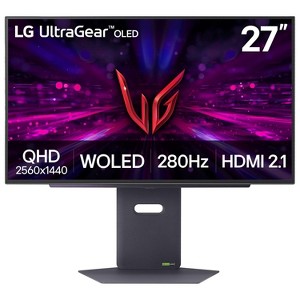
LG 27 Inch UltraGear OLED QHD 280Hz 0.03ms G-Sync Gaming Monitor - 27GX700A-B
$846.99 reg $849.99
Sale
In Stock
Eligible for registries and wish lists
About this item
Additional product information and recommendations
Discover more options
Related Categories
3.2 out of 5 stars with 9 reviews
5 out of 5 stars
28 December, 2025
originally posted on lg.com/ca

Phenomenal picture quality!
Really enjoying the quality of the OLED screen, I have another high quality LG IPS panel and it has a clarity of text that I wasn't sure I'd be able to replicate on my new 27GX700A-B, but I can say that I am completely surprised at the quality of text. Now we move on to the real difference, which is colours and visual fidelity of the screen, I am very impressed with how colours are represented, there is a depth in colour rendering that took me by surprise. Finally, HDR, it just pops, at the brightness level that I use in my office, the HDR quality is simply amazing and I am very surprised at just how things pop on the screen now in my games. For those debating whether this is an ideal 2K panel for OLED gaming, well, you can make the leap and not look back, OLED is truly at another level of colour rendering and visual quality!
1 reply from LG CareQ team - 17 days ago
Thank you for the fantastic review! We are thrilled that the text clarity and color depth of our OLED technology exceeded your expectations, especially coming from a high-quality IPS panel. It’s great to hear that the HDR is making your games 'pop' and that you're enjoying the leap to OLED gaming. Welcome to the next level of visual fidelity!
5 out of 5 stars
26 December, 2025
originally posted on cohley.com

Fast, beautiful OLED gaming monitor
[This review was collected as part of a promotion.] This LG gaming monitor looks incredible right out of the box. The OLED panel delivers deep blacks, strong contrast, and vibrant colors that make games feel more immersive than any IPS monitor I’ve used. The 280Hz refresh rate and near-instant response time make gameplay extremely smooth and responsive, especially in fast shooters. Input lag is basically nonexistent. Build quality is solid, the stand is fully adjustable, and HDMI 2.1 makes it easy to use with both PC and console. Review submitted as part of a program that provides a purchase discount.
1 reply from LG team - 18 days ago
Hello, Tosh. Thank you for sharing your thoughts about your LG Monitor! It’s awesome to hear that the monitor impressed you right out of the box — those deep OLED blacks, vibrant colors, and that ultra‑smooth 280Hz performance really take gaming to another level. The way you highlighted the near‑instant response time, low input lag, and flexible stand paints a great picture of how well it fits into your setup. HDMI 2.1 definitely makes it a powerhouse for both PC and console gaming. For more feedback or questions, please send us an email at lgdigitalcare@lg.sprinklrsupport.com. Thanks for choosing LG! #LifesGood ^James
1 out of 5 stars
19 December, 2025
originally posted on lg.com

Terrible text rendering with this RGWB WOLED panel
Terrible fringing on text in Windows 11 with and without ClearType on. Tried using MacType to adjust the font, but there aren't tools made for RGWB panels. Microsoft doesn't seem to care about addressing this issue. I would avoid all OLED monitors until this is fixed.
1 reply from LG team - 27 days ago
Hi, Joe. Thank you for sharing your experience with your LG Monitor. We appreciate you taking the time to describe the text‑fringing behavior you’re seeing in Windows 11, both with and without ClearType enabled, as well as the challenges you’ve run into when trying third‑party tools that aren’t optimized for RGWB sub‑pixel layouts. Your insight on how this affects everyday usability is valuable, especially for customers considering OLED monitors for text‑heavy workflows. To allow us to properly investigate the details of your specific product model and to see if there is anything we can do to assist with this text‑rendering and sub‑pixel‑layout issue being encountered, please send us an email at lgdigitalcare@lg.sprinklrsupport.com if you need further assistance. You can also refer to this helpful link for reference on LG monitor support: https://www.lg.com/us/support/help-library/lg-monitor-troubleshooting-the-monitor-screen--20153192527480 ^James
1 out of 5 stars
4 December, 2025
originally posted on lg.com
Horrible VRR flickering
I really wanted to like this monitor since everyone mentions how great OLEDs are. The first issue is the matte screen this has, which I new before I bought it, but I didn't realize it would cause a light bleeding/blooming effect similar to my older IPS monitor. OLEDs are known to have poping colors and no light bleed. The second issue, which was the dealbreaker for me, was the horrible VRR flickering. Whenever I moved my mouse or do anything it the lighting would flicker. It was far too distracting. Given the how long OLED technology has been around, you'd think this issue would have been ironed out.
1 reply from LG team - 1 month ago
Hi. Thank you for sharing your experience with your LG Monitor. We appreciate your feedback regarding the matte screen finish and the VRR flickering issues you encountered with your OLED monitor. To allow us to properly investigate the details of your specific product model and to see if there is anything we can do to assist with this monitor performance issue being encountered, please send us an email at lgdigitalcare@lg.sprinklrsupport.com if you need further assistance. You can also refer to these helpful links for guidance on LG monitor support and available resources: https://www.lg.com/us/support/help-library/lg-monitor-troubleshooting-light-leakage--20153186527181 and https://www.lg.com/us/support/help-library/lg-monitor-troubleshooting-a-shaking-screen--20153192710854 ^James
4 out of 5 stars
27 November, 2025
originally posted on lg.com
great monitor, noticable flickering with grey
the monitor overall is great, loving the colors, refresh rate and resolution, not super noticeable jump from my previous monitor but the colors are alot better than my previous IPS, my two issues are with the stand and flickering when the screen is mostly shades of grey, the stand doesnt go as short as i wish it would and flickering is very noticeable when the screen is mostly grey but its not a deal breaker especially at the price point though i do wish that when it automatically did image cleaning, when it gets turned off, it had the rgb colors same as when you do it manually as it makes me doubt whether or not its actually cleaning
1 reply from LG team - 2 months ago
Hello, Duncan. Thanks for sharing your thoughts about your LG Monitor. We’re delighted to hear that the great colors, refresh rate, and resolution have impressed you, especially the color improvement over your previous monitor. It’s wonderful to know that the overall performance has made such a positive difference for you. For more feedback or questions, please send us an email at lgdigitalcare@lg.sprinklrsupport.com. Thanks for choosing LG! #LifesGood ^James
5 out of 5 stars
21 November, 2025
originally posted on lg.com
Best OLED 2025
[This review was collected as part of a promotion.] Amazing monitor. Lightning fast. Beautiful colors.
1 reply from LG Digital Care Team team - 2 months ago
Hi there, thank you for sharing your feedback on the LG 27GX700A‑B. ❤️ We’re thrilled to hear the lightning‑fast performance and beautiful colors have impressed you, making this OLED monitor feel like the best of 2025. It’s wonderful knowing it has elevated your viewing and productivity experience. #LifesGood For any further assistance, feel free to DM us at @LGUSSupport. LG Digital Care Team ^Rich
3 out of 5 stars
25 October, 2025
originally posted on lg.com
Good but may be great in the future
This tandem Oled is still early in its lifecycle so we don't have any suggested setting guides or real reviews yet. Overall its bright and the SDR colors seem vibrant for an W-OLED, out performs my 3rd Gen W-Oled in these areas. Text clarity actually looks better than my 3rd gen W-Oled and isn't an issue for gaming and light-moderate productivity work. Windows HDR still is lacking, as with all monitors, and gaming HDR is undetermined at this point. The display modes seem to all have built in color mapping, although it's hard to tell exactly what they are (gamer 1 vs gamer 2 etc) and how peak brightness factors in to overall brightness and color contrast etc. Hopefully there will be some firmware updates that make this Oled rise to the top. The matte screen isn't as distracting as I thought it Would be and I came from a glossy Oled. Overall I'd buy again but if LG isn't careful the go to will be the glossy ASUS version. LG - please send some test units out to the big testers!
1 reply from LG team - 3 months ago
Hi, Mike. Thank you for sharing your experience with your LG Monitor. It’s great to hear that the tandem OLED is delivering vibrant SDR performance and improved text clarity compared to your previous generation. Your insights on display modes, HDR behavior, and the matte screen finish are incredibly helpful as we continue refining the product experience. For updates on firmware and feature enhancements, you can keep an eye on our monitor support page here: https://www.lg.com/us/support/products/monitors. To allow us to properly investigate the details of your specific product model and to see if there is anything we can do to assist with this display mode and HDR issue being encountered, please send us an email at lgdigitalcare@lg.sprinklrsupport.com if you need further assistance. ^James
1 out of 5 stars
24 October, 2025
originally posted on lg.com
Disappointing release from LG
Much better color and full screen brightness, but has crushed HDR black levels, poor HDR EOTF tracking, a hazy matte screen, and blown out highlights in HDR. SDR also has issues, but not as bad. This monitor needs a lot of work. It shouldn't have been released in this state. LG does great on TVs, so im not sure why monitors keep having so many accuracy issues, especially in HDR.
1 reply from LG team - 3 months ago
Hello. Thank you for sharing your experience with your LG Monitor. Your feedback on HDR black levels, EOTF tracking, and the matte screen finish is valuable and helps us better understand how the monitor is performing in real-world use. It's great to hear the improvements in color and full-screen brightness, and we appreciate your comparison to LG TVs. For reference, you can explore LG’s monitor support resources and firmware updates here: https://www.lg.com/us/support/products/monitors. To allow us to properly investigate the details of your specific product model and to see if there is anything we can do to assist with this HDR accuracy issue being encountered, please send us an email at lgdigitalcare@lg.sprinklrsupport.com if you need further assistance. ^James
4 out of 5 stars
15 October, 2025
originally posted on lg.com
Best OLED display minus HDR
Definitely one of the best monitors I've ever had. Very impressed with the color, brightness and overall build quality of the monitor. The only thing that makes me consider returning it is the HDR implementation. For some reason it just completely washes out all the colors. Nothing in the OSD is able to restore any of the vibrance, so there has to be some tweaking done in various control panels. Even then the overall image looks poor. HDR was a feature I was excited about having, so I may return this monitor.
1 reply from LG team - 3 months ago
Hi There. Thank you for sharing your review! We're thrilled to hear you're impressed with the color, brightness, and build quality of your LG monitor. Your feedback on HDR performance is appreciated and helps us continue refining the experience for our users. If you'd like assistance with optimizing HDR settings or exploring support options, feel free to email us at lgdigitalcare@lg.sprinklrsupport.com. We're here to help. ^James.