Sponsored
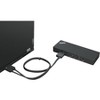
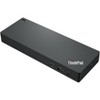
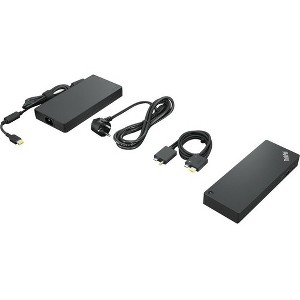
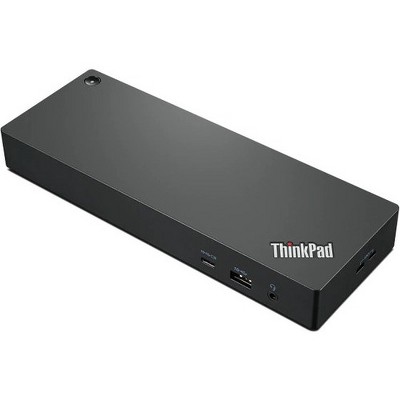
Lenovo ThinkPad Thunderbolt 4 Workstation Dock - for Monitor/Notebook/Workstation - 230 W - Thunderbolt - 4 Displays Supported - 4K, 8K
$396.99 reg $439.99
Sale save $43.00 (10% off)
In Stock
Eligible for registries and wish lists
Sponsored
About this item
Highlights
- Connectivity Technology: Wired
- Screen Mode Supported: 4K, 8K
- Device Supported: Monitor/Notebook/Workstation
- Number of Displays Supported: 4
- Supported Resolutions: 3840 x 2160, 7680 x 4320
Description
Premium Thunderbolt 4 Docking Experience: ThinkPad Thunderbolt 4 Workstation Dock delivers reliable and consistent industry leading video, data and power connectivity; Maximize Your Productivity: Expand your horizon with versatile 8K display support or multiple 4K displays support, Upto 230W Power Delivery to Workstation, silent firmware upgrades, VPro/AMT support and transfer data at lightning fast 40Gbps.; The ThinkPad Thunderbolt 4 Workstation Dock is future-proof and fully loaded to take your productivity, efficiency and creativity to the peak. Top Features The ThinkPad Thunderbolt 4 Workstation Dock supports upto 230W PD; Single 8K@30Hz or upto 4 4K@60HZ display support; Silent firmware upgrades, vPro/AMT Pass through support, and; Data transfer rates upto 40 Gbps; (depending on host system and peripheral processing capability, file attributes, and other configuration and operating environment factors)
Dimensions (Overall): 1.18 inches (H) x 8.7 inches (W) x 3.15 inches (D)
Weight: .99 pounds
Holds up to: 20 pounds
Compatible With: Most Laptops up to 17"
Model name: 40B00300US
Battery: No Battery Used
Warranty: 3 Year Limited Warranty. To obtain a copy of the manufacturer's or supplier's warranty for this item prior to purchasing the item, please call Target Guest Services at 1-800-591-3869
TCIN: 87882712
UPC: 195348677387
Origin: made in the USA or imported
The above item details were provided by the Target Plus™ Partner. Target does not represent or warrant that this information is accurate or complete. On occasion, manufacturers may modify their items and update their labels.
We recommend that you do not rely solely on the information presented. If you have a specific question about this item, you may consult the item's label, contact the manufacturer directly or call Target Guest Services at 1-800-591-3869.
If the item details aren’t accurate or complete, we want to know about it.
Shipping details
Estimated ship dimensions: 11 inches length x 8 inches width x 4 inches height
Estimated ship weight: 4.05 pounds
This item cannot be shipped to the following locations: American Samoa (see also separate entry under AS), Guam (see also separate entry under GU), Northern Mariana Islands, Puerto Rico (see also separate entry under PR), United States Minor Outlying Islands, Virgin Islands, U.S., APO/FPO, Alaska, Hawaii
item ships from third party seller: antonline
Return details
This item can be returned to any Target store or Target.com.
This item must be returned within 30 days of the date it was purchased in store, shipped, delivered by a Shipt shopper, or made ready for pickup.
See the return policy for complete information.
Frequently bought together
Guests also viewed
Discover more options
Related Categories
Guests are saying
The ThinkPad Thunderbolt 4 Workstation Dock is a powerful and versatile docking solution designed for professionals who require seamless connectivity and high performance. It supports multiple monitors, offers a variety of ports, and provides robust power delivery for demanding laptops. Guests appreciate its solid build quality and ease of use, making it an excellent choice for both office and travel setups. However, some users have experienced compatibility issues and performance inconsistencies with certain devices.
Summary created by AI from text of reviews reflecting recent feedback provided across different star ratings (includes incentivized reviews)
4.4 out of 5 stars with 535 reviews
5 out of 5 stars
15 December, 2025
originally posted on lenovo.com

Excellent
(This review was collected as part of a promotion.) The device was outstanding in every aspect. It delivered exceptional performance, reliability, and efficiency, exceeding expectations consistently. Its design was sleek and intuitive, making operation effortless. Durability and precision were evident throughout usage. Overall, this equipment proved to be a top-tier solution, combining innovation and functionality for an impressive experience.
5 out of 5 stars
30 November, 2025
originally posted on lenovo.com

Good product to add other components
Works well with the new laptop and very compact...
5 out of 5 stars
26 November, 2025
originally posted on lenovo.com
Great dock—works perfectly
[This review was collected as part of a promotion.] his Thunderbolt 4 dock works great and does exactly what I needed. Solid performance, reliable connections, and a perfect fit for my setup. Very happy with it.
3 out of 5 stars
25 November, 2025
originally posted on lenovo.com
Not compatible with ThinkPad P16 Gen 3
[This review was collected as part of a promotion.] Does not charge more than 90 watts over USB-C. Not a good fit for the latest workstations
1 reply from Lenovo team - 1 month ago
Hello Nick, Thank you for sharing your feedback. We’re sorry to hear that the dock didn’t meet your expectations. The ThinkPad Thunderbolt 4 Workstation Dock is designed to provide up to 230W of power delivery which should support most Lenovo workstations. If your device is only receiving 90W, this may indicate a configuration or compatibility issue. We’d like to help resolve this for you. Please reach out to our technical support team at 1-855-253-6686. Our team can guide you through troubleshooting steps and confirm if your workstation is fully compatible with the dock. Regards, Thomas, Lenovo
5 out of 5 stars
24 November, 2025
originally posted on lenovo.com
Works Better with Lenovo's than other brands
[This review was collected as part of a promotion.] Worked better than expected with my Thinkpad pushing 2 monitors. Tried the Kington and monitor blinks every hour or two. Also, would lose USB connections at times.
5 out of 5 stars
24 November, 2025
originally posted on lenovo.com
Thinkpad Thunderbolt 4 Workstation Dock
[This review was collected as part of a promotion.] Excellent product, with lots of features. Ample ports, including headphone jack, 10GB USB and USB-C on the front of the device. On the back power connect for the 300W adapter, 3 more 10GB USB ports, 2 Display ports, 1 HDMI port, an ethernet network connection, 1 thunderbolt connect and what Lenovo calls 300W adapter, 1x power cord, 0.7m Thunderbolt 4 Split Cable.
5 out of 5 stars
1 November, 2025
originally posted on lenovo.com
Dock
[This review was collected as part of a promotion.] Great dock - easy setup - durable and comes with plenty of extra ports
5 out of 5 stars
30 October, 2025
originally posted on lenovo.com
Great device for on the go workers who have a desk
[This review was collected as part of a promotion.] Works well, connects a workstation laptop to a desk setup allowing for easy connectivity while working in the office and can quickly disconnect when you need to.
3 out of 5 stars
28 October, 2025
originally posted on lenovo.com
Solid until the ethernet adapter dies.
[This review was collected as part of a promotion.] So far, this one has worked great. This is my fourth one of these docks over the last 5 years. The ethernet adapter seems to be the weak point. It died on the first and third dock and was nonfunctional out of the box on the second dock. On the third dock I ended up using a USB ethernet adapter plugged into the dock until it decided to completely not work one day. I do not know that there is a better option for workstation dock with a single point hook up to the laptop (via the twinned Thunderbolt USB / power cable)
5 out of 5 stars
25 October, 2025
originally posted on lenovo.com
Simple and functional
[This review was collected as part of a promotion.] The dock does what you would expect, without any trouble or fuss. Due to the power demands of my P16 I bought the model with the combined power Thunderbolt cable for quick and convenient connection. Since the P16 is my workstation I need the versatility of mobility and performance without sacrificing desktop features like large monitors Ethernet and ports for peripherals. Sor far its been solid and functional. When plugged into the dock for all purposes my P16 functions like a desktop.
5 out of 5 stars
23 October, 2025
originally posted on lenovo.com
Great docking station and reasonable price
[This review was collected as part of a promotion.] I had to buy a new docking station with the new laptops I purchased because the wattage changed on the laptop requirements. This was by far the least expensive docking station I purchased and had just a few more features than prior.
5 out of 5 stars
20 October, 2025
originally posted on lenovo.com
So far….works great
[This review was collected as part of a promotion.] So far this dock has had no issues. Works really well with my ThinkPad P16v. I run two non 4K monitors on it at the moment. Hopefully will upgrade to 4k soon. This dock should run them without any issues.
5 out of 5 stars
16 October, 2025
originally posted on lenovo.com
Good Dock
[This review was collected as part of a promotion.] These are good docks. We purchased several. One was bad, but was quickly replaced for free by Lenovo. Excellent support.
4 out of 5 stars
14 October, 2025
originally posted on lenovo.com
Ultimate Portability Between 2 locations
[This review was collected as part of a promotion.] I routinely travel between two locations. This dock allows me to keep all of my various keyboards, mice, monitors, and external drives plugged in, ready to go. All I need to do is to plug in one connector to my laptop. The dock also keeps the Thunderbolt 4 connector close and easily accessible. Recommended
5 out of 5 stars
14 October, 2025
originally posted on lenovo.com
awesome powerful docking station
great docking station for all your needs. it has so many plugs and outlets.
4 out of 5 stars
14 October, 2025
originally posted on lenovo.com
TB4 Dock with all the needed ports
[This review was collected as part of a promotion.] What can I say, it’s a thunderbolt. 4 docking station. These TB4 workstation docks are needed for higher performance laptops to supply enough power.
5 out of 5 stars
10 October, 2025
originally posted on lenovo.com
Lenovo HO Dock with Charging
[This review was collected as part of a promotion.] Standard design and size which fits well on our current desktop setups with ample power for our more robust laptops charging and operating needs.
5 out of 5 stars
17 September, 2025
originally posted on lenovo.com
Works great! Perfect for P1 G7
[This review was collected as part of a promotion.] Works perfect! Love not having to carry around the huge charger. I bought this for my ThinkPad P1 Gen 7.
2 out of 5 stars
2 September, 2025
originally posted on lenovo.com
Issues with multiple monitors
I've been having issues with multiple monitors, which has been the whole purpose of buying the Workstation Dock with my new laptop (thinkpad P16, which is an advanced laptop with strong graphic card). The issue is with dock being incompatible with the laptop, which is ironic because the whole purpose of this dock is to handle this laptop.
1 reply from Lenovo team - 4 months ago
Hello Bennie, Thank you for sharing your feedback. It’s disappointing to hear that the Workstation Dock isn’t functioning as expected with your ThinkPad P16 and we understand how frustrating that must be. Here are a few troubleshooting steps that might help resolve the issue. 1.Update Drivers and Firmware: Use the Lenovo Vantage app to check for and install updates for both your P16 and the Thunderbolt 4 dock. 2. Verify BIOS Settings: Check your BIOS settings to make sure Thunderbolt is enabled and that no security settings are preventing it from connecting properly. 3. Check Device Manager: In Windows Device Manager, look under "Universal Serial Bus controllers" or "Thunderbolt" for any error icons or issues. Try disabling and re-enabling the network adapter in the docking station, or scan for hardware changes. 4. Perform a Full Reset: Unplug all cables from the docking station, including the power cable, and disconnect it from your laptop. Wait a few minutes, then reconnect everything and try again. 5. Try a Different Cable or Dock: An old or faulty Ethernet cable can cause issues. If the issue persists, you may need to try a different, compatible Thunderbolt 4 dock, as some users have reported issues with specific dock models or batches. If the issue persists after following these steps, we recommend reaching out to our tech support team at 1-855-253-6686. We're committed to ensuring your satisfaction and appreciate your patience as we work to resolve this matter. Regards, Thomas, Lenovo
5 out of 5 stars
25 August, 2025
originally posted on lenovo.com
Versatile and Powerful
[This review was collected as part of a promotion.] This dock is versatile and powerful. It has all the important ports I used (and many more). It provides USB C PD for most smaller laptops, such as my X1 Carbon, but still provides slim port charging for more powerful Lenovo machines, like my P1. Even better, it is rock solid in build and performance and gets very consistent firmware updates.