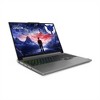
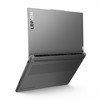

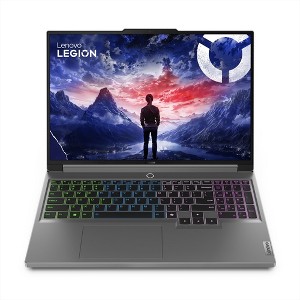
Lenovo Legion Pro 5i 16" QHD 165Hz Gaming Laptop, Intel i9-14900HX, RTX 4070, 16GB DDR5 RAM, 512GB SSD, Wi-Fi 6E, 4-Zone RGB Keyboard, Win 11 Home
$1,549.00 reg $3,098.00
Sale save $1,549.00 (50% off)
Out of Stock
Eligible for registries and wish lists
At a glance
About this item
Additional product information and recommendations
Discover more options

Frequently bought together


Guests also viewed
5.0 out of 5 stars with 2 reviews
quality: 5 out of 5
value: 5 out of 5
100% would recommend
2 recommendations
5 out of 5 stars
Thumbs up graphic, would recommend
23 June, 2025Verified purchase
NOT a Legion Pro - but still a good laptop
First, this computer is a Lenovo Legion 5i, NOT a Levono Legion Pro 5i. The UPC in the product description is accurate to the computer if you want the specs from Lenovo directly. The laptop is solid and will perform well. I recommend buying some extra memory and storage. For whatever reason, from the factory Lenovo decided to loctite the 2nd M.2 screw so it can be tough to get off, I had to use needlenose pliers to get it unscrewed because it was stripping. The open M.2 slot can accomodate double-sided stroage, and the M.2 slot that holds the 512gb NVMe can only accomodate one-sided drives. Anything under 2tb should be one-sided, and the only 4tb one sided drive I am aware of is the Samsung 990 pro. Both memory slots are upgradeable, no soldered ram. You can add more than what Lenovo states, as that is only what they offer. You can add more than 64gb memory (up to 192gb, but good luck finding two 96gb sodimm ddr5 modules and why would you even do that) and I have a 4tb SSD in mine alongside the stock 512gb. Screen is nice, but if you plan on using it outdoors or in direct, shining right behind you sunlight, it may be a little dim. Keyboard is a laptop keyboard but feels fine. Track pad works well. The numpad is awesome to have. There is a camera-dsiable button on the right side but it does not physically cover the camera. Haven't tried the webcam. Having the charger on the rear of the laptop is very nice. Overall a very good laptop. The absolute first thing you should do when you get this laptop is update the BIOS. 13th and 14th gen Intel CPUs have voltage issues that can cause degradation that are fixed in the latest BIOS version. If you really want to be careful, you can undervolt the CPU. It is not readily available to do, but to do it you shift+click restart, go to advanced settings, go to UEFI, then go to Advanced/More settings, then in the white screen press and hold down the Fn key and press R and then N, then F10 to save and exit, and press F2 when rebooting and when you go to Advanced/More settings again you will have an advanced tab.
5 out of 5 stars
Thumbs up graphic, would recommend
5 October, 2024Verified purchase
WOW - amazing build!
The perfect computer! And it has a charging port from the back. The keyboard is impressive - its a full keyboard with a numpad. Very easy to type unlike almost all other laptops I’ve used.