Sponsored
$780.00
In Stock
Eligible for registries and wish lists
Sponsored
About this item
Highlights
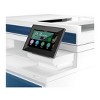
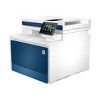
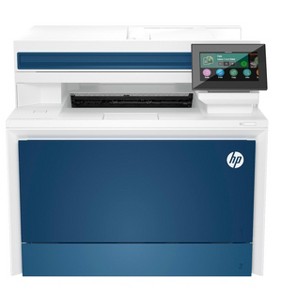
- Blazing fast speeds for professional quality color prints
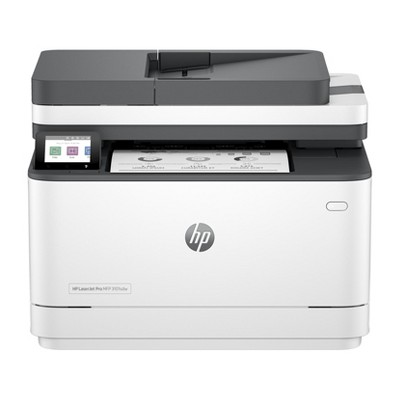
- Color printing, scan, copy, fax, ethernet, auto 2-sided printing
- Advanced network protection with Wolf Pro security
- True-to-life colors
Description
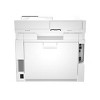
Overview - Get a blazing fast color printer and easy management tools with LaserJet Pro. - HP Office Laser Multifunction Printers are designed for SMBs and small workteams in larger companies, delivering enhanced productivity, simplified workflows and reduced costs. - - Save on quality, refurbished products. The HP collection of Certified Refurbished products are thoroughly tested to meet the same functional standards as comparable new products. HP’s refurbished products are put through a series of mechanical and electrical stress tests, complete software re-installation, a final inspection, and then thoroughly cleaned, sanitized and packaged in new boxes with the same supplies as new version printers. Refurbished Print products are covered by a same as new HP limited warranty and offer optional HP Care Pack Services. Most often, refurbished products are indistinguishable from their comparable new counterparts, though some may have cosmetic blemishes or scratches. This printer is intended to work only with cartridges that have a new or reused HP chip, and it uses dynamic security measures to block cartridges using a non-HP chip. Periodic firmware updates will maintain the effectiveness of these measures and block cartridges that previously worked. A reused HP chip enables the use of reused, remanufactured, and refilled cartridges. More at: Features Maximum productivity in full color - Support your business workteam with this compact, high-performing, color printer, ideal for up to 10 users. Seamless management - Centralize your print management. HP Web Jetadmin easily adds and updates devices and solutions. HP Wolf Pro Security - Get printer fleet security out of the box. Preconfigured settings mean it's ready when you are. Sustainable printing - Redesigned Original HP TerraJet Cartridge for reduced plastic use and energy consumption when printing. Minimum system requirements - 2 GB available hard disk space, Internet connection or USB port, Internet browser. ; What's in the box? - HP Color LaserJet Pro 4301fdn; 4 preinstalled HP LaserJet Toner cartridges (Black: ~2,000 pages, Introductory-Cyan, Magenta, Yellow: ~1,000 pages); In-box documentation (Reference Guide, Setup Card); warranty card (Where required). Power cord; fax cable (New Zealand only). Disclaimers - Requires HP app download available at www.hp.com/go/mobileprinting . Certain features are available in English language only, and may vary by printer model/country, and between desktop/mobile applications. HP reserves the right to introduce charges for use of functionality facilitated by the HP app. Internet access required and may not be available in all countries. HP account required for full functionality. Fax capabilities are for sending a fax only. List of supported operating systems available in app stores. See details at http://123.hp.com . - Requires use of Smart Admin Dashboard for printer setup and onboarding of users. - HP Web Jetadmin is available for download at no additional charge at hp.com/go/webjetadmin. - HP calculations based on ENERGY STAR® normalized TEC data comparing HP LaserJet 200-500 series printers at launch. - HP Auto-On/Auto-Off Technology capabilities subject to printer and settings; may require a firmware upgrade. - Internet access required and must be purchased separately. Wireless operations are compatible with 2.4 GHz and 5.0 GHz operations only. Supports both 5.0 GHz and 2.4 GHz using up to 112 non-overlapping channels vs. only 3 non-overlapping channels for 2.4 GHz only. Supports 5.0 GHz band (up to 150 mbps) v. 2.4 GHz band (up to 72.2 mbps). Learn more at: www.hp.com/go/mobileprinting. - HP JetAdvantage Security Manager must be purchased separately. To learn more, please visit hp.com/go/securitymanager.
Dimensions (Overall): 15.1 inches (H) x 17.1 inches (W) x 16.6 inches (D)
Weight: 45.0 pounds
B&W Print Speed: 35 pages per minute
Color Print Speed: 35 pages per minute
Electronics Condition: Manufacturer Refurbished
Compatible With: Up to 8.5" x 11" Documents
Maximum Resolution: 600 x 600 (Black and White)
Wireless Technology: Wi-Fi
Printer Ink Color: Multiple Colors
Ink Series: HP 21/22 series
Battery: No Battery Used
Warranty: Multiple Warranties and/or Time Frames Apply. To obtain a copy of the manufacturer's or supplier's warranty for this item prior to purchasing the item, please call Target Guest Services at 1-800-591-3869
TCIN: 1000137697
UPC: 197192218686
Origin: imported
The above item details were provided by the Target Plus™ Partner. Target does not represent or warrant that this information is accurate or complete. On occasion, manufacturers may modify their items and update their labels.
We recommend that you do not rely solely on the information presented. If you have a specific question about this item, you may consult the item's label, contact the manufacturer directly or call Target Guest Services at 1-800-591-3869.
If the item details aren’t accurate or complete, we want to know about it.
Shipping details
Estimated ship dimensions: 19.57 inches length x 18.1 inches width x 16.1 inches height
Estimated ship weight: 52 pounds
item ships from third party seller: HP Official Store
Return details
This item can be returned to any Target store or Target.com.
This item must be returned within 30 days of the date it was purchased in store, shipped, delivered by a Shipt shopper, or made ready for pickup.
See the return policy for complete information.

Discover more options
$620.00
reg $740.00 Sale
3.5 out of 5 stars with 26 ratings
$549.99
reg $4,201.67 Sale
$649.99
reg $5,369.46 Sale
Related Categories
4.2 out of 5 stars with 458 reviews
1 out of 5 stars
23 December, 2025
originally posted on hp.com

Poor drivers
The scanner driver continues to fail, having issues getting it to print in color and entire printer occasionally loses connection. I have a new Windows computer so that’s not the issue.
5 out of 5 stars
27 November, 2025
originally posted on hp.com
Great speed of printer/copier/scanner
I finally traded out my 16-year old HP printer (that was still working) for a newer model. I’m so glad I did. It is so much faster with great quality.
4 out of 5 stars
25 November, 2025
originally posted on hp.com
Sold it to a customer.
We are an HP partner. Customer is happy.
5 out of 5 stars
6 November, 2025
originally posted on hp.com
Great Small Office Printer
Replace my outdated HP MFP M476 printer. This new MFP 4301 is an exceptional replacement. Fast, quiet and versatile. Does absolutely everything one would need for a small office environment.
5 out of 5 stars
1 November, 2025
originally posted on hp.com
Support was never completed.
Printer is great. Installation support was never completed. I still need help.
4 out of 5 stars
28 October, 2025
originally posted on HP - New Zealand

Positive review
Looks sleek and is working well so far
5 out of 5 stars
27 October, 2025
originally posted on store.hp.com

A great Colour Laser
Excellent printer with scan and duplex functions. (Who needs a fax anymore). It's fast enough for our home use and works wired or wireless. The toner is a bit expensive for the HP original but lasts a long time for us. We used other brand toner cartridges in our first Colour Laser, but they caused trouble. I am still using the old one, but the new Laser is a beaut.
5 out of 5 stars
23 October, 2025
originally posted on hp.com
Faster and Quieter
This printer is a significant improvement over the M283dfw we previously used—it's faster, more stable, and noticeably quieter. I’m still evaluating, but it seems to power down automatically after a period of inactivity, which could be an inconvenience depending on workflow. Otherwise, it’s an excellent printer and was very easy to set up.
5 out of 5 stars
19 October, 2025
originally posted on hp.com
New Jet Pro MF
Great machine, my old one broke after 6 years at our company. The new one is faster. The ink lasts longer.
5 out of 5 stars
16 October, 2025
originally posted on hp.com
My Best HP Laser Yet
Despite being marketed for small business, it is a fantastic home printer for demanding work! Provided the speed and precision needed for latest task: 400 cut-and-assemble sundials for an elementary school.
5 out of 5 stars
23 September, 2025
originally posted on hp.com
Enjoy the splendor of fall color
HP quality!
1 out of 5 stars
15 September, 2025
originally posted on hp.com

take time to read, Network naming don't mean 2025 networking....
print good, but .... in 2025 every printer should have wifi, the era of no wifi or as an option on same model, then with or without just ain't good nowadays, WiFi should be standard with LAN.
2 out of 5 stars
14 September, 2025
originally posted on hp.com
Doesn't work.
I hit print. It hums like it's going to start . Then nothing happens.
1 out of 5 stars
8 September, 2025
originally posted on hp.com
Had Same Problem with 2 of the Same Model Printers MFP 4301fdn
The Scan and Copy button would disable after one use. Maybe would come back after reboot.
5 out of 5 stars
8 September, 2025
originally posted on hp.com
HP LaserJet Pro MFP4301fdn
I have a home office and recently upgraded my HP Laser/Printer/Copier I previously used for over 10 years. This model is the newest version and I was amazed on how much quicker it printed. In addition, this printer can do doubled sided prints and scans which save me money on paper. I was hesitant on purchasing a "Certified Refurbished" unit, but so far (approx. a month when writing this review), I have had zero issues. The laser cartridges are expensive, so I choose to print most thing in black and white, unless I need color copies. There was quite a few negative reviews online, but I'm not sure why. It seemed like a lot of negative comments were based on the software and slow printing. For best results, use the HP computer software to scan and have the printer is connected directly to the network. Hope this helps!
1 out of 5 stars
29 August, 2025
originally posted on hp.com
Cannot connect
Does not show up on October connect
5 out of 5 stars
22 August, 2025
originally posted on hp.com

Fantastic Product
Fantastic product! My only question: Why ship with a starter toner instead of a full one? Including a full cartridge would be a win-win: it would reduce landfill waste, align with a truly green policy, and give customers much better value right out of the box. It seems like a simple way to make a great product perfect.
5 out of 5 stars
16 August, 2025
originally posted on store.hp.com
A Flawless Experience
From the moment it arrived, this HP colour laser printer has been a fantastic addition to my home office setup. The delivery was incredibly fast. The setup process was, without a doubt, the easiest I've ever encountered for a printer. The configuration for all my devices—whether it was my Windows PC, Linux machine, or mobile phone—was straightforward and completely hassle-free. It connected to the network instantly and was ready to go in minutes, saving me a ton of time and frustration. Once it was set up, the performance lived up to the promise. This printer is remarkably fast. Whether it's a simple black-and-white text document or a full-colour report with graphics, it spits out pages at a speed that truly feels instantaneous. The print quality is crisp and vibrant, as you would expect from a colour laser printer. Overall, I can't recommend this printer enough. The combination of its impressive speed, user-friendly setup, and seamless multi-device compatibility makes it a standout product that delivers on all its promises.
5 out of 5 stars
25 July, 2025
originally posted on hp.com
They just work.
HP make the best laser printers, period.
3 out of 5 stars
25 July, 2025
originally posted on hp.com
Has a lot of glitches.
It is glitchy. Sometimes only prints in black and when, at times the duplexer doesn’t work, but when it’s working the print quality is fabulous.