Sponsored


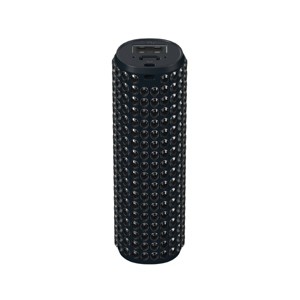
GEMS Embellished Power Bank
In Stock
Sponsored
About this item
Highlights
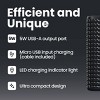
- 2000mAh portable power capacity
- 5W USB-A output charging port
- Micro USB input charging, cable included
- LED charging indicator light
- Ultra compact, travel-ready design
Description
Shipping details
Return details
Q: Where are the instructions for using this?
A: Hi, thanks for reaching out about GEMS Embellished Power Bank. That is a great question! Unfortunately, GEMS doesn't always make the full, detailed manual easy to find online, but the basic operation for the GEMS Embellished Power Bank is straightforward and follows the same steps as almost any portable charger. Here are the simple instructions for how to use your power bank: 1. How to Charge the Power Bank (Recharge the Gems) Locate the Input Port: Find the input port on the side of the power bank. This is usually a Micro-USB or USB-C port, depending on the model. Connect the Cable: Use the small charging cable that came with the power bank (often USB-A to Micro-USB or USB-C). Plug into Power: Plug the USB-A end of the cable into a wall charger/adapter or a USB port on a computer. Monitor the Light: The indicator light (often red or blue) will start flashing while it charges. Charging Complete: The light will turn solid (stop flashing) when the power bank is fully charged (this usually takes 2–4 hours for this small capacity). 2. How to Charge Your Device Use Your Device's Cable: Take the charging cable that you normally use to charge your phone or device (e.g., Lightning, USB-C, or Micro-USB). Plug into Output: Plug the USB-A end of that cable into the USB output port on the power bank. Plug into Device: Plug the other end of the cable into your phone, headphones, or other device. Start Charging: The indicator light on the power bank (often a solid blue) should turn on, and your device should begin charging immediately. If not, press the small Power Button on the power bank to turn it on. 💡 Tip for the Indicator Light The light is the key indicator: Flashing Light (Red/Blue): The power bank itself is charging. Solid Light (Blue): The power bank is currently charging a device. Light Off: The power bank is off or completely out of charge. If you have any additional questions, we welcome you to contact MyTGTtech at 833-848-8324 every day, between 7am-11pm CST.
submitted byJoe - 1 month agoTarget staff support
Frequently bought together


Guests also viewed



Discover more options