Sponsored

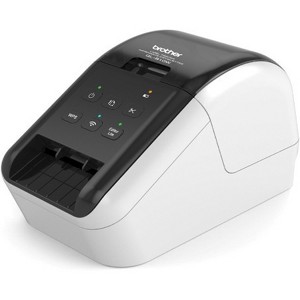
Brother QL-810W Ultra-Fast Label Printer with Wireless Networking
New at target
$192.76
In Stock
Eligible for registries and wish lists
At a glance
Sponsored
About this item
Highlights
- Prints up to 110 labels per minute so you can get more done
- Prints in red and black on the same label (no ink needed)
Description
Create amazing black/Red labels using DK 2251 or cost effective, paper labels for packages, envelopes, file folders, name badges, postage and more. Wireless interface offers easy connectivity print from virtually anywhere or share on a network. Ultra fast, printing up to 110 standard address labels per minute with black text at 300dpi. Create and print labels from your mobile device when connected to a wireless network. Add an optional li ion battery for a complete mobile solution. Easy to integrate with free software development kits (windows, iOS and Android). Convenient, Brother DK drop in labeling supplies. No ink or toner needed. Windows and Mac compatible.Enrollment in the service necessary, internet connection, and postage label roll required. service compatible with windows only. Usb connection required.
Dimensions (Overall): 9.0 inches (H) x 7.3 inches (W) x 11.7 inches (D)
Weight: 5.8 ounces
Package Quantity: 1
Material: Plastic
Power Source: Electric
Battery: Optional, Not Included
TCIN: 93555311
UPC: 012502646334
Origin: made in the USA or imported
The above item details were provided by the Target Plus™ Partner. Target does not represent or warrant that this information is accurate or complete. On occasion, manufacturers may modify their items and update their labels.
We recommend that you do not rely solely on the information presented. If you have a specific question about this item, you may consult the item's label, contact the manufacturer directly or call Target Guest Services at 1-800-591-3869.
If the item details aren’t accurate or complete, we want to know about it.
Shipping details
Estimated ship dimensions: 11.7 inches length x 7.3 inches width x 9 inches height
Estimated ship weight: 5.8 pounds
This item cannot be shipped to the following locations: American Samoa (see also separate entry under AS), Guam (see also separate entry under GU), Northern Mariana Islands, Puerto Rico (see also separate entry under PR), United States Minor Outlying Islands, Virgin Islands, U.S., APO/FPO, Alaska, Hawaii
item ships from third party seller: Spacebound
Return details
This item can be returned to any Target store or Target.com.
This item must be returned within 30 days of the date it was purchased in store, shipped, delivered by a Shipt shopper, or made ready for pickup.
See the return policy for complete information.
WARNING: This product can expose you to chemicals which are known to the State of California to cause cancer and birth defects or other reproductive harm. For more information, go to www.P65Warnings.ca.gov For more information, go to https://www.p65warnings.ca.gov/
Guests also viewed
Discover more options
Related Categories
3.8 out of 5 stars with 75 reviews
5 out of 5 stars
18 June, 2025
originally posted on brother-usa.com

Excellent Label Printer
I freely admit that I have not used all the Brother QL-810W features. I have not used the WPS button, which allows the user to connect this device easily and quickly to other computers on the network, provided those other computers are also WPS capable, but I am thrilled to use this feature when the need arises. This is also true for the Wi-Fi button as well as the Wi-Fi LED indicator. Again, this is a terrific feature that I plan to use when needed. The Editor Lite button is another terrific feature that I have not used but will come in handy when I do. The Editor Lite is a Windows-only application but is great if you are in a hurry and do not have the time to create a complicated, time-consuming label. I have my label printer plugged in. Thus, I do not use the battery feature, but this is another handy attribute of an excellent product and is beneficial if you have limited outlets or are in a location deprived of electricity. The P-touch software has a rich layout and is adaptable to the novice to the advanced user. I love the P-touch application feature where once you create a label, you next press the print button and the label in the P-touch application ejects, and the printer automatically cuts the label. You cannot go wrong with this choice for an efficient, easy-to-use label printer.
4 out of 5 stars
8 September, 2024
originally posted on brother-usa.com
Label printing
Toooo much trouble settling up and connecting plus download p touch and Then installer. Directions not clear enough. Difficult to wifi and bluetooth. Not bad after that tho
1 out of 5 stars
6 September, 2023
originally posted on brother-usa.com
Don't buy one!
I received this as a gift. I spent 4 hours of my time plus at least 2 hours with Brother technical support trying to get it to print. It would spit out labels but printed nothing on them. I asked Brother to replace the unit. But since I did not have the original receipt, they would not. Thank goodness I had my old QL-570 that did work. I will not buy another Brother product.
1 reply from Brother Customer Service team - 2 years ago
We would like to take this opportunity to thank you for your feedback. We are sorry to hear that you are having issues with your Brother QL810W. At Brother, customer satisfaction is something we take seriously. Your feedback is important to us and will be reviewed to help us improve our future products. Thank you for being a Brother customer. Please know that we will be here, should you need to contact us in the future. Our Brother customer support team is available to assist you directly at www.brother-usa.com/brother-support
1 out of 5 stars
31 January, 2023
originally posted on brother-usa.com
CODABAR 14 start and stop codes should be axed
We need CODABAR 14 with NO start and stop codes for our database. But the Brother software requires start and stop codes for CODABAR 14, so we sent it back.
5 out of 5 stars
26 November, 2022
originally posted on brother-usa.com
Great printer...
Excellent value. Easy to learn operation. Fantastic it prints in black & red and that there are colour editing options for graphics.
5 out of 5 stars
14 October, 2022
originally posted on brother-usa.com
quality output so so network printing
quality label output, works on network (but install is tedious) but not with ARM based windows computers, software is overly complex
5 out of 5 stars
12 September, 2022
originally posted on brother-usa.com
Great Product
[This review was collected as part of a promotion.] This printer has been a time saver as a small business owner. It is super easy to set up and use.
5 out of 5 stars
20 May, 2022
originally posted on brother-usa.com
Great little label maker
This label maker works great and was easy to set up
1 out of 5 stars
29 December, 2021
originally posted on brother-usa.com
Least user friendly tool i have ever seen
Its a royal pain to setup. When you connect to the wifi to your phone an go through this weird password process, why would you need a password, like is someone going to steal my label maker. Once connected it never redirects to the Home Wifi network to set the printer to wifi. When you look at the phone after connecting it just sets there and spins saying "your device is connecting with 'QL-810W'. Its a great idea to have a wireless connection to a label maker.....Brother really missed on the setup process execution
1 reply from Brother Customer Service. team - 4 years ago
We are sorry that you are experiencing connection issues issues with your Brother QL810W machine and we understand your disappointment. If you continue to have issues, our Brother Customer Support Team is available to assist you direct: www.brother-usa.com/brother-support
5 out of 5 stars
1 June, 2021
originally posted on brother-usa.com
lightning fast printing and wirelessly!
The label printer is only option I have since the envelopes wasn't fitting on my HP printer and will not work on my HP printer and I didn't have any label sheets so I looked at these before deciding on Brother QL-810W because my notebook computer didn't have many ports.... I am using this printer to make series of labels necessary for mailing 10 to 40 letters.... That is time saving works,,,
5 out of 5 stars
28 May, 2021
originally posted on brother-usa.com
EXCELLENT MACHINE!!!!!!!!!!!!!!!!!!!!!!!!!!!1
WORKS PERFECTLY EVERY TIME! SHOULDA HAD THIS SOONER! HAPPY I CHOSE BROTHER!
3 out of 5 stars
6 May, 2021
originally posted on brother-usa.com
A nice label printer, works good
The label print works well but the address book is horrible. They really don't make it easy to change. It has 5 lists (Personal, Business, Other1, Other2, and Other3) that can't be edited or added to, why is that? I tried to make a simple label but I need to change the templet in the lists and can't.
5 out of 5 stars
5 May, 2021
originally posted on brother-usa.com
Works great!
My organization is very happy with this product. Works as expected and is pretty reliable.
5 out of 5 stars
15 April, 2021
originally posted on brother-usa.com
Very useful
Excellent business labels and personal labels saves a lot of time handwriting.
5 out of 5 stars
4 April, 2021
originally posted on brother-usa.com
iPad connects to it quite easily.
Wonderful connectivity and very easy to use. I use it for my mailing list.
1 out of 5 stars
3 April, 2021
originally posted on brother-usa.com
Whatever you do, do not buy this for labels
This printer is absolutely horrible. Purchased with the intent of printing shipping labels through usps for e-commerce and has been an absolute nightmare, the quality is terrible. I repeat DO NOT BUY.
1 reply from Brother Customer Service team - 5 years ago
We understand that you are experiencing issues printing shipping labels with the Brother QL-810W label printer and we'd like to help. Poor print quality when printing shipping labels can occur if the label is not formatted for your label size. Here is a link with step by step instructions on how to print shipping labels from a Mac or Windows computer. Macintosh: https://help.brother-usa.com/app/answers/detail/a_id/154675 Windows: https://help.brother-usa.com/app/answers/detail/a_id/155840 If the problem persists, feel free to contact Brother Customer Service directly at https://www.brother-usa.com/support/ql810w
5 out of 5 stars
10 March, 2021
originally posted on brother-usa.com
love it
use it the most use for address,lables easy to use on cell
4 out of 5 stars
3 March, 2021
originally posted on brother-usa.com
Works as expected
Had to call customer service to get it up and running but now works fine!!
5 out of 5 stars
28 February, 2021
originally posted on brother-usa.com
Works great. FAst & Quiet
Wireless connected to multiple computers. Works quiet and fast. Simple to use.
5 out of 5 stars
28 February, 2021
originally posted on brother-usa.com
Just What I Needed
Easy to set up and connect to computer. P-Touch host software is excellent.