Sponsored
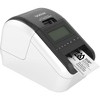
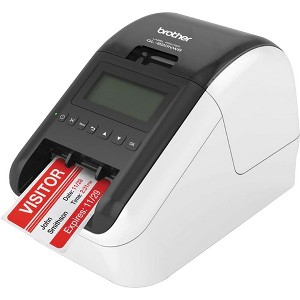
Brother Professional, Ultra Flexible Label Printer w/ Multiple Connectivity Options
$239.99
In Stock
Eligible for registries and wish lists
Sponsored
About this item
Highlights
- Professional ultra-flexible label printer for offices, warehouses, receptions, retail and shipping.
- Ultra-fast printing – up to 110 standard address labels per minute (black text at 300 dpi) for high-volume jobs.
- High print resolution up to 300 × 600 dpi for crisp barcodes, logos, and text.
- Multiple connectivity options: Wi-Fi, Ethernet, Bluetooth, Wireless Direct, and USB for flexible setup.
- USB Host port allows direct connection of a peripheral (e.g., scanner) for stand-alone workflows.
- Easy-to-read backlit LCD screen to configure settings and print labels directly without a PC.
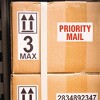
- Supports black + red printing on special DK-2251 tape for attention-grabbing warnings, badges, and notices.
- Works with DK die-cut and continuous label rolls from 12 mm up to 62 mm wide for many label sizes.
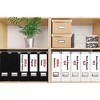
- Automatic built-in cutter for clean, precise cuts on both die-cut and continuous labels.
- Mobile and cloud ready – print from smartphones and tablets via apps (iOS/Android) and network.
- Compatible with P-touch Editor software for advanced layouts, barcodes, databases, and merges.
- Compact desktop footprint (5.0" × 9.2" × 5.7") fits easily on counters or shared workstations.
- No ink or toner required – direct thermal technology reduces running and maintenance costs.
- Designed for heavy duty use, with long cutter life (up to ~300,000 die-cut labels / 150,000 continuous).
- Genuine Brother DK label rolls and accessories ensure optimal performance and long-term reliability.
Description
Product Description:
The Brother QL-820NWB is a high-speed, professional label printer designed for dynamic office, retail, and industrial labeling needs. It prints high-resolution black and red labels using Brother’s unique DK label rolls and supports a wide range of connectivity options, including USB, Ethernet, Wi-Fi, and Bluetooth. With a print speed of up to 110 standard address labels per minute and a 300 x 600 dpi resolution in high-quality mode, this label printer offers versatility, performance, and reliability. The built-in backlit LCD display and standalone printing capability allow users to print without a connected computer, making it ideal for use in multiple environments.
Product Features:
• Fast print speeds: Up to 110 labels per minute
• High-resolution printing: Up to 300 x 600 dpi for sharp text and barcodes
• Multiple connectivity options: USB, Ethernet, Wi-Fi, Bluetooth
• Two-color printing (black and red) with DK-2251 labels
• Backlit LCD screen with internal memory for standalone operation
• Automatic cutter for precise and professional label edges
Product Specifications:
• Product: Brother QL-820NWB
• Print Technology: Direct Thermal
• Print Resolution: Up to 300 x 600 dpi
• Max Print Speed: 176mm/sec (approx. 6.9 in/sec)
• Max Print Width: 2.3 inches
• Display: Backlit monochrome LCD
• Connectivity: USB 2.0, Ethernet, Wi-Fi (802.11b/g/n), Bluetooth
• Compatibility: Windows, macOS, mobile devices (via apps)
• Power: AC adapter (included); optional Li-ion battery available
• Dimensions (W x D x H): 4.9" x 9.2" x 5.7"
• Weight: 2.6 lbs
Dimensions (Overall): 5.7 inches (H) x 5.0 inches (W) x 9.2 inches (D)
Weight: 2.5 pounds
Electronics Condition: New
Wireless Technology: Wi-Fi
Style: Sublimation Photo Paper
Maximum Speed: 110 pages per minute
Battery: No Battery Used
Warranty: 1 Year Limited Warranty. To obtain a copy of the manufacturer's or supplier's warranty for this item prior to purchasing the item, please call Target Guest Services at 1-800-591-3869
TCIN: 1007688835
UPC: 012502646341
Origin: imported
The above item details were provided by the Target Plus™ Partner. Target does not represent or warrant that this information is accurate or complete. On occasion, manufacturers may modify their items and update their labels.
We recommend that you do not rely solely on the information presented. If you have a specific question about this item, you may consult the item's label, contact the manufacturer directly or call Target Guest Services at 1-800-591-3869.
If the item details aren’t accurate or complete, we want to know about it.
Shipping details
Estimated ship dimensions: 11.75 inches length x 7.25 inches width x 9 inches height
Estimated ship weight: 5.6 pounds
This item cannot be shipped to the following locations: American Samoa (see also separate entry under AS), Guam (see also separate entry under GU), Northern Mariana Islands, Puerto Rico (see also separate entry under PR), United States Minor Outlying Islands, Virgin Islands, U.S., APO/FPO, Alaska, Hawaii
item ships from third party seller: Beach Camera
Return details
This item can be returned to any Target store or Target.com.
This item must be returned within 30 days of the date it was purchased in store, shipped, delivered by a Shipt shopper, or made ready for pickup.
See the return policy for complete information.
Guests also viewed
Related Categories
3.9 out of 5 stars with 39 reviews
2 out of 5 stars
12 December, 2025
originally posted on brother-usa.com

Ok printer, worse reliability and support
Great when it works. Has issues with any other app besides Brother app which isn't compatible for our needs. Regularly has issues with iPad and misprints labels. When asking support, I have to buy their labels and only use their app to get help. I would go another route.
5 out of 5 stars
27 February, 2025
originally posted on brother-usa.com
Great printer and fast
Works great just wish they had blk and red labels in the smaller sizes
4 out of 5 stars
1 November, 2024
originally posted on brother-usa.com
Works well
Works great, a little slow and I can’t get it to print the round labels I got. I have to use the continuous labels and have it cut every 1.5 inches for my grab&go’s.
2 out of 5 stars
28 October, 2024
originally posted on brother-usa.com
Tedious, outdated, kinda cool
As the title says, this software was impossibly tedious to install and attempting to install it on my coworker's computers has been somehow worse. This along with the P-touch editor seem like strange out dated aspects to this supposedly modern helpful tool. P-touch Editor is kind of neat with all the clip art and templates, it has the feeling of old old Microsoft word but formatting is strange and again tedious. I imagine we'll get more comfortable with it as time passes but for now it's hard to get over the annoyance of 4 different user manuals and an hours long software installation process.
1 reply from Brother Customer Service team - 1 year ago
Thanks for taking the time to review your experience with the Brother QL820NWB. We appreciate your feedback. I’m sorry to hear that you had some setup issues and are not too happy with the P-touch Editor. I sincerely apologize for any inconvenience this issue may have caused you. At Brother, customer satisfaction is something we take seriously. Your feedback is important to us and will be reviewed. Thank you for being a Brother customer. Please know that we will be here, should you need to contact us in the future. Please contact us directly at: https://www.brother-usa.com/support/QL820NWB
3 out of 5 stars
28 October, 2024
originally posted on brother-usa.com
Difficult Setup
I found this printer very hard to setup. I double label for file folders seems to be missing.
1 reply from Brother Customer Service team - 1 year ago
Thanks for taking the time to review your experience with the Brother QL820NWB. We appreciate your feedback. I’m sorry to hear that you are having issues with the Brother QL820NWB. I sincerely apologize for any inconvenience this issue may have caused you. We’d like an opportunity to help. Please contact us directly at: https://www.brother-usa.com/support/QL820NWB
4 out of 5 stars
24 July, 2024
originally posted on brother-usa.com
Decent little printer
Works as advertised. The biggest issue is that when the power goes out, it doesn't automatically reconnect to the wireless network. That's not great. We had to stick a UPS on each one to avoid this from happening if the lights go out for a few seconds.
5 out of 5 stars
22 May, 2023
originally posted on brother-usa.com
Pdf to sticker
We print stickers from pdfs created by our computer system. Works great!!
5 out of 5 stars
13 September, 2022
originally posted on brother-usa.com
Easy and reliable
[This review was collected as part of a promotion.] I love these little printers. We have the small and larger version of it and they are great. Easy to use, great software and quick printing even from the phone. I only connect with BT since its so convenient and never disconnects.
1 out of 5 stars
29 March, 2022
originally posted on brother-usa.com
Not designed well
20 year IT professional here. I would throw this in the face of the designer and the managers that let this go to market. Issues Lack of robust menu - can not setup network via interface, only generic settings Labels do not tear cleanly - there is no tear cut line and the 2 feed guides on the front (why?!) tear of the label Requires extraneous software to manage - there is no reason this shouldn't be all integrated into the menu and or a web interface. Can't view printer info without printing label - that costs me money and is wasteful I spent more time troubleshooting the network on this device than I should have. Every other device of its type has on screen menu ways to look up info and change settings like static network. Seems very little priority to how the customer uses it was taken into consideration.
1 reply from Brother Customer Service. team - 4 years ago
We are sorry that you are experiencing connection issues with your Brother QL820NWB machine and we understand your disappointment. Our Brother Customer Support Team is on stand-by to provide quality products and service to our customers via online, email or live chat: www.brother-usa.com/brother-support
5 out of 5 stars
5 March, 2022
originally posted on brother-usa.com
Very fast
Very good printer .............. .... .
5 out of 5 stars
20 June, 2021
originally posted on brother-usa.com
Barcode scanner
I need to know the best Bluetooth barcode scanner for this printer
3 out of 5 stars
16 April, 2021
originally posted on brother-usa.com
Doesn’t work with Bluetooth
I have been able to print with a cable but not Bluetooth. The printer shows up on my WiFi network but fails to print via Bluetooth
1 reply from Brother Customer Service team - 5 years ago
We are sorry to hear that your experience with your Brother QL-820NWB label printer has not been favorable so far and we'd like to help. The Bluetooth connection is compatible with mobile devices only, here is a link with step by step instructions on how to link a Bluetooth compatible device: https://help.brother-usa.com/app/answers/detail/a_id/142333 If the problem persists, feel free to contact Brother Customer Service directly at https://www.brother-usa.com/support/ql820nwb
2 out of 5 stars
19 March, 2021
originally posted on brother-usa.com
Why doesn't P-touch Editor work with 64 bit Office
I bought the best you had due to the fact that I believed that it would work with Office 19. It doesn't and therefore it has not improved my efficiency. I should have stayed with my QL-550 it's just as good.
5 out of 5 stars
22 February, 2021
originally posted on brother-usa.com
Simple and easy to use
It is a great label machine. Not complicated to set up and to use. We bought quite of few of these for our lab, and they are been working great so far. We had a couple machines that the label got stuck. We called customer support and they were able to replace the machines.
5 out of 5 stars
8 February, 2021
originally posted on brother-usa.com
Good Printer Bad Software
It took all day to install the software and the Brother website did not help. I kept getting error messages until I finally found a place on the internet that showed how to do it.
4 out of 5 stars
20 January, 2021
originally posted on brother-usa.com
Great Printer
The battery lasts 12 hours and prints clearly. Works with IPADs. Sometimes information doesn't get sent from IPAD which can be annoying and have to forget the device and pair it again. Not sure if it's the IPAD or the Printer. Other than that it is brilliant. Any critics should suggest a comparable printer which has the same features. I would love to know something better.
3 out of 5 stars
3 January, 2021
originally posted on brother-usa.com
Fair with some great features
Great features - Wi-Fi and Bluetooth. The implementation of these features is what is lacking! It doesn't seem like you can just set it up with the Wi-Fi and forget it with it able to be printed to whenever you needed to use it. I am still working on it, though. I am also finding it doesn't accept the older labels of the same type and noticed the new ones, with the same number, have a larger base with more holes which enable the machine to read what label is installed - not acceptable! I kept the machine under the hopes I can learn to use it at a later date but it is VERY EXPENSIVE considering it has only worked for me when plugged directly into the laptop!
4 out of 5 stars
8 June, 2020
originally posted on brother-usa.com
Great printer
Purchased this printer because of its 2 color capability. The red tends to blend in with the black giving it a hazey look. The colors look good when printed by themselves. I would recommend the vc500 if you want color although the paper is expensive. If you want red and black printing the paper for this printer is expensive as well. I purchased the battery pack as well it works great for portable operation. I really like the wireless capability and general label printing of this printer. It uses all the same size paper as my 720 printer so I can have different size labels in each printer without changing.
5 out of 5 stars
4 May, 2020
originally posted on brother-usa.com
able to print with bluetooth
the printer is , sturdy, compact and do what it was made to do.
5 out of 5 stars
1 May, 2020
originally posted on brother-usa.com
fast and easy
use for many coin ID labels and the like--works very smooth and fast with P touch