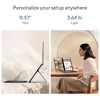


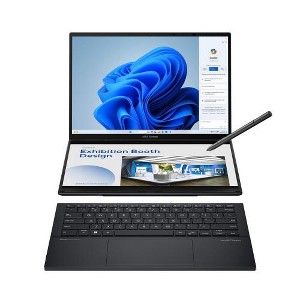
ASUS Zenbook DUO Dual 14" OLED 3K 120Hz Touchscreen Laptop Intel Core Ultra 9 285H 32GB RAM 1TB SSD Inkwell Gray
$1,799.99
Out of Stock
Eligible for registries and wish lists
At a glance
About this item
Additional product information and recommendations
Related Categories
Discover more options
Frequently bought together
Trending 2-in-1 Laptops
Guests are saying
The ASUS ZenBook Duo 2025 is a remarkable laptop that combines innovative dual-screen functionality with impressive performance, making it ideal for productivity and multitasking. Guests appreciate its lightweight design, vibrant displays, and detachable keyboard, which enhance usability. While some have experienced minor issues with the keyboard and screen, the overall feedback highlights its effectiveness for work and leisure, making it a great choice for those seeking a portable solution.
Summary created by AI from text of reviews reflecting recent feedback provided across different star ratings (includes incentivized reviews)
4.3 out of 5 stars with 36 reviews
5 out of 5 stars
30 December, 2025
originally posted on https://www.asus.com

ASUS double screen envy
This is my second Asus laptop. Like my last one, it is fast, solid, sleek, and is a pleasure to use, but this one is much better. I read the processor is so fast it generates heat quickly so I ordered a laptop cushion with fans. Some complained about the heat. I am impressed and try to prevent overheating to maintain speed. I am used to working with two screens, but need USB dock, wires, placement and was not mobile. Now can use two screens and go wherever i need. Great design, great speed, and flies through whatever I use it for.
5 out of 5 stars
28 December, 2025
originally posted on https://www.asus.com
Quirky on Linux, Still Awesome
Very nice hardware. Solid build, very very fast. Running on Debian 13 with Cinnamon has some quirks I've worked around. I'm missing a trackpoint, but the touchpad and touchscreens are excellent. I've owned a lot of very nice laptops and this has become my favorite of all time. Transforming into 2 screen mode is incredibly functional and turns some heads. Beautiful bright and clear screens.
5 out of 5 stars
12 December, 2025
originally posted on https://www.asus.com
Unique and tailored to business.
Very versatile tool. It takes some learning, but it's well-worth the time.
1 out of 5 stars
24 November, 2025
originally posted on https://www.asus.com
Zenbook Major Mouse Issues
I really like the two screens and the design overall is not bad but the mouse goes to crap when the keyboard is separated. Not good, and I have tried every update possible with no improvement, don’t buy!!!
1 reply from CLM team - 2 months ago
Dear DenisK, Thank you for your comment. We do understand your disappointment with this laptop and the inconvenience this may have caused if you are experiencing issues with the touchpad. Most likely, this is a driver or connection issue, and you can fix it by updating the drivers, checking device settings, and running Windows troubleshooters. Updates for this laptop are posted at: https://www.asus.com/laptops/for-home/zenbook/asus-zenbook-duo-2024-ux8406/helpdesk_download?model2Name=UX8406CA. Updating the chipset, System Control Interface, keyboard and touchpad drivers, adjusting settings in the touchpad properties, and ensuring all Windows and BIOS updates are installed can resolve the problem. If these steps were performed to no avail, we recommend you send the product in for service to determine if this is a hardware issue so this may be resolved immediately. An RMA number is required to send it in for service. For RMA details, please go to: https://www.asus.com/us/support/article/818/. Should you need further assistance with the product, please email me at cl-rodel@asus.com and I would be more than happy to help. Or, you are most welcome to call Product Support Hotline at: 1(888) 678-3688. Also, you can chat with an ASUS live support agent from the link: https://www.asus.com/us/support/article/1135/. Thank you for choosing an ASUS product. Regards, Rodel ASUS Customer Loyalty
5 out of 5 stars
27 October, 2025
originally posted on https://www.asus.com
Great computer
The best computer for my needs that I’ve ever owned, and I’ve owned several!
5 out of 5 stars
4 October, 2025
originally posted on https://www.asus.com
Dual Screens!!!
So far, it has been amazing! I'm excited to use the dual screens for virtual meetings.
5 out of 5 stars
2 October, 2025
originally posted on https://www.asus.com
Super cool double screen notebook
I really like this very high quality, yet light weight with double touch screen notebook with a paper thin keyboard, Ultra 9 258H is most powerful CPU available, 32GB DDR5 RAM give super fast processing power I need for my daily research work, price is very affordable, packaging is great, resolution is high enough, if you add a USB-C hub, you can add a lot of possibility in connecting to large monitors, SD card, or other media card, even Ethernet connection, you cannot ask for more, highly recommended!!!
2 out of 5 stars
22 September, 2025
originally posted on https://www.asus.com
Hope you don't need Asus support!
No one in Support can help with a zenbook duo. They don't know it, never seen it, and don't understand the problems that occur. I have a connection issue with the Bluetooth keyboard, and 3 different I spoke to didn't understand the zenbook duo comes with a detachable Bluetooth keyboard, and all three could not help me connect it.
1 reply from CLM team - 4 months ago
Dear Corey, Thank you for your comment. We do understand your dissatisfaction with the quality of your recent customer service experience and the inconvenience this may have caused if you didn't get help with the issue you are experiencing with the detachable Bluetooth keyboard. To resolve this, ensure the keyboard is charged and paired successfully. In Windows, go to Settings > Bluetooth & devices, ensure Bluetooth is on, select Add device, and choose your keyboard from the list. If the issue persists, update your Bluetooth drivers. Furthermore, ensure Windows and drivers for this laptop are up to date. Updates for this laptop are posted at: https://www.asus.com/us/laptops/for-home/zenbook/asus-zenbook-duo-2024-ux8406/helpdesk_download?model2Name=UX8406CA. We do value our customers and take the negative customer service experience very seriously. This is not the quality of service expected from ASUS. We stand behind our product and continuously strive to improve our approach and processes to achieve customer service excellence. If you need further assistance with the product, please email me at cl-rodel@asus.com and I will be more than happy to help. Or you are most welcome to call Product Support Hotline at: 1(888) 678-3688. Also, you can chat with an ASUS live support agent from the link: https://www.asus.com/us/support/article/1135/. Thank you for choosing an ASUS product. Regards, Rodel ASUS Customer Loyalty
5 out of 5 stars
7 September, 2025
originally posted on https://www.asus.com
Excellent Laptop
So far,.I love everything about it. It's a wonderful device.
5 out of 5 stars
20 August, 2025
originally posted on https://www.asus.com
Absolute beast
Absolute beast! Productivity laptop on steroids! Lighter than my MacBook.
5 out of 5 stars
8 August, 2025
originally posted on https://www.asus.com
My new trading laptop
The laptop is awesome. One con the speaker sucks. It comes with a stylus.
5 out of 5 stars
6 August, 2025
originally posted on https://www.asus.com
A whole lot in a small, sleek package
It does everything I wanted and needed in a laptop and does it well.
1 out of 5 stars
29 July, 2025
originally posted on https://www.asus.com
Extremely disappointed!
Had to return the product due to the complete malfunction of the second screen. From the many reviews and product specifications, I was really excited to own and use this product. Unfortunately, the malfunctioning screen made it no more useful than a one-screen laptop at double the price. No thanks! Also, I found the key placement on the keyboard to be very tight causing continuous typing errors. Returned it for a more reasonably priced Dell.
1 reply from CLM team - 6 months ago
Dear VHannahs, Thank you for your comment. We do understand your extreme disappointment with this laptop and the inconvenience this may have caused if the second screen is not working. To resolve this, ensure you have configured the second screen correctly inside the Display Properties, the most current graphics driver was installed and it was connected securely. Additionally, ensure the ScreenXpert driver and the Intel graphics driver posted for this laptop at: https://www.asus.com/us/laptops/for-home/zenbook/asus-zenbook-duo-2024-ux8406/helpdesk_download?model2Name=UX8406CA . Furthermore, check if this laptop's drivers, BIOS and Windows are up to date. Should you need further assistance with the product, please email me at cl-rodel@asus.com and I would be more than happy to help. Or, you are most welcome to call Product Support Hotline at: 1(888) 678-3688. Also, you can chat with an ASUS live support agent from the link: https://www.asus.com/us/support/article/1135/. Thank you for choosing an ASUS product. Regards, Rodel ASUS Customer Loyalty
1 out of 5 stars
28 July, 2025
originally posted on https://www.asus.com
Touchscreen doesn't work
One of the touchscreens did not work. Awaiting refund
1 reply from CLM team - 6 months ago
Dear Valued Customer, Thank you for your comment. We certainly understand your disappointment with this laptop and the inconvenience this may have caused if touchscreen is not working. All ASUS products undergo intensive quality control testing and inspections, and are built to last, the toushcscreen not working is a random problem. ASUS provides warranty coverage for the product. We recommend you send the product in for service to determine if this is a hardware issue so this may be resolved immediately. An RMA number is required to send it in for service. For RMA details, please go to: https://www.asus.com/us/support/article/818/. If you need further assistance with this laptop or other ASUS products, please email me at cl-rodel@asus.com and I would be more than happy to help. Or you are most welcome to call Product Support Hotline at: 1(888) 678-3688. Also, you can chat with an ASUS live support agent from the link: https://www.asus.com/us/support/article/1135/. Thank you for choosing an ASUS product. Regards, Rodel ASUS Customer Loyalty
4 out of 5 stars
24 July, 2025
originally posted on https://www.asus.com
Very clever design that works
Very clever design that works remarkably well. It is finicky about power supplies. Have both USB A and C ports is a real plus. The pen is remarkable
5 out of 5 stars
10 July, 2025
originally posted on https://www.asus.com
A must have powerhouse for a working professional
This is an amazing computer. Sexy too. The detachable keyboard is clutch. highly recommended. Cant believe this was under 2k
2 out of 5 stars
29 June, 2025
originally posted on https://www.asus.com
Zenbook Duo is outstanding!
At first a little concerned but the dual display has worked out wonderfully. Its ergonomics put both display at a good reading distance. Displays are nright colors rich and the keyboard flat and wrist friendly
1 reply from CLM team - 7 months ago
Dear Jeff Wert, Thank you for your comment. We appreciate your feedback. Information coming from valuable customers, like you, will help us improve our future product offering and services. Should you need further assistance with the product, please email me at cl-rodel@asus.com and I would be more than happy to help. Or you are most welcome to call Product Support Hotline at: 1(888) 678-3688. Also, you can chat with an ASUS live support agent from the link: https://www.asus.com/us/support/article/1135/. Thank you for choosing an ASUS product. Regards, Rodel ASUS Customer Loyalty
5 out of 5 stars
25 June, 2025
originally posted on https://www.asus.com
Zenbook DUO is a winner for travel work.
The Zenbook Duo 2025 model has been great to use. I travel for work and have often carried a second monitor to work on Outlook, Excel files and PowerPoints. Having this setup streamlines the workflow and makes setting up the laptop so much quicker than plugging in another monitor to HDMI and power. When on the airplane, I use it as a regular laptop and the 14" size is perfect, just slightly bigger than 13" and fits in the workspace. The detachable keyboard is also a huge benefit so you can slide the screens forward and work comfortably. Speed has been great on the unit, I'm coming from a Dell XPS13 that is 3 years old and I find the Asus build quality on par with that brand. Great price also compared to the Dell model. I have the faster processor and noise has been low when the fan is on. I highly recommend this model.
5 out of 5 stars
17 June, 2025
originally posted on https://www.asus.com
Love it!
Super convenient to have both displays, especially when presenting to a client.
5 out of 5 stars
8 June, 2025
originally posted on https://www.asus.com
Super O Super
Here's an excellent review: "I've had the privilege of using numerous laptops over the past 30 years, but the ASUS Zenbook DUO (2025) UX8406 has genuinely surpassed all expectations! Its performance is top-notch, and the product design is simply awesome. The dual-screen setup is a game-changer, offering unparalleled productivity and multitasking capabilities. The sleek and durable design makes it a joy to use, and the specs are incredibly impressive. If you're looking for a laptop that combines power, style, and innovation, look no further than the ASUS Zenbook DUO. It's a true masterpiece that will take your productivity and entertainment experiences to new heights! 5/5 stars!"